Your First Classes and Objects · practice
Work with Several Independent Objects
In the previous lesson, self referred to first during one second during another. That change is possible because both names lead to separate
A program can create as many Question instances as it needs:
first = Question("Two plus two?", "4")
second = Question("Three plus three?", "6")
Both instances follow the same Question definition, but each one keeps its own state.
Changing an attribute on first does not change second:
first.prompt = "What is two plus two?"
print(first.prompt)
print(second.prompt)
That independence is one reason objects are useful for modeling several records of the same kind.
Objects fit inside collections
An object is a Python
questions = [first, second]

for question in questions:
    print(question.prompt)
The Question instance on each pass.
Names are not objects
The variable name is only one way to reach an object:
current = first
Now current and first refer to the same object. This does not create a copy.
current.prompt = "Updated prompt"
print(first.prompt)
The output is Updated prompt because both names lead to one instance.
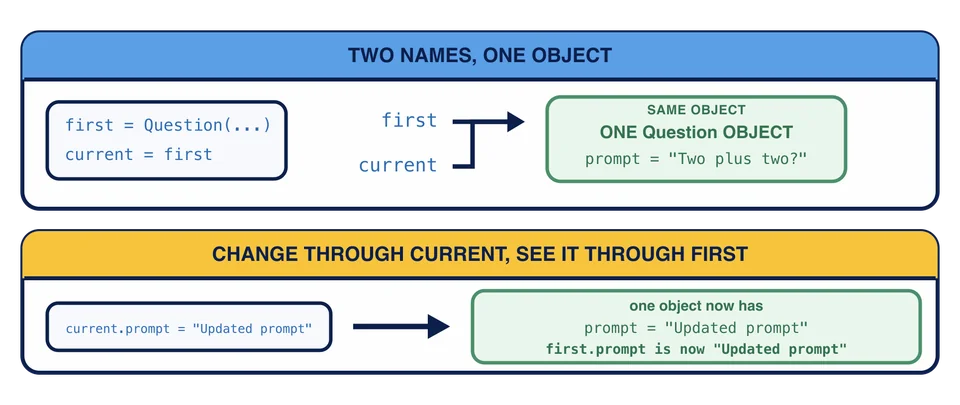
After current = first, what does changing current.prompt do?
The next lesson will give another object a collection of questions and let the objects work together.
Task
Create the missing third Question, add it to the questions current refer to first.
Then update current.prompt to "How much is two plus two?". The printed first prompt should change, while the second and third prompts stay the same.