What Is a Computer?
The CPU Executes Instructions
“Processing” was the vaguest word on the map. Something happens, and the picture gets brighter. This lesson makes it concrete.
The central processing unit, or CPU, carries out instructions. Not instructions in English, and not the buttons you click. Instructions so basic that a single one does about as much as “add these two numbers” or “copy this value over there.”
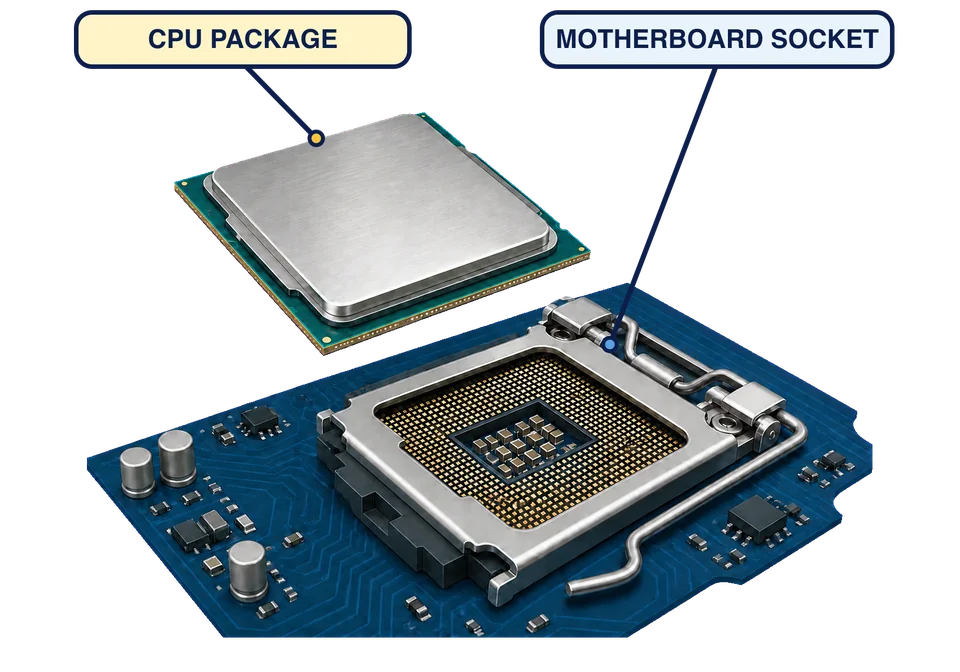
The CPU is also a physical part. In a typical desktop computer, the square processor package sits in a matching socket on the motherboard. The picture separates them so you can see where the part connects; once installed, the metal-topped package lies flat inside that socket.
One instruction at a time
The instructions are waiting in the computer’s working memory, which is called RAM. The next lesson is about RAM properly; for now, think of it as the place the CPU reaches into for whatever it needs next.
The CPU then repeats a three-part cycle, forever, for as long as the machine is on:
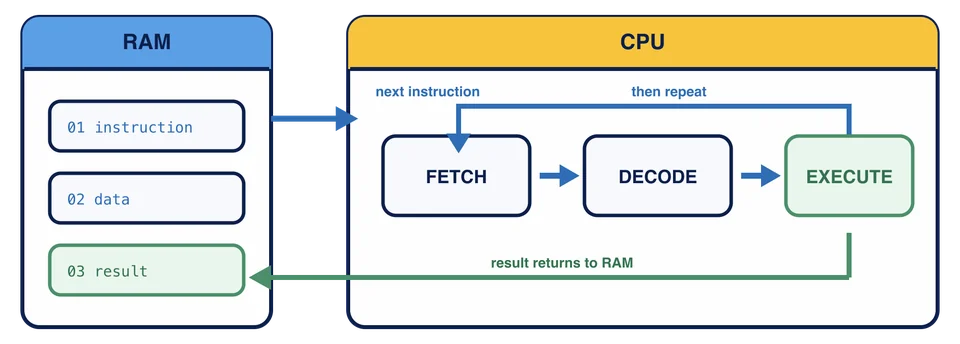
Fetch: get the next instruction from RAM.
Decode: work out which operation it asks for, and which data it applies to.
Execute: do it. Add, compare, move a value.
The result is kept briefly inside the CPU or written back to RAM, and then the cycle starts again with the next instruction.
That three-step model is enough for the work ahead. The reason it adds up to a photo editor is speed: a modern processor gets through billions of these steps every second. Recalculating every pixel in a photograph takes millions of tiny operations, which is why it finishes before you have lifted your finger.
The next instruction is sitting in RAM. What happens first in the cycle?
Ask Monty for another angle
Fetch, decode, execute is one of those ideas that clicks on the second or third telling rather than the first. If it has not clicked yet, open Monty and ask:
Walk me through fetch, decode, and execute for a single simple instruction, one stage at a time, and pause after each stage.
Monty is free through this whole chapter, so ask a follow-up too. “What does the CPU actually do during decode?” is a good one.
The CPU can only work on what is within reach. That reach is the subject of the next lesson, and it explains something you have almost certainly experienced: losing work you had not saved.