Slow Clients and Lost Connections · practice
Notice a Dead Peer
Viewers now send from their own threads, and a viewer that closes leaves the registry within half a second. One kind of viewer still stays forever: one that is gone without saying so. A phone walks out of Wi-Fi recv never returns b"" to say the other end closed, because the machine that would close it is no longer reachable. A send to that viewer still succeeds, because, as Lesson 1 showed, it only puts bytes into buffers. An idle recv(timeout=0) finds nothing waiting, which is also what it finds on a healthy, quiet viewer.
The only way to tell a dead peer from a quiet one is to ask a question that needs an answer.
Three numbers
The library sends those pings for you, on the connection’s own schedule, and three of its settings decide how long a dead viewer can stay:
ping_interval: how often it sends a ping;ping_timeout: how long it waits for the pong;close_timeout: how long it waits, after sending a close frame, for the other side to finish closing.
When ping_timeout passes with no pong, the library fails the connection: it sends a close frame with code 1011 and the reason keepalive ping timeout, then closes its own end of the connection, so the peer’s recv would return b"" once it read that far, and then waits up to close_timeout for the peer’s side to close. A dead peer never closes, so the library waits out the whole close timeout. Only then do the handler’s recv and send raise. The picture shows it as a time line, running down, for a viewer whose last pong came at the start.
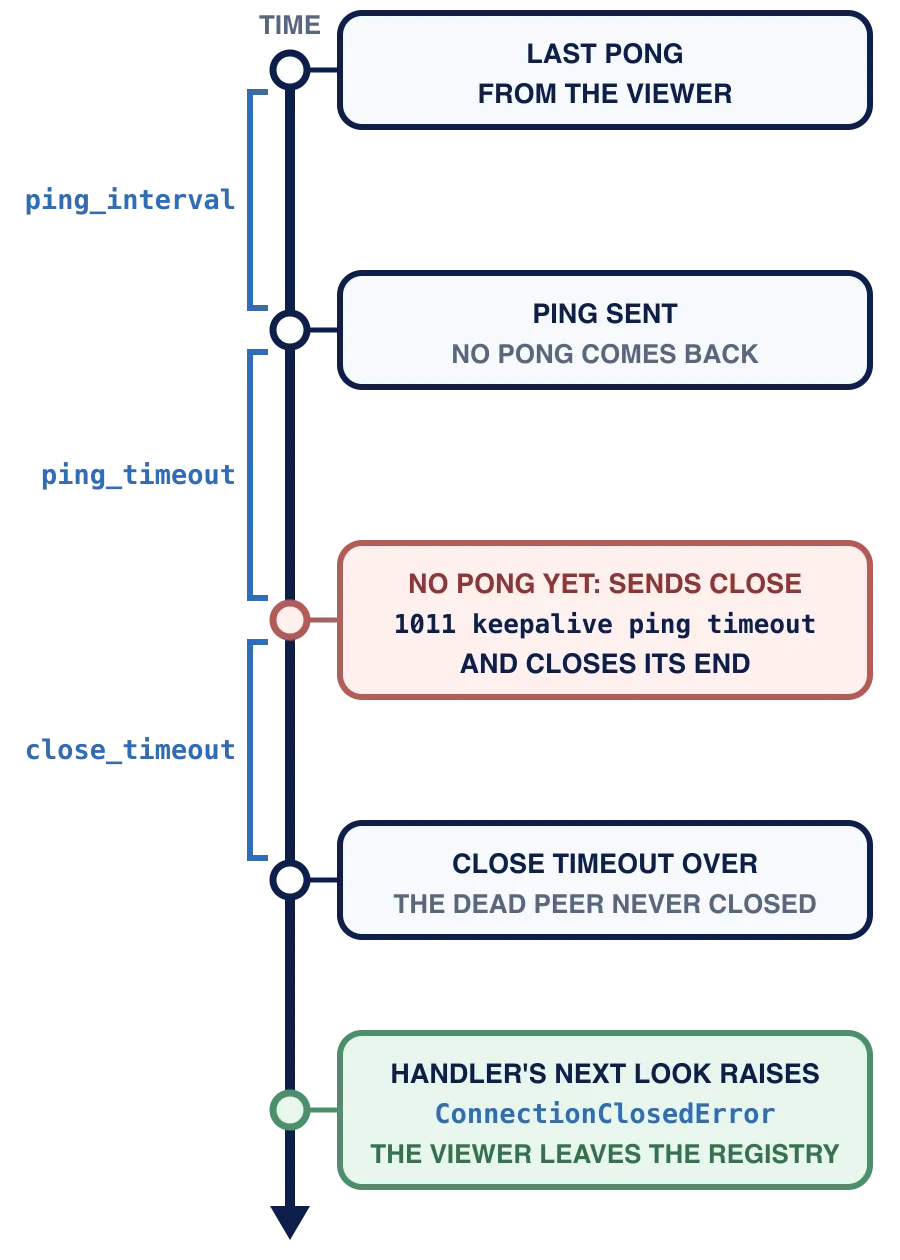
In words: one ping interval after the last pong a ping goes out; one ping timeout later the library sends close 1011 and closes its end; one close timeout later the handler’s next look raises ConnectionClosedError, and the viewer leaves the registry.
The defaults are 20, 20 and 10 seconds. They suit the internet, where a slow mobile network can take seconds to answer. They make a demonstration on one machine very slow, so this chapter passes 1.0 second for each: PING_INTERVAL, PING_TIMEOUT and CLOSE_TIMEOUT at the top of scoreboard_server.py. In local tests, a silent client was dropped about 1.5 s after its last pong with 0.5 s for each
With ping_interval=1.0, ping_timeout=1.0 and the default close_timeout=10, about how long can a dead viewer stay registered after its last pong?
What the handler sees
When the library gives up, the handler’s next recv or send raises ConnectionClosedError. Read it as you learned in Chapter 6: exc.sent is the close frame this side sent, with exc.sent.code 1011 and exc.sent.reason keepalive ping timeout, and exc.rcvd is None, because no close frame came back. Your describe_close from Chapter 6 reads rcvd, so on the server it would report 1006: no close frame arrived.
There is nothing new to write in viewer_handler. Its next idle check calls recv(timeout=0), which raises the ConnectionClosedError; except ConnectionClosed: pass ends the finally block removes the viewer. Lesson 3’s idle check is how a dead viewer is noticed.
Your server's keepalive gives up on a viewer. Which code does the exception's sent hold?
A line in the log
When the close timeout runs out, the library also writes a block to standard error: a first line, keepalive ping failed, and a
keepalive ping failed
TimeoutError: timed out while closing connection
websockets.exceptions.ConnectionClosedError: sent 1011 (internal error) keepalive ping timeout; no close frame received
That is the library reporting a dead peer, not a fault in your code. This lesson’s Run uses a stand-in viewer, so the block does not appear here. In Lesson 6, pl_ws.py meets a real silent client and prints the block as one line.
Configure the server in one place
open_server(board, *, serve=serve) makes the library server for a board, with these values, and returns it without starting it. Its body is one call to serve, with the handler from make_handler(board), the host 127.0.0.1, 127.0.0.1 keeps the server on this machine. The serve serve, the same kind of seam run_echo had in Chapter 6: a caller can pass another open_server would have asked for. pl_ws.py does exactly that, to learn your three values before it builds its server, and the Lesson 4 section of Run does it too. Whoever calls open_server runs the server with serve_forever and stops it with shutdown.
Your task
In scoreboard_server.py, write open_server(board, *, serve=serve): call serve with make_handler(board), "127.0.0.1", 0 and the three keyword arguments, and return what it returns.
Run
Press Run. The Lesson 4 section calls your open_server with a serve of its own that records the keyword arguments, prints them, and then gives viewer_handler a stand-in viewer D whose idle check raises the exception the library raises after a missed pong, as if
Lesson 4: a viewer that stopped answering pings
    ping_interval = 1.0
    ping_timeout = 1.0
    close_timeout = 1.0
    after the library gave up on D, the registry holds: []
Then press Submit.
Lesson 5 crosses to the other side of the connection: what a viewer’s program should do when its server drops it.
Task
In scoreboard_server.py, write open_server(board, *, serve=serve). Call the serve make_handler(board) as the handler, "127.0.0.1" as the host and 0 as the ping_interval=PING_INTERVAL, ping_timeout=PING_TIMEOUT and close_timeout=CLOSE_TIMEOUT. Return what serve returns.
Do not call serve_forever or shutdown, and do not use a with block: whoever runs the server does that.
Press Run: the Lesson 4 section prints ping_interval = 1.0, ping_timeout = 1.0, close_timeout = 1.0 and after the library gave up on D, the registry holds: []. Standard error stays empty: the stand-in viewer D raises the library’s keepalive ping failed line appears in this Run.
Then press Submit. The check calls open_server with a stand-in serve that records its arguments and refuses to be started; it replaces the serve first, so nothing can open a port. It expects the handler from make_handler(board) (it calls that handler with a stand-in /watch viewer and checks that the viewer joins that board), "127.0.0.1" and port 0, and ping_interval, ping_timeout and close_timeout each given as a number above 0 and at most 2.0. Then it gives viewer_handler a viewer whose second idle check raises the ConnectionClosedError the library raises after a missed