Chapter 2
Asking to Switch Protocols
Read an Upgrade Request
A GET with a few extra headers, and asks the server to stop speaking HTTP on this connection and switch to the WebSocket protocol. If the server agrees, it says so in one response, and from then on the same connection carries WebSocket messages in both directions. That exchange is called the
Here is the request a client sends. It is the example from RFC 6455, the document that defines the WebSocket protocol, in its section 1.3:
GET /chat HTTP/1.1
Host: server.example.com
Upgrade: websocket
Connection: Upgrade
Sec-WebSocket-Key: dGhlIHNhbXBsZSBub25jZQ==
Origin: http://example.com
Sec-WebSocket-Protocol: chat, superchat
Sec-WebSocket-Version: 13
As in every HTTP request you wrote in HTTP with Python, each line ends in \r\n and an empty line ends the head. With those line endings and the empty line, this request is 230 bytes. It has no body.
Line by line
The first line is a request line like any other: the GET, the target /chat, and the version HTTP/1.1. RFC 6455 requires the method GET and HTTP version 1.1 or higher, and in practice the version is always HTTP/1.1.
Host: server.example.com names the server the request is for. HTTP/1.1 requires it in every request, for the reason you met in HTTP with Python: one address can serve many sites, and the server needs to know which one the client meant.
Upgrade: websocket names the protocol the client wants to switch to. Upgrade is an ordinary websocket says which one.
Connection: Upgrade tells the server that this connection itself should act on the Upgrade header. The Connection header holds a comma-separated Upgrade. Many clients send Connection: keep-alive, Upgrade, and that asks for the upgrade just as well, in either order. What matters is that Upgrade is one of the tokens.
Sec-WebSocket-Key holds 16 random bytes, written in
Sec-WebSocket-Version: 13 is the version of the WebSocket protocol the client speaks. Version 13 is the one RFC 6455 defines; drafts written before it used other numbers.
Header names compare without regard to case, as in every HTTP message, so upgrade: WebSocket means the same as Upgrade: websocket. The two tokens compare the same way: websocket in Upgrade and Upgrade in Connection may arrive in any mix of capitals.
The key looks like a secret, but it is not one. Decode it and see what the RFC’s authors put inside:
It prints b'the sample nonce' and 16. A nonce is a value used once. Whatever its 16 bytes are, the key travels in plain sight. Its job is to make each request different, so that the answer computed from it belongs to this request and no other.
That answer is what makes the handshake trustworthy. A server that speaks WebSocket computes a value from the key and sends it back. A server or a cache in between that does not understand WebSockets cannot produce that value, so a client that receives the right one knows its request was understood as a WebSocket request, not mistaken for an ordinary GET. The key does not encrypt anything, which is the job of
Two headers this course leaves out
Two lines of the example are optional, and this course’s server does not need them.
Origin: http://example.com names the web page whose script opened the connection. A browser always sends it; a Python client, like the one you write in Lesson 5, may leave it out. A server can use it to refuse connections from pages it does not trust, and Chapter 9 shows how. Until then your server ignores it.
Sec-WebSocket-Protocol: chat, superchat offers a list of subprotocols, application-level languages the client could speak over the WebSocket, and lets the server pick one. In the RFC’s example the server’s reply names chat. This course defines its own messages and negotiates no subprotocol, so your server never sends that header, and your client never asks.
What happens after the request
If the request is acceptable, the server answers with the status 101 Switching Protocols, some headers, and an empty line, and nothing else. After that empty line, HTTP is over on this connection. The same TCP connection stays open, and both sides now send
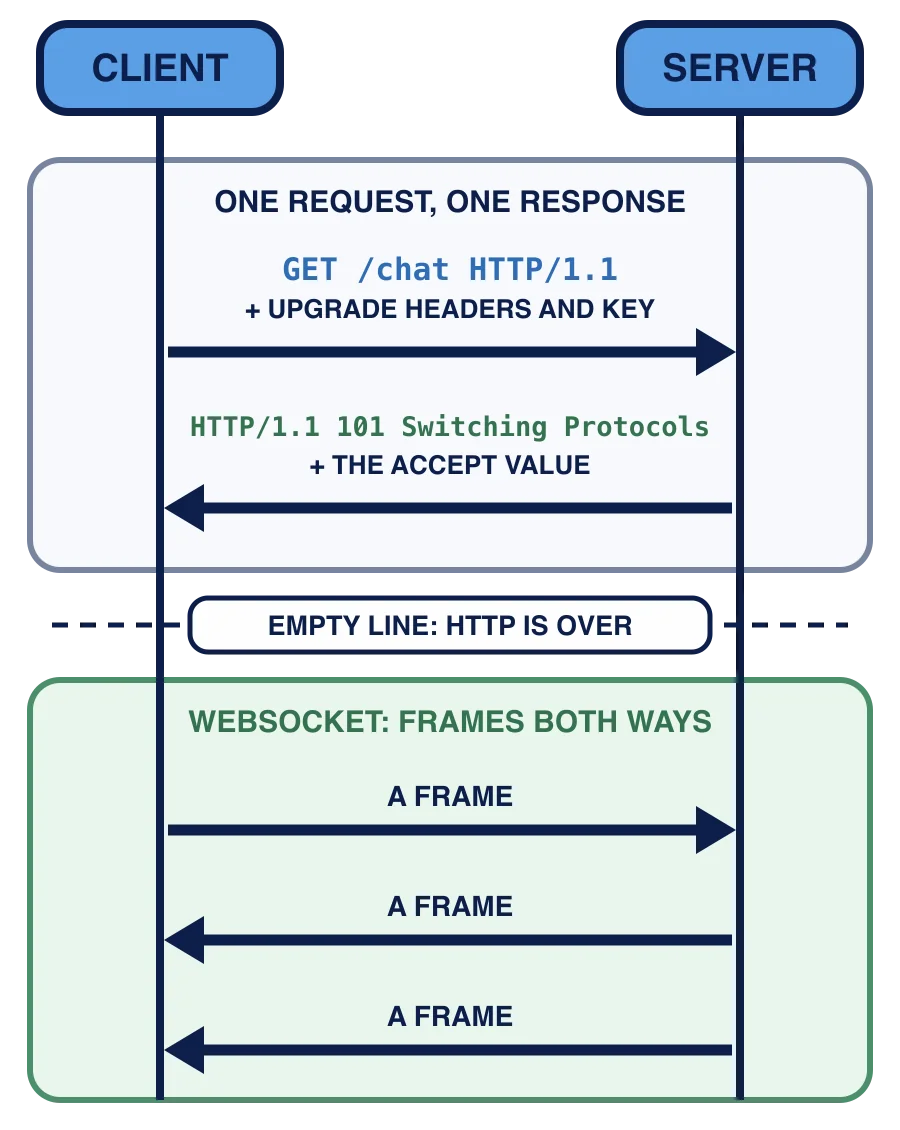
In words: the client sends the upgrade request, GET /chat HTTP/1.1 with the Upgrade, Connection, key and version headers; the server replies with HTTP/1.1 101 Switching Protocols that carries the value computed from the key, and from then on frames flow both ways on the same connection, with no request and response pairing. If the request is not acceptable, the server answers with an ordinary HTTP error instead, and no switch happens. Lesson 4 decides which.
An upgrade request carries Host, Upgrade, Connection, Sec-WebSocket-Key, Origin and Sec-WebSocket-Version. Which of these headers could a client leave out and still get a 101 from this course's server?
A request carries Connection: keep-alive, Upgrade. Does it ask for the upgrade?
What is Sec-WebSocket-Key for?
You can now read every line of an upgrade request and say why it is there. In the next lesson you open the chapter’s project and turn these bytes into a