Chapter 11
A Taste of Async
Why Most WebSocket Servers Are Async
Most async def. Your scoreboard is not, on purpose: threads let every earlier chapter follow one connection at a time with the kind of asyncio, rewrite one handler as a asyncio properly takes a course of its own: Async Python, which needs only Python in Practice.
This lesson writes no code. It asks what your server spends while its viewers wait, and what the other style asks in return.
What your server spends
Since Chapter 7 your scoreboard has run on the library’s sync server from Chapter 6, which gives every connection a thread of its own. The handler runs in that thread from the
A run on a local computer, not yet on the site, counted the threads in a server process. With no viewer connected, the sync server ran 2 threads: the main thread and the one running serve_forever. With 20 idle viewers connected from another process, it ran 62. That is 60 more for 20 viewers, three per viewer: the thread your handler runs in, one the library uses to read the connection, and one for its
Your sync scoreboard has 20 viewers who are all waiting for the next score. What is each of their handler threads doing?
A viewer mostly waits
How much of that time is work? Take a two-hour quiz night with 40 scores, and say that sending one snapshot to one viewer takes about a millisecond. This block does the arithmetic for one viewer:
It prints busy 0.04 s of 7200 s: 0.0006 %. The millisecond is a round guess, and ten times more would still leave the viewer idle for nearly all of the evening. Waiting is a viewer’s normal state, as Chapter 7 found when it first kept viewers connected between scores. A thread per viewer is paid for during all 7200 seconds, while the work adds up to less than a tenth of one second.
Why does it matter that a viewer is busy for well under one percent of a quiz?
One loop, many waits
You have seen the other shape. In Networks with Python, Chapter 9 served many clients from one thread with selectors: one call, select, waited until any
An async def defines, and Lesson 2 shows how. Python’s standard event loop lives in the asyncio websockets library has a server built on it, websockets.asyncio.
The same local run counted that server’s threads too: 1 with 20 idle viewers, and 1 with none. The picture sets the two shapes one above the other for twenty viewers. Count the threads in each, and find the one viewer that is doing anything.
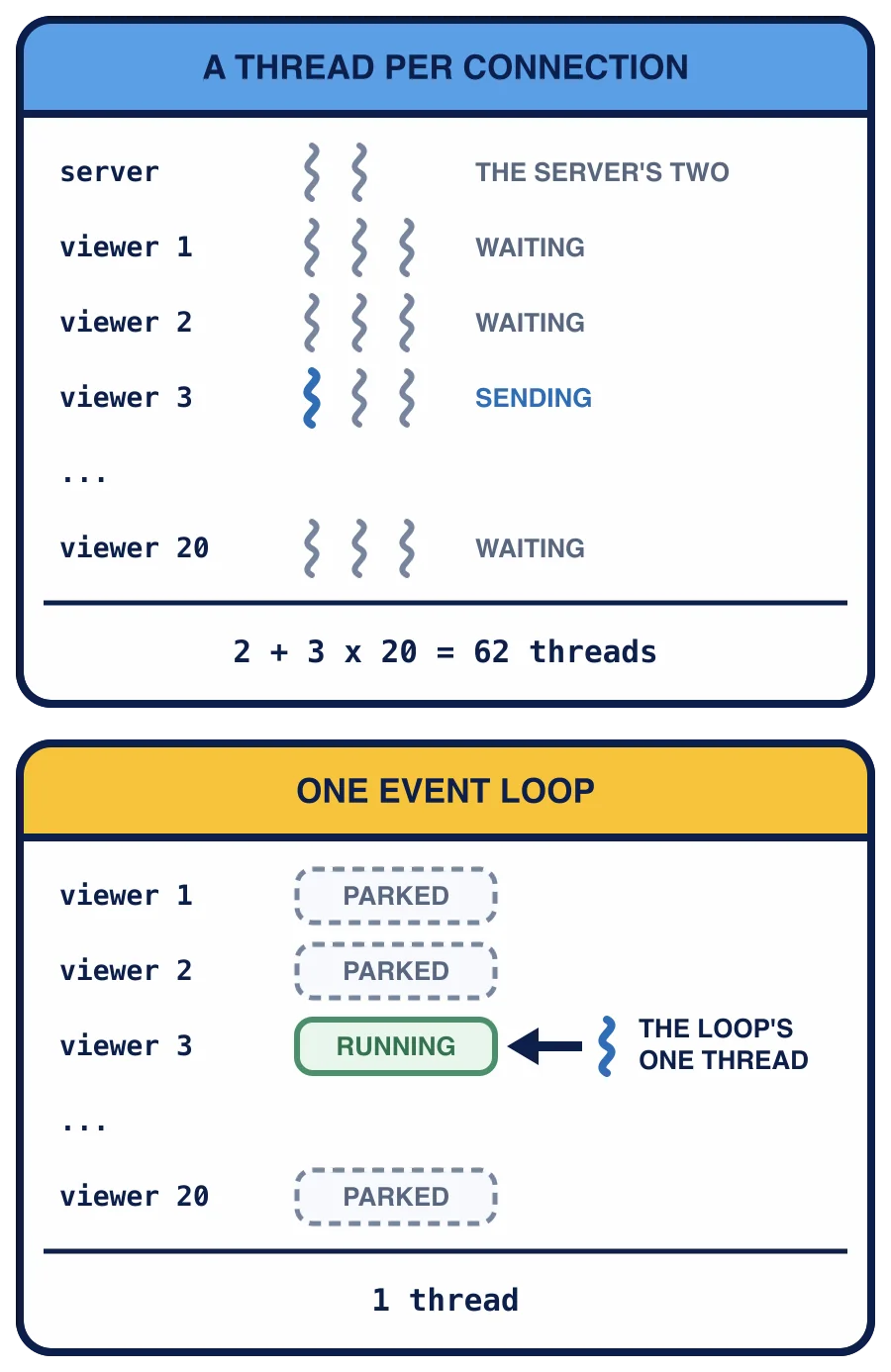
In the top half, each of twenty viewers has three threads (its handler’s, a reader and a keepalive), plus the server’s two, and almost all of them are waiting: 2 + 3 x 20 = 62 threads. In the bottom half, the same twenty viewers are parked, and one thread runs whichever viewer can go on, here viewer 3, before it returns to the loop. That is 1 thread in all.
The price
The loop has one thread, so it runs one handler at a time. That works only if every handler hands control back to the loop whenever it has to wait. A handler that waits the old way, with a call that blocks such as time.sleep or the outbox’s Event.wait, holds the only thread, and every other viewer waits with it until that call returns. Lesson 3 shows this happening, with a count.
So neither style is simply better. For the five clients this course has served at once, threads cost little and let you reason about one connection at a time. A service with thousands of viewers who mostly wait is the usual reason to move to a loop, because that many threads would cost far more than the work they do. That is the common
Which situation is the strongest reason to move the scoreboard to an event loop?
In the next lesson you write your first coroutines and run them with asyncio.run, on the server.