Organizing a Program Across Files · practice
Package Folders and Circular Imports
Three main.py, and at that size a flat project is fine. Grow it to twenty and the folder stops helping: models.py, attempts.py, report.py, report_html.py, scoring.py, scoring_rules.py, and no visible grouping anywhere.
A package is a folder of modules, and it is the next level of the same idea. A module groups related definitions; a package groups related modules.
Making one
quizapp/
    __init__.py
    models.py
    scoring.py
main.py
quizapp is a regular package because the folder contains __init__.py. Python also supports namespace packages without that file, but regular packages are the explicit, predictable form this project uses. Their modules are reached with a dot:
from quizapp.models import Question
from quizapp import scoring
The dot in quizapp.models is the folder separator, spelled the way Python spells “inside”.
What __init__.py is for
It marks the folder as a regular package, and it runs when the package is first imported. Most of the time it should be empty, and an empty file is a perfectly good and very common thing to find there.
Its one common use is to decide what the package offers:
# quizapp/__init__.py
from quizapp.models import Question, Quiz
With that line, users of the package can write from quizapp import Question without knowing which module inside it holds the class. That is a real benefit and a real commitment: you have promised that name, and moving the class between modules must not break it.
Start with an empty __init__.py. Add to it when you have a reason.
What does an empty __init__.py accomplish?
Absolute imports inside your own project
Inside quizapp/scoring.py, reaching the neighboring models.py is written from the top of the project:
from quizapp.models import Question
Not from models import Question, which would look outside the package, and not from .models import Question, which is the relative form. Relative imports work and you will meet them in other people’s code; the absolute form is clearer for a project this size, because the line reads the same wherever it appears.
The problem this creates
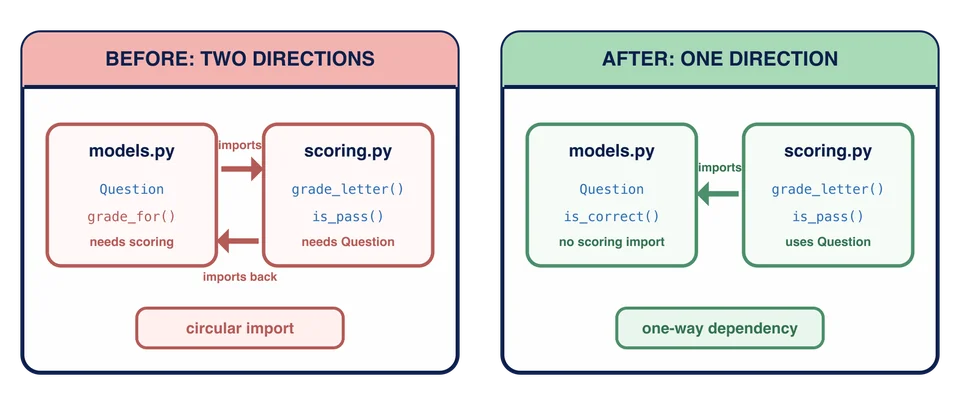
Two modules that import each other is called a circular import, and it is the one import problem that reliably bites people.
# quizapp/models.py
from quizapp.scoring import grade_letter      # models needs scoring

# quizapp/scoring.py
from quizapp.models import Question           # scoring needs models
Python starts importing models, reaches line one, and goes off to import scoring. scoring reaches line one and asks for models, which is already being imported and is therefore half-finished: the name exists, but Question has not been defined yet. The result is an ImportError complaining about a partially initialized module, and the message points at whichever file happened to be second.
The confusing part is that both files are individually correct. The error is in the shape of the dependency, not in either line.
Fixing it
The cycle is almost always telling you something true, so the good fixes are design fixes:
One of the two directions is wrong. This is the usual answer. Does models really need scoring, or was a grade being computed somewhere it does not belong? Removing the import that should not exist fixes the cycle and improves the design.
The shared piece wants its own module. If both genuinely need something, move that something into a third module they both import. The cycle becomes a shape.
The import is only needed inside a import from the top of the file into the function that uses it delays it until after both modules are loaded. This works, and it is worth being suspicious of: it hides the dependency from anyone reading the top of the file, and it usually means one of the first two fixes was the honest one.
The exercise has a real cycle in it, and the first fix is the one that applies. The workspace also supplies the package’s complete scoring module and a package-local report module for the final assembly; your one task here is to repair the direction between scoring and models.
Task
This lesson supplies a quizapp package containing a deliberate circular import. Submit exposes the broken package even though Run still uses the earlier flat
quizapp/scoring.py imports Question from quizapp.models, which is correct: scoring needs the domain. quizapp/models.py imports grade_letter from quizapp.scoring, which closes the circle, and neither module can finish loading.
Fix it by removing the import that should not exist. Ask which direction is genuine: does a Question need to know about grade letters?
Question.grade_for(response) is what pulled the wrong import in. It does not belong on a question at all, so delete it. A question reports whether a response is correct; deciding what a fraction is worth as a letter is scoring’s job, and scoring already asks the question.
Leave everything else in quizapp/models.py as it is. Question, Quiz, and Attempt keep the behavior they have had all chapter: the package is the whole domain, which is what the next lesson imports from.
The supplied quizapp/scoring.py contains the complete percentage and letter-grade rules plus is_pass. The supplied quizapp/report.py uses those package rules. Do not edit either helper file in this exercise.