Working with Text
A Look Under the Hood: Strings Are Objects
You already know that len() can measure a
A value is an object with a type
In Python, every "Hello" is an object, and the integer 42 is another object.
Every object has a type. A type tells Python what kind of value it has and which operations make sense for that value. The familiar type()
Python displays <class 'str'> for the string and <class 'int'> for the integer. Read the useful parts as “string type” and “integer type.” You do not need to build your own
An object provides methods
A
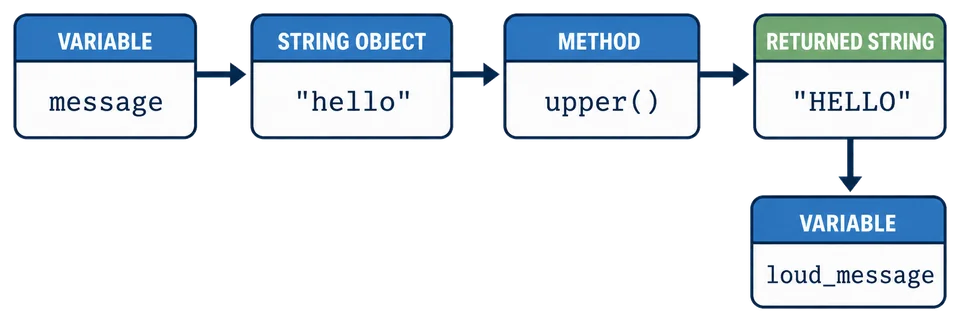
The call message.upper() has three important parts:
messagerefers to the string object;the dot asks for an operation provided by that object;
upper()calls that method.
The call returns the new string "HELLO", which loud_message. A small dot is doing useful work here. No wand required.
Compare the familiar function form with the method form:
len(message)       # Pass the object to a built-in function
message.upper()    # Call a method provided by the object
Both are calls, so both use parentheses. The dot tells you that upper() comes from the string object.
Pause here and picture the relationship: message refers to a string object, its str type provides .upper(), and the method call returns a new string.
The diagram follows that exact call from the original
What does the dot mean in message.upper()?
The idea to carry forward
When you soon meet name.strip(), name.lower(), and name.replace(), read them with the same model: a name refers to a string object, the dot selects one of its methods, and parentheses call it.
That is enough object vocabulary for now. The next few lessons can concentrate on what you want the text to do.