Welcome to Python Land
What Is Programming?
In the previous lesson, you ran a Python program before we stopped to define one. Now we can put names to what you saw.
Programs and programming
A program is a set of instructions written for a computer. Programming is the work of deciding what those instructions should do, writing them clearly, and correcting them when the result is not what you expected.
The instructions are written as code. Code is text that follows the rules of a programming language. In this course, that language is Python.
For now, there are four useful words to remember:
Program: The complete set of instructions.
Code: The text used to write those instructions.
Instruction: One action that Python should carry out.
Output: Information produced when the program runs.
Here is the basic path from an idea in the editor to a result on the screen:
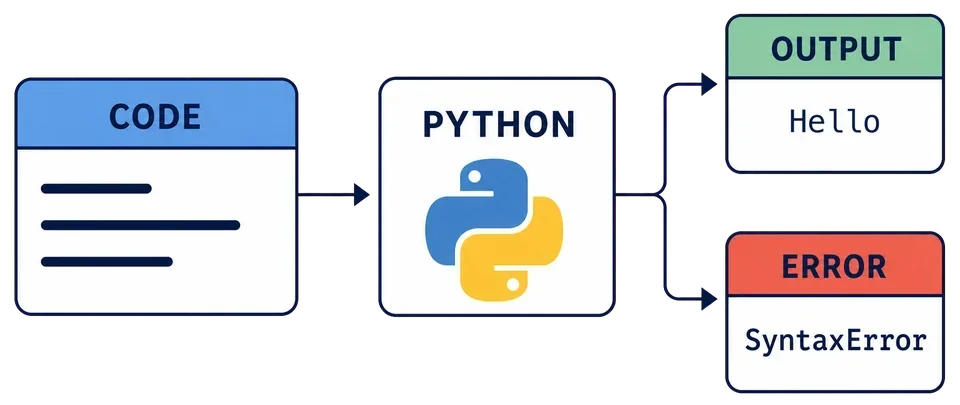
That final possibility matters. A program does not always produce the output you wanted. Sometimes it produces an error instead. Both results give you information.
Deep dive
The software that reads and runs Python code is called the Python interpreter. Python Land loads an interpreter in your browser, which is why these examples can run without installing Python on your computer.
Instructions run in order
In a small program like the one below, Python normally starts with the first line and then moves downward.
Before running this example, read the code and predict the output:
What will this program print?
print("Morning")
print("Afternoon")
print("Evening")Now experiment with the same idea:
Move the third line to the top and press Run. Then repeat one of the lines and run it again. Use Reset code when you want the original example back.
Python does not decide that First instruction sounds as if it belongs first. It follows the order of the code.
Code and output are different
When you run print("Hello"), the code is:
print("Hello")
The output is:
Hello
The quotation marks and parentheses help Python understand the instruction. They are not part of the displayed output.
You run print("Welcome") and see Welcome underneath the editor. Which statement is correct?
Programming is a cycle
Writing code is rarely a one-pass activity. You write something, run it, inspect the result, and adjust it. Experienced programmers do this constantly.
Starting at the moment you write or change the code, put this small programming cycle in order:
Drag the options into order, or use the arrow buttons.
Press Run.
Decide what to change next.
Write or change the code.
Read the output or error.
Ask Monty for another angle
If the difference between a program, code, an instruction, and output still feels blurry, open Monty and ask:
Explain program, code, instruction, and output using an everyday example.
If the example does not work for you, say so and ask for a different one. This is one of Monty’s most useful features: the lesson stays the same, but the explanation can change.
You can also ask Monty for one extra practice question about code and output.
Complete the three checks in this lesson, then press Next to continue.
Task
Learn what programs, code, instructions, and output are. Then ask Monty to explain them from another angle.