Talking with Your Program
How Function Calls Work
print() to display messages and input() to collect answers before you knew their shared pattern. Let us give that pattern a name.
A function has a name and a job
A function is a named operation with a particular job. Calling a function means asking it to do that job now:
print("Hello")
This is a function call. It has three visible parts:
| Part | Meaning |
|---|---|
print | The function’s name |
( and ) | The parentheses that make the call |
"Hello" | A |
The value inside the parentheses is an
print("Good morning")
print("Good evening")
Same job, different message.
A function can return a value
Some functions produce a value for the rest of the program to use. That result is the function’s
You have already used a returned value here:
name = input("What is your name? ")
If the person Ada, the call can be pictured like this:
input("What is your name? ") -> "Ada"
The arrow is an explanation, not Python syntax. It shows the value produced by the call.
Assignment stores the returned value
Python completes the right side of an
calls
input();supplies
"What is your name? "as the argument;waits for the returned
; assigns that string to
name.
The assignment has to wait for Enter because it needs the function’s return value. No mystery here, just four small steps in order.
The diagram below follows that same journey: argument into the call, return value out, then assignment to a
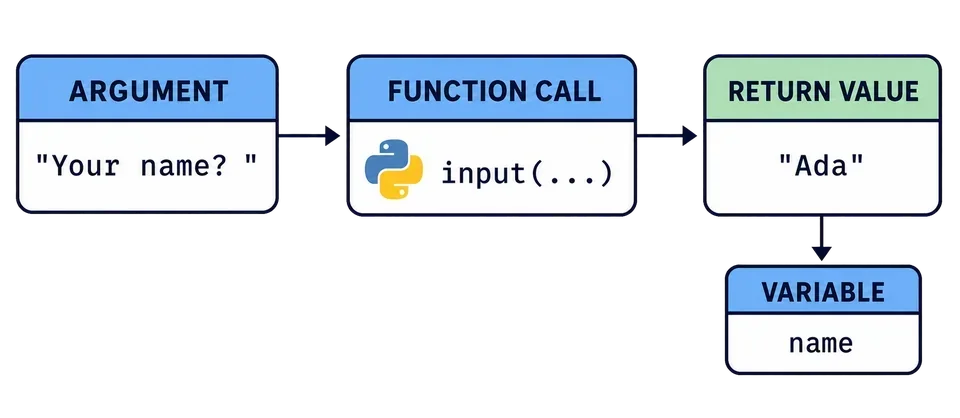
In name = input("Your name? "), what does input() return?
Trace one complete trip
The playground keeps the pattern short:
answer = input("Type anything: ")
print(f"You entered: {answer}")
Press Run and enter any answer. On the first line, the prompt is the argument, your typed text is the return value, and assignment stores it in answer. On the second line, the finished print().
In the next lesson, int() will use the same pattern: give the function text as an argument, receive an integer as its return value, and store that value in a variable.
Task
Run the program and enter any answer. Trace the first line and identify:
the
supplied to input();the
returned after you press Enter; the
that stores that .
Complete the quiz, then press Next to continue.