Repeating Work with Loops
When a Loop Never Ends
A for for loop you have written so far.
A while loop makes no such promise. It ends when its False, and nothing forces that to happen. If the condition stays True forever, the loop repeats forever. That is an infinite loop, and every programmer writes one eventually.
This lesson is about recognizing them, escaping them, and preventing them. The examples here are deliberately broken, so read them rather than running them. There are no Run buttons on this page.
The classic: nothing changes
count = 3

while count > 0:
    print(count)
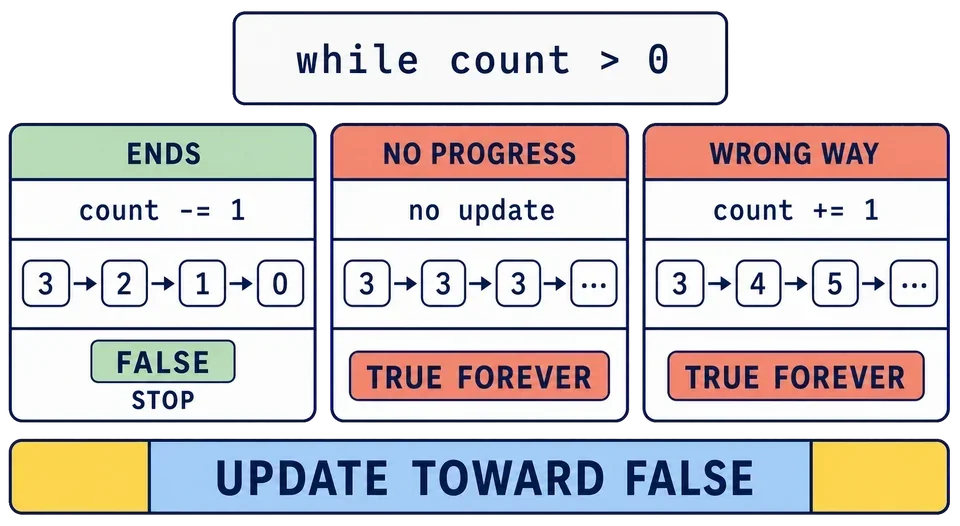
The condition asks about count. The body never touches count. It stays 3 forever, the condition stays True forever, and Python keeps printing 3 until something outside the program stops it.
For this countdown, the missing step is the line that lowers count.
The subtle one: changing in the wrong direction
count = 3

while count > 0:
    print(count)
    count = count + 1
Here count does change, so the loop looks complete at a glance. It moves the wrong way. count climbs past 4, 5, 6, and gets further from ending on every pass.
Read the condition and the update together, as a pair. The condition says the loop ends when count reaches 0. The update has to move count toward 0.
The hidden one: the update is trapped inside an if
attempts = 0
answer = "no"

while answer == "no":
    attempts += 1
    if attempts > 10:
        answer = "yes"
        print("Finally")
That one does end. Change the condition inside the
attempts = 0
answer = "no"

while answer == "no":
    attempts += 1
    if attempts < 0:
        answer = "yes"
        print("Finally")
The attempt count starts at zero and increases, so attempts < 0 is never true. The line that changes answer exists, but Python never reaches it. Whenever the update to a condition if, ask yourself whether that if will become true.
Compare the three paths below: one moves the condition toward False, one makes no progress, and one moves farther away. The arrows are the part to inspect.
In the diagram, count -= 1 is the shorter form of count = count - 1, just as count += 1 adds one.
What happens on Python Land
If you do run one, stop it and inspect the condition and update before trying again. What you see depends on where the lesson runs.
In a browser lesson, your code runs inside a worker in the page. Output is streamed while the program runs, so an endless loop that prints can fill the print() may look silent. After a few seconds a warning appears above the editor:
⚠ This does not look like it is finishing.
Next to it is a Stop button. Press it. The terminal explains that the program may contain a loop that never ends or may simply be doing much more work than expected.
Stopping restarts Python behind the scenes, so the next run takes a moment longer to get going. Your code in the editor is untouched.
The debugger uses a different safety limit. It records at most 1,000 trace events before showing you the result. For an endless loop, it opens a truncated trace instead of hanging the page. You can inspect the repeated lines and changing variables, then press Stop in the debugger toolbar to leave it. No page reload is needed.
In a server lesson, the Run button becomes a Stop button while your program is waiting or working. Use it to end an interactive run that is stuck. Server execution also has time and output limits, but an interactive session does not use the same short time limit as a submission, so do not wait for it to stop on its own.
A timeout, or that Stop warning, in a lesson that should finish quickly is a strong hint that a loop is not ending. It is information, not a scolding.
Check a while loop before you run it
Three questions, in this order:
Which variable does the condition ask about?
Which line inside the body changes that variable?
Does that change move the variable toward ending the loop?
If you cannot point at a line for question 2, you have found the bug before running anything. This takes a few seconds and saves you a stopped run.
Sometimes the honest answer is that a while loop is the wrong tool. If you are repeating once per item in a fixed, finite collection and the loop does not extend it, a for loop ends when the items run out and needs no counter at all.
Loops that run forever on purpose
Not every endless loop is a mistake. This appears in real programs:
while True:
    ...
True is not a comparison. It is simply the True, so the condition can never become False on its own. Programs that wait for input, or run a menu until the user chooses to quit, are often written this way.
A loop like that needs a deliberate exit from inside the body, which is exactly what the next lesson gives you.
Which of these loops never ends?
total = 0
while total < 5:
    print(total)
    total = total - 1
A while loop in your program never finishes. What is the most useful first thing to check?
What to take with you
An infinite loop is not a disaster. It is a bug with an obvious symptom, an escape hatch when you hit one, and a fix that is usually one line. Learn the three questions, use them before you run a while loop, and this stops being frightening quite quickly.
Task
There is nothing to run in this lesson. Read the broken examples carefully and answer both questions.
Before moving on, make sure you can explain:
why a
forover a fixed, finite that it does not extend will finish, while a whileloop can keep itstrue forever; the three ways a
whileloop fails to end: no update, an update in the wrong direction, and an update trapped inside anthat is never true; what appears if a browser program does not finish, and what the Stop button does;
how Step limits an endless loop to 1,000 recorded events and lets you inspect the truncated trace;
the three questions to ask about a
whileloop before running it.