Repeating Work with Loops · practice
Build Up a Result
The last two exercises collected the values from a
For that you need a
Start outside, change inside, use after
Suppose you want the total of a list of prices:
Three lines, three jobs:
total = 0runs before the. It creates the variable and gives it a starting . total = total + priceruns inside the loop, once per value. It takes the current total and replaces it with a larger one.print(total)runs after the loop, when every value has been added.
That shape has a name. The variable is called an accumulator, and this is the accumulator pattern. The loop keeps one result alive while each value contributes to it.
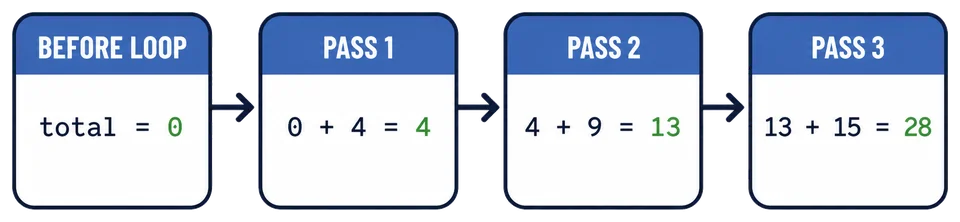
Follow total through the passes: it starts at 0, then holds 4, then 13, then 28. Watching it climb one pass at a time makes the pattern far easier to trust than reading about it, and the exercise at the end of this lesson is a good place to do that with the Step button.
This four-panel trace freezes the accumulator before the loop and after each addition:
Why the starting value matters
Put total = 0 in the wrong place and the loop resets it on every pass:
The answer is 15, the last price, because the total was thrown away before each addition. If an accumulator ends up holding only the final value, check whether you set it up inside the loop by mistake.
Leaving the line out entirely gives a total + price needs a total that already exists.
What does this code print?
values = [2, 5, 3]

total = 0
for value in values:
    total = total + value
print(total)Where does the starting value of an accumulator belong?
Once the long form is clear
Python has a shorter spelling for the update:
total += price
For these numbers, it means the same thing as total = total + price: take the current total, add the current price, and store the new value back in total. The longer form is excellent while you are tracing the pattern. The shorter form is handy once you can explain what it replaces.
Now build one total of your own. One accumulator is plenty for a first meeting; it already has a lot to remember.
Task
The donations total, then keep the report line after the loop.
Expected output:
Total: 142
Set up total before the loop. You can write the update as total = total + donation or, once that feels clear, as total += donation.
Watch the accumulator grow
Once your program runs, press Step in the editor toolbar and move through it with Next, watching the
Watch total climb from 0 to 12, then 57, and eventually 142. The useful question on every pass is: “What did total hold before this donation, and what does it hold now?”