Making Decisions · practice
Turn Answers into Decisions
You practiced decisions with fixed values first. In this lesson, your program will ask for values and use them to choose a response.
The Python ideas are the same. The difference is that the starting values now come from what you enter in the
Read the three examples below to trace how an answer reaches a decision. Then build and run the weather recommendation in this lesson’s Editor. Its terminal lets you type answers and press Enter, just as you did in Chapter 3.
Plan input, process, and output first
You met the Input, Process, Output pattern in Chapter 3. It is especially useful for an interactive decision because it separates three different jobs:
Input: collect the raw answers.
Process: clean or convert those answers, then use
to choose a result. Output: present the chosen result.
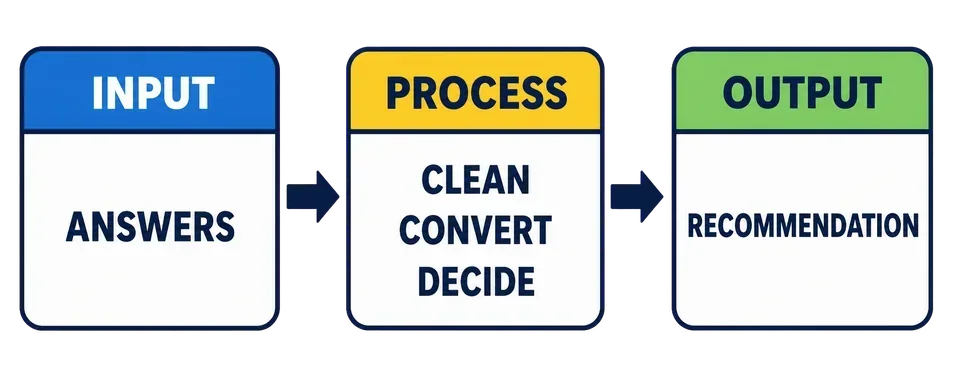
The process stage now does more than calculate a number. It prepares the answers and decides which path the program should follow. Keeping those jobs between input and output makes the program easier to trace and test.
Before writing code, plan an interactive decision with three questions:
What answers does the program need?
How must those answers be prepared, and what rules choose the result?
What should the program show at the end?
Clean text before comparing it
input() always returns a
setting = input("Choose indoor or outdoor: ").strip().lower()

if setting == "outdoor":
    print("You chose an outdoor plan.")
elif setting == "indoor":
    print("You chose an indoor plan.")
else:
    print("That choice is not recognized.")
Chapter 4 introduced method chaining. Here, input() returns a string, .strip() returns a string without surrounding whitespace, and .lower() is called on that returned string.
If you enter OUTDOOR , the chained calls produce "outdoor". The first condition can then match it.
If you enter another word, the final else still gives you a result. It does not ask again. Repeating until the input is suitable requires
Convert numeric input before comparing it
A string and an integer cannot be compared as if they were both numbers. Convert the answer first:
minutes = int(input("How many minutes are available? "))

if minutes < 30:
    print("Choose a short activity.")
else:
    print("There is time for a longer activity.")
The call to int() returns an integer. The comparison minutes < 30 therefore compares two numbers.
For example, an answer of 20 selects the short activity; 30 selects the longer one. Use whole numbers when you test the exercise below. Handling text that cannot be converted belongs in the later chapter on errors and validation.
Combine more than one answer
Once each answer has the right form, use the same conditions you practiced with fixed data:
pace = input("Choose quiet or active: ").strip().lower()
minutes = int(input("How many minutes are available? "))

if pace == "active" and minutes >= 45:
    recommendation = "Try a longer active session."
elif pace == "active":
    recommendation = "Try a short active session."
else:
    recommendation = "Choose a quiet activity."

print(recommendation)
Condition order matters. The first branch handles the narrower case: active with at least 45 minutes. The second branch catches other active answers. The final branch handles every other cleaned answer.
This quiz uses a fixed value instead of live input. What does the code print?
weather = "  SUNNY  ".strip().lower()
if weather == "sunny":
    print("Outdoor option")
else:
print("Indoor option")Recommend a short or long plan
Your exercise asks two questions:
Is the weather
sunnyor something else?How many minutes are available?
Clean the weather answer and convert the minutes to an integer. Then choose one recommendation:
sunny with at least 30 minutes:
Take a longer walk.;sunny with less than 30 minutes:
Take a short walk.;any other weather:
Choose an indoor activity..
Open Editor, complete the decision, and press Run. At each question, type your answer in the terminal and press Enter. Run again for each of these cases:
| Weather answer | Minutes | Expected recommendation |
|---|---|---|
SUNNY (with spaces at both ends) | 30 | Take a longer walk. |
sunny | 20 | Take a short walk. |
rain | 20 | Choose an indoor activity. |
The first case checks text cleanup and the 30-minute boundary. The other two check the remaining branches. When all three work, press Submit to check your solution with private answers.
Task
Complete the interactive recommendation.
Clean the weather answer with
.strip().lower().Convert the minutes answer with
int().Use
, elif, andelseto choose the required recommendation.Keep the supplied questions and final print call.
Press Run and answer each question in the SUNNY with 30 minutes, sunny with 20, and rain with 20 to exercise all three paths. Enter whole numbers for the minutes.
Then press Submit to check your solution with private answers.