Lists · practice
When Two Names Share a List
A
Both names show the new item. The assignment shared_plan = weekend did not copy the list. It gave one list a second name.
Now that the surprise is visible, we can choose the solution deliberately.
Make a separate list when changes should stay separate
Call .copy() when you need an independent outer list:
Now the lists begin with equal items but can change independently. .copy() earns its place because we have seen the problem it solves.
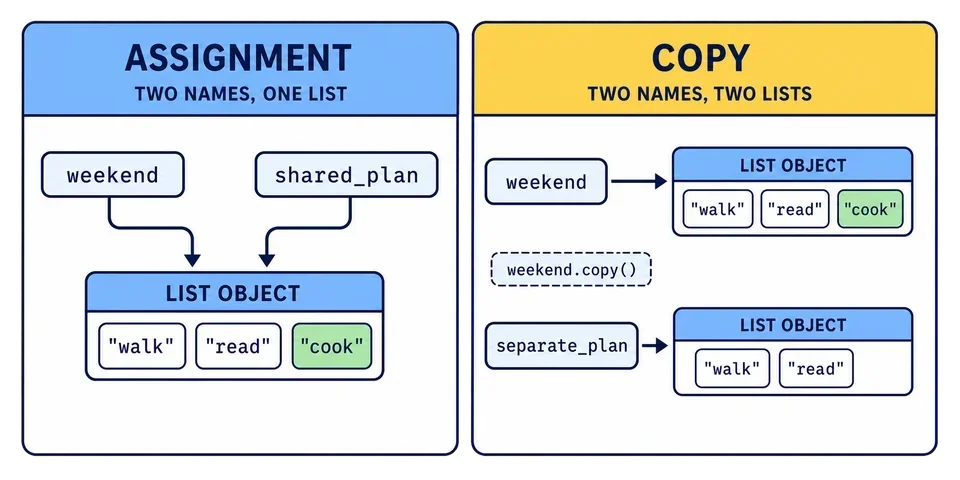
The exercise at the end of this lesson builds both relationships in one program. After append(), the one shared
This distinction explains behavior that can otherwise feel surprising:
Changing alias changes original because those names refer to the same list. The copied list keeps 10 as its first item.
What does this code print?
colors = ["red", "blue"]
other = colors
saved = colors.copy()
other.append("green")
print(colors)
print(saved)For the lists of
The word outer matters: .copy() makes a new list, but it does not also copy objects stored inside that list. If an item is itself a
Task
Complete the program so it creates both kinds of relationship:
Make
shared_plananother name for the existingweekend. Make
separate_plana separate copy.Keep the provided append operation.
Replace the first item in
separate_planwith"cycle".Print all three lists.
The appended item should appear through weekend and shared_plan, but not in separate_plan.
Once it runs, press Step in the editor toolbar and move through the program with Next, watching the weekend.append("cook") runs, weekend and shared_plan change together, because they are two names for one list. separate_plan does not move. That is the whole idea of this lesson, visible in one moment.