More Than One Client · practice
A Thread per Connection
Since Chapter 4, every pl_net.py run has had two sides talking at once inside one program. pl_net, the helper written for this course that plays the program on the other end, played one side; your code played the other. A program normally does one thing at a time, so how did both sides run together? pl_net ran your code in a thread: a second line of work inside the same program, with its own place in the code and its own waits, sharing the program’s accept() or recv, pl_net’s own line of work went on sending and reading. That is also what the last line of every transcript, pl_net: every thread has stopped, has been telling you: before it finished, pl_net checked that no line of work was left running.
Your server can do the same: give each client its own thread, so a silent client holds up only itself.
A thread runs a function
The threading
import threading


def count_down(name, start):
    while start > 0:
        print(name, start)
        start -= 1


worker = threading.Thread(target=count_down, args=("worker", 3))
worker.start()
print("start() has returned")
worker.join(2.0)
threading.Thread(...) only prepares the thread. target is the function the thread will run, passed as a connect. args is a start() begins the thread and returns at once, so print("start() has returned") runs while count_down may still be counting, and its line can appear before, between or after the countdown’s lines. join(2.0) waits until the thread has finished or 2 seconds have passed, whichever comes first. A join without a timeout could wait forever, which no program in this course does.
What goes wrong with threading.Thread(target=serve_client(conn, board, outcomes))?
One thread per client
serve keeps its accept() and conn.settimeout(idle_timeout). Instead of calling serve_client(conn, board, outcomes) and waiting for it, serve starts a thread that will call it:
thread = threading.Thread(target=serve_client, args=(conn, board, outcomes))
thread.start()
threads.append(thread)
Nothing inside serve_client or handle_client changes. serve_client still closes the connection and appends the outcome; it now does so in its own thread. serve keeps every thread in a max_connections still bounds how many clients are served and how many threads exist. This course keeps every run to eight client threads or fewer, and pl_net’s scenarios in this chapter pass max_connections=2.
The target is serve_client, not handle_client, because the thread now owns the connection. serve_client is the one place a connection is closed, so serve must not close conn or use with conn: itself: it would close the connection while the thread is still reading from it.
After the loop, serve joins each thread in the list with JOIN, the 2-second constant at the top of board_server.py, and then returns the outcomes. With pl_net’s idle_timeout=1.0, a silent client’s thread ends after its one-second idle timeout, inside that bound. A client that keeps sending requests could keep its thread busy for longer; then join returns after 2 seconds anyway and serve returns without that client’s outcome. Lesson 5 makes serve report such a thread.
Follow each client from the listener to the thread that serves it:
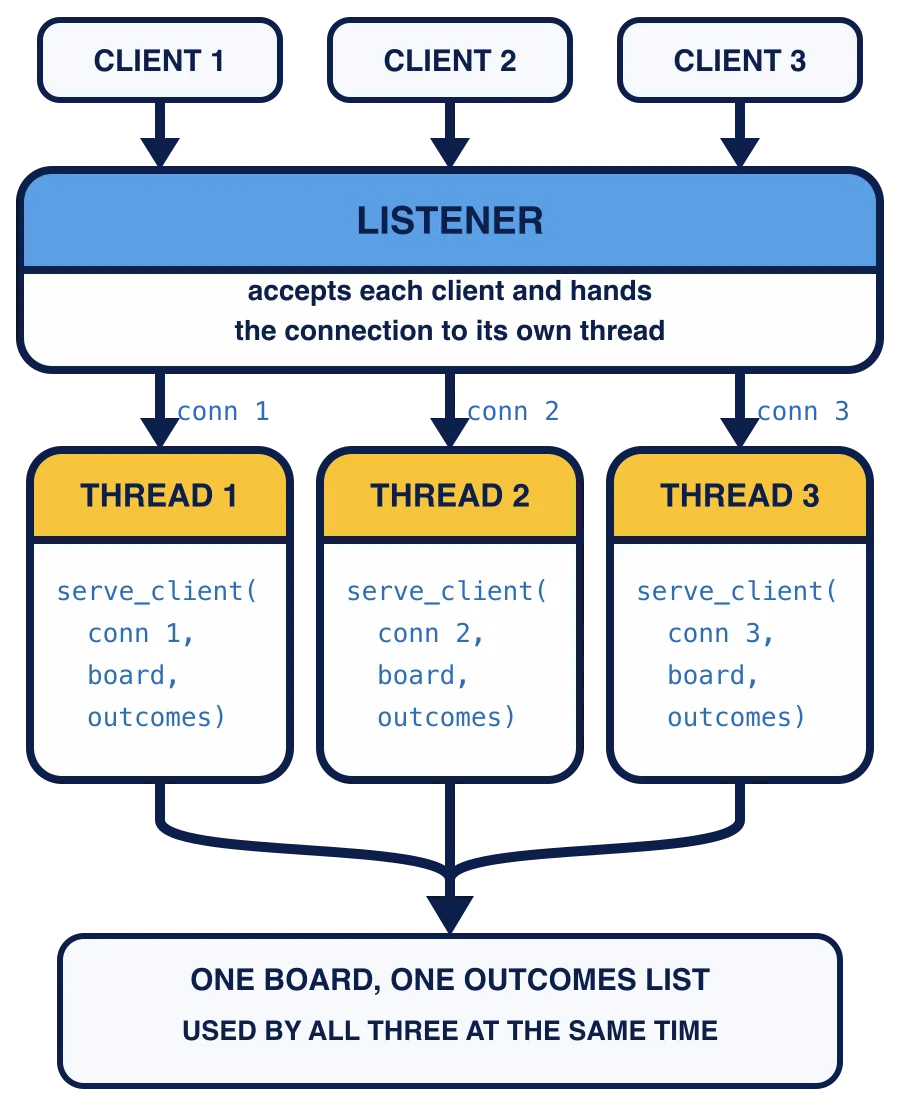
In words: the loop hands each accepted connection to a thread of its own and goes straight back to accept(). Three threads work at the same time, and all of them use the same board and append to the same outcomes list.
serve starts each thread and joins it before the next accept(). What happens?
One list, many threads
Every thread appends its outcome to the same outcomes list. That is safe to share. In CPython, the Python this course runs, one list.append is a single step that no other thread can interrupt halfway, and the Python documentation’s FAQ lists it among the operations that are safe to share. What changes is the order: outcomes now follow which client finished first, not which connected first.
Lesson 3 shows a change to shared data that takes two steps, and what a second thread can do between them.
Why does serve join every thread before it returns?
Your task
Rewrite serve in board_server.py:
Keep the listener’s timeout, the outcomes list and the loop. Make an empty list for the threads, and loop while fewer than
max_connectionsthreads have been started.After
accept()andconn.settimeout(idle_timeout), start athreading.Threadwithtarget=serve_clientandargs=(conn, board, outcomes), and add it to the list.After the loop, join every thread with
JOIN, then returnoutcomes.
Keep import threading at the top of the file and write threading.Thread(...). Check my work replaces the module with a stand-in that records every thread, which a from threading import Thread line would hide.
Run the scenario from Lesson 1 again:
python pl_net.py server slow-client
client 1: connected and sends nothing
client 2 -> server  frame {"op": "post", "text": "still here"}  (36-byte body)
server -> client 2  frame {"ok": true, "id": 1}  (21-byte body)
client 2: closed the connection
client 1: the server closed my connection
client 2 was answered while client 1 was still connected
--- result ---
your serve() returned ['ok', 'timed out']
Client 2 was answered while client 1 sat silent, and its "ok" now comes first because it finished first. Client 1 still got its idle timeout, in its own thread. python -m pytest still passes the outcomes test, whose posting client hangs up before serve runs.
Then press Check my work.
Several threads now change one board at the same time. The next lesson shows what two posts at the same moment can do to next_id.
Task
Rewrite serve(listener, board, *, max_connections=5, idle_timeout=WAIT) in board_server.py so it serves each client in a thread of its own:
Keep
listener.settimeout(idle_timeout)before the, stop when accept()raisesTimeoutError, and callconn.settimeout(idle_timeout)on every accepted connection.For each accepted client, start one
threading.Thread(target=serve_client, args=(conn, board, outcomes)), with the sameoutcomesfor every thread. Start no more than max_connectionsthreads.Start every thread before joining any. After the loop, join each thread with a timeout of
JOIN, then returnoutcomes.Leave the listener open.
Keep import threading and write threading.Thread(...), with no from threading import line. Keep serve_client and handle_client as they are.
In the python pl_net.py server slow-client and python -m pytest.
Then press Check my work. The check hands serve a stand-in listener with clients you have not seen, more clients than max_connections, and a stand-in for the threading pl_net.py transcript.