Write Requests by Hand
Take a URL Apart
In Chapter 1 the request target was typed by hand: /v1/items?page=1&page_size=2, with the address ("practice-api", 8080) written separately in ADDRESS. A http://practice-api:8080/v1/items?page=1&page_size=2, and a client has to take it apart before it can send anything. Some parts decide where to connect, some go into the request, and one part is never sent at all.
Python’s standard library does the taking apart for you: urlsplit, from the urllib.parse. Run it on a URL with every part filled in:
urlsplit returns one parts.port is the number 8080, an int; every other part is a string. The separators are gone: no ://, no : before the ? before the query, no # before the fragment.
Where each part goes
Here is the same URL with each part labeled, and where it ends up. Follow each part down to the request at the bottom:
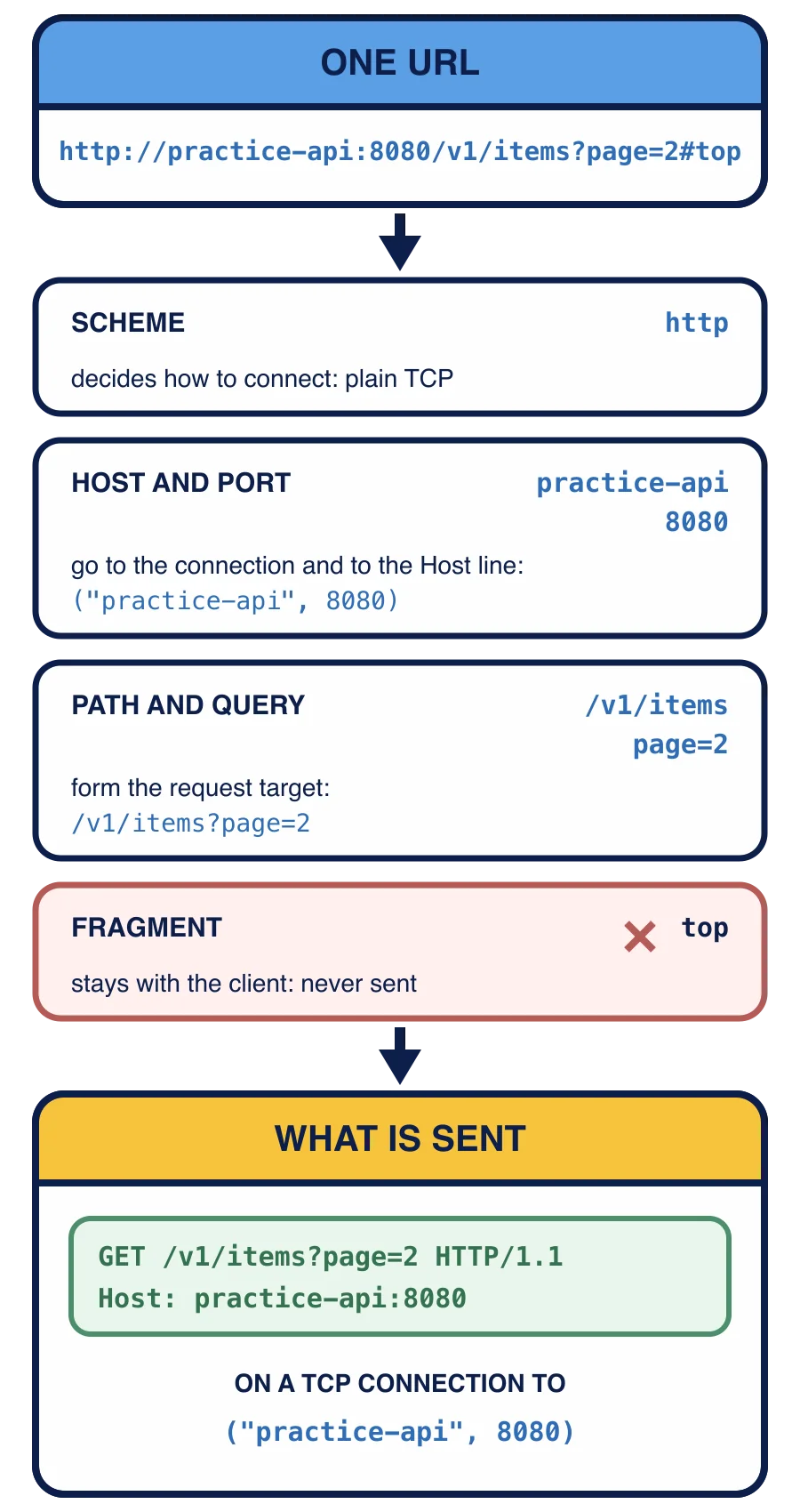
The request this URL produces is GET /v1/items?page=2 HTTP/1.1 with the line Host: practice-api:8080, sent on a ("practice-api", 8080). Nothing in it says #top.
Scheme. http means plain https means the same HTTP carried inside an encrypted http.
Host and port. These say where to connect. The host name is resolved to an (host, port) is the address connect Host line that Chapter 1 supplied as HOST_LINE. Lesson 4 explains why the server needs them again when the connection already reached it.
Path and query. These become the request target, the second word of the request line: the path, then ? and the query when there is one. This is the only part of the URL the request line carries. There is also a form of the request line that holds the whole URL, used when a client talks to a proxy that forwards requests elsewhere; a request sent straight to the server it is meant for, as all of yours are, carries only the path and query.
Fragment. The part after # points at a place inside the document, such as a heading on a web page. It is for the client alone: a browser uses it to scroll after the document arrives. It never appears in the request.
For the URL http://practice-api:8080/v1/items?page=2#top, which text goes in the request line as the target?
When the URL names no port
Most URLs do not name a port. Then parts.port is None, and the client fills in the default port for the scheme: 80 for http, 443 for https.
books.test is a made-up name: names ending in .test are reserved for examples and tests and never belong to a real site. urlsplit only takes the string apart, so it works on any URL without looking up the name or connecting anywhere. Your client connects to port 80 here, while the None still matters for the Host line, as Lesson 4 shows.
urlsplit also leaves the path empty when the URL ends right after the host, as in http://books.test. The request line still needs a target there, and the target for “the root of the server” is /. Lesson 5 handles that case.
What does this print?
from urllib.parse import urlsplit

parts = urlsplit("http://books.test:9000/shelves/3?sort=title&page=2#notes")
print(parts.path)
print(parts.query)
print(parts.port)
Every part of every URL so far has been plain ASCII words: items, page=2, fiction. Real values are not so tidy. A book title can hold a space, a slash, an ampersand, or a letter outside ASCII, and each of those would break the request line or change what the target means. The next lesson makes such values safe to send.