Chapter 7
State and Identity
HTTP Forgets Between Requests
Your reading
Here are two requests for a page that should answer “who am I?”, sent by one program a second apart:
GET /me HTTP/1.1
Host: books.test

GET /me HTTP/1.1
Host: books.test
They are byte for byte the same. Each one arrives, gets its answer, and is forgotten; under HTTP/1.0 each even arrives on a connection of its own. Nothing in the second request says it came from the program that sent the first. HTTP keeps no memory between requests: every request has to carry everything the server needs to know. So if the server is to recognize a client, the client has to carry the reminder, and send it back every time.
Set-Cookie and Cookie
That reminder is a Set-Cookie header on a reply, and the client sends it back in a Cookie header on every later request to that server:
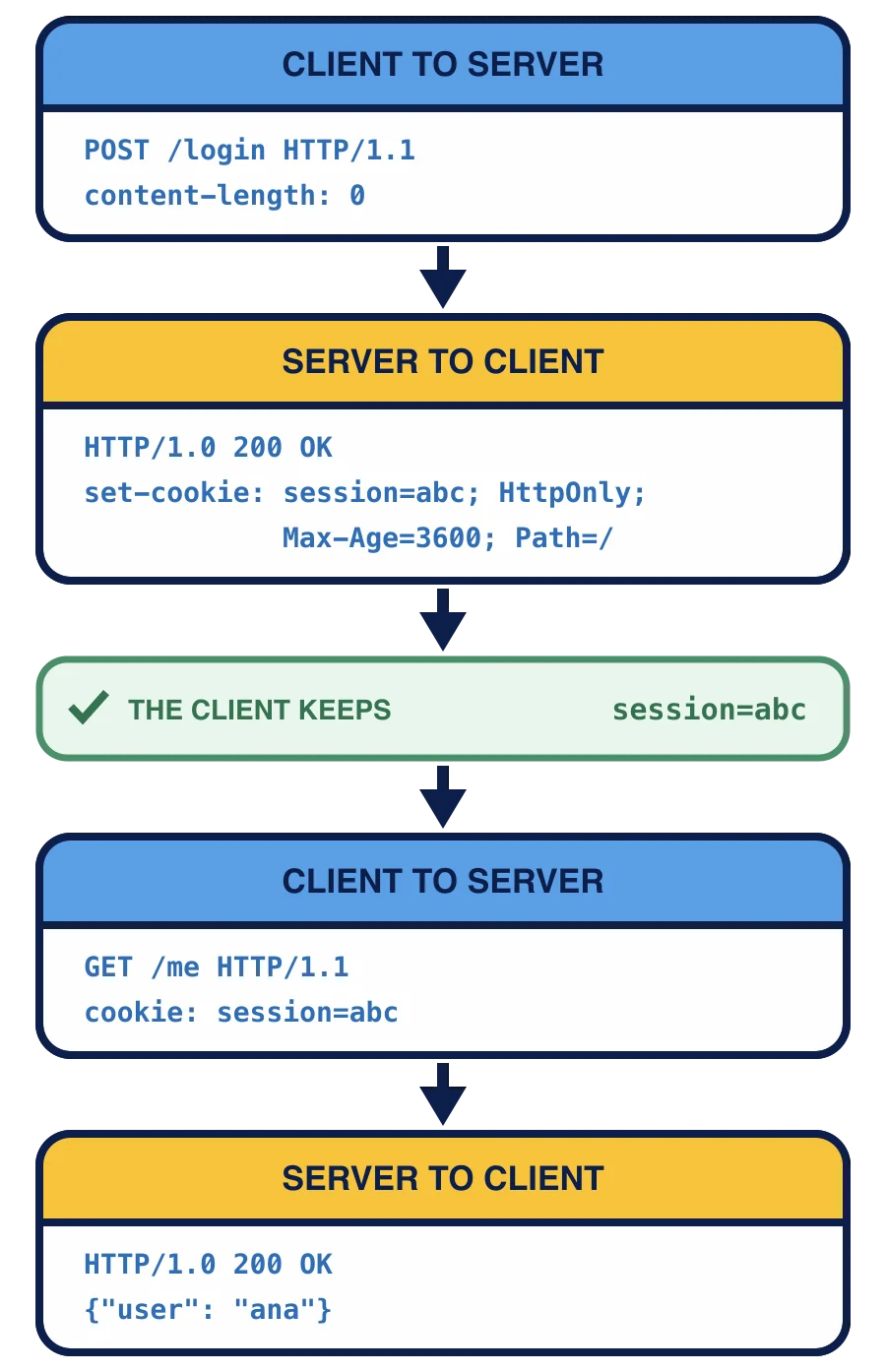
The client sends POST /login HTTP/1.1 with content-length: 0. The server’s HTTP/1.0 200 OK sets a cookie named session with the abc: set-cookie: session=abc; HttpOnly; Max-Age=3600; Path=/. The client keeps it; its next request, GET /me HTTP/1.1, carries cookie: session=abc. From it the server knows this client logged in and answers {"user": "ana"}.
The two headers are not mirror images. A Set-Cookie line carries one name and value, then attributes separated by ;, which tell the client how to treat the cookie. A server that sets three cookies sends three Set-Cookie lines. The Cookie line carries only names and values, every cookie that applies to the request on one line, separated by ; , and never an attribute: the attributes were instructions for the client, and the server already knows what it asked for.
Python’s http.cookies SimpleCookie works like a
OutputString() is the value of a Set-Cookie header: session=abc; HttpOnly; Max-Age=3600; Path=/. output() puts Set-Cookie: in front of it. The attributes come out in alphabetical order, whatever order you set them in, and their names may be set in any case. Only attributes you set appear; an unknown name such as color raises http.cookies.CookieError.
Reading goes the other way. Hand SimpleCookie the text of a Cookie header, and
Each entry holds its text in .value, so this prints abc-DEF_123, then dark, then 2: two cookies came in on one line.
What each attribute asks
Each attribute on a Set-Cookie line is a request to the client:
Path=/asks the client to send the cookie with requests for every path on the server. A cookie set withPath=/bookswould only go along with requests under/books.Max-Age=3600asks the client to keep the cookie for 3600 seconds and then forget it.Max-Age=0means “forget it now”, which is how a server deletes a cookie.Expires, a date instead of a number of seconds, is the older form of the same request.HttpOnlyasks a browser not to let scripts in the page read the cookie. The browser still sends it with every request; it only hides it from page code, so a script injected into a page cannot copy it.Secureasks the client to send the cookie only over HTTPS, never over plain HTTP.
You will also meet SameSite, which tells a browser whether to send the cookie when another site starts the request. This course has no browser, so neither page scripts nor SameSite is shown.
None of these can be enforced by the server. The server sends the request, and a well-behaved client honors it; a careless or hostile client can keep a cookie past its Max-Age or send it anywhere. The server must decide everything that matters on its own side, which is exactly what the next lessons do.
Secure and this course
Secure keeps a cookie off plain HTTP, and it encrypts nothing: anyone who can read the network can read a cookie sent over plain HTTP. Only HTTPS, HTTP inside an encrypted
Your server speaks plain HTTP on this machine’s Secure, a correct client would keep the cookie and never send it back to http://, and the login would seem to do nothing. So this course leaves Secure off the session cookie, as a learning
Two GET /me requests arrive from one program a second apart. What can tell the server they came from the same client?
What does this print?
import http.cookies

cookie = http.cookies.SimpleCookie()
cookie["session"] = "abc"
cookie["session"]["httponly"] = True
cookie["session"]["path"] = "/"
print(cookie["session"].OutputString())
What does HttpOnly protect against?
Why does this course's session cookie carry no Secure?
A cookie can hold any short text, but nothing it holds can be trusted: the client can change it at will. The next lesson keeps the real facts on the server, in a session, and hands the client only a random id to send back.