State and Identity
Bytes as Text with Base64
Anyone can log in to your server, and the client carries the session that results. Before the login can check a password, the user name and password need a way to travel in a request. A header is the obvious place, and it is a narrow one. In Chapter 2 you saw that a header \r or \n, and in Chapter 6 that http.server will not even write a value that does not fit in Latin-1. A password is less polite. It can contain letters such as ü that take two bytes in
The fix is to turn the bytes into text made of a small, safe set of characters, and turn that text back into the same bytes at the other end. A to Z, a to z, 0 to 9, +, and /, plus = for padding.
Three bytes become four characters
Base64 reads the bytes three at a time. Three bytes are 24 bits, which it cuts into four groups of 6 bits. Six bits can count from 0 to 63, so each group picks one of the 64 characters: 0 is A, 25 is Z, 26 is a, 51 is z, 52 is 0, and 62 and 63 are + and /. Here are the two bytes of b"ab". Read the picture from the top: the same bits, cut first into eights and then into sixes.
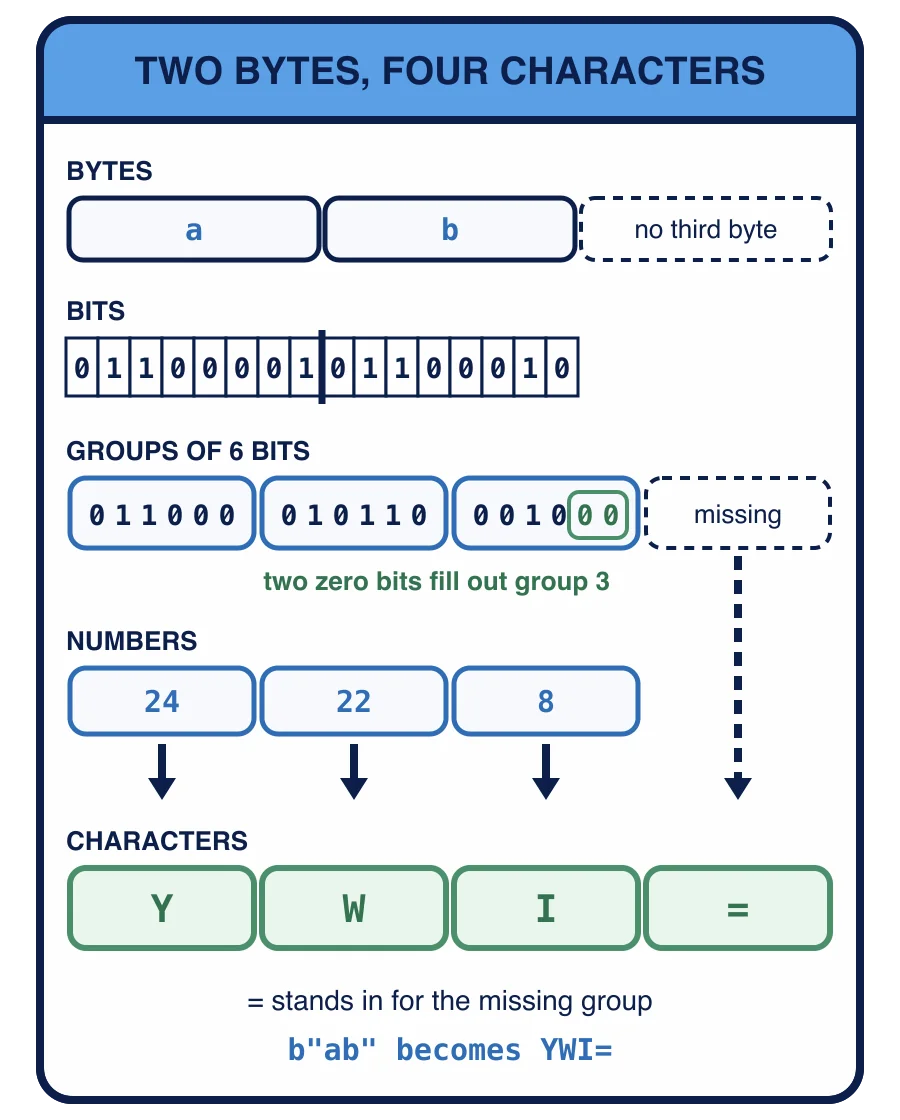
a is the byte 01100001 and b is 01100010. Cut into sixes, those bits are 011000, 010110 and 0010. There are only 16 bits, so the third group is filled out with two zero bits to 001000. The three groups are the numbers 24, 22 and 8, which are the characters Y, W and I, and an = stands in for the group that is missing entirely. b"ab" becomes YWI=. A last group of one byte gets ==. Every three bytes, or the one or two left over at the end, become four characters, so the text is about a third longer than the bytes.
Python’s base64 base64.b64encode(data) takes bytes and returns the base64 text, as bytes made of those 64 characters; base64.b64decode(text) takes that text, as bytes or a str, and returns the original bytes.
What does this print?
import base64

print(base64.b64encode(b"ab"), base64.b64decode("YWI="))
bytes(16) is sixteen zero bytes. What does this print?
import base64

print(len(base64.b64encode(bytes(16))), len(base64.b64encode(b"abc")))
Now a whole round trip with text that is not plain ASCII. Encode the
ë took two bytes, so zoë:x is six bytes, and six bytes become eight characters with no padding. The two bytes of ë are now plain letters, so the text fits any header. The last line prints 16 8: ten bytes are three full groups and one leftover byte, and four bytes are one group and one leftover byte, each leftover padded out to four characters.
Strict decoding
b64decode is forgiving by default. Characters outside the alphabet are skipped without a word:
The first call drops the ! and returns b'ana:b', as if nothing were wrong. With validate=True, any character outside the alphabet, including a space or a line break, raises binascii.Error with the message Only base64 data is allowed. Missing padding raises binascii.Error either way. binascii.Error is a kind of except ValueError catches it, together with the UnicodeDecodeError that .decode("utf-8") raises when the bytes are not UTF-8.
A server checking credentials wants the strict form. A header with stray characters was not written by a client following the rules, and quietly repairing it means accepting something nobody meant to send.
base64.b64decode("YW5h!OmI=") returns b'ana:b'. What does validate=True change?
Encoding is not encryption
Look at what decoding needed: the text, and nothing else. There is no key and no secret. Anyone who sees base64 text can reverse it with one call, exactly as you just did. Base64 changes how bytes are written down; it hides nothing.
That matters for the next lesson. hashlib, is different: it turns bytes into a short fingerprint that cannot be turned back.
A request carries authorization: Basic YW5hOmNvcnJlY3QgaG9yc2U=. Who can read the password?
Why encode the user name and password at all?
Base64 turns up wherever bytes have to travel as text. A later course in this track, WebSockets with Python, is planned and will use it again, in the handshake that turns an HTTP connection into a WebSocket. Next, your server uses it to read a user name and password from a login request.