Chapter 4
Serve HTTP Yourself
Turn the Connection Around
In Chapters 1 to 3 you wrote request lines and read response lines. practice-api did the other half, and you could not change a byte of what it sent back. This chapter turns the connection around. A server reads the request lines a client wrote, decides what to answer, and writes the response lines that client will read. It does those three things once per connection, on a accept, as your notice board server did in Networks with Python. The difference is the text on the socket:
The same lines, from the other end
Follow one request from the client you built, through a server, and back:
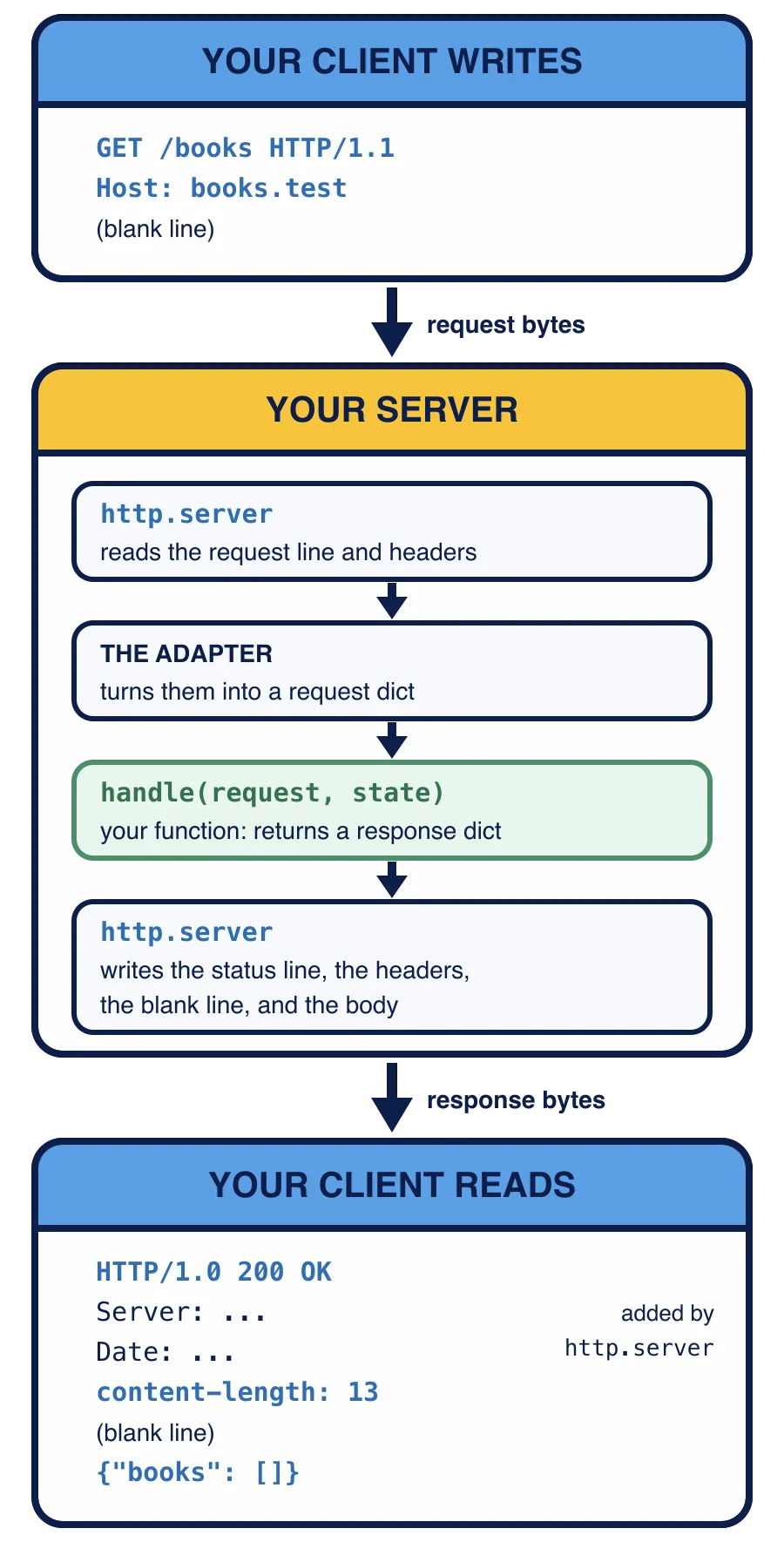
Your Chapter 1 client writes GET /books HTTP/1.1, Host: books.test and a blank line. On the server, Python’s http.server handle(request, state), decides the reply and returns it as a response dict. The adapter hands that dict to http.server, which writes it back as bytes: the status line HTTP/1.0 200 OK, its own Server and Date lines, the header content-length: 13, a blank line, and the body {"books": []}. Your client reads those lines exactly as it did in Chapter 1.
Here is the reading half and the writing half done by hand on captured bytes. It runs in your browser, so no socket is involved; every byte is a literal:
The first half reads: it cuts the head off at the blank line, splits it into lines, and splits the request line into content-length line a server would send before it. In this chapter http.server and the supplied file do both halves for you. The deciding in the middle is yours.
Who does what
Three parts share the work:
http.serverreads the request bytes from the socket and writes the response bytes back. It checks that the request line is well formed and finds the method.http_adapter.py, supplied in your workspace, turns whathttp.serverread into a request dict, calls your function, and hands the response dict back tohttp.serverto write:send_responsewrites the status line,send_headerwrites each, end_headerswrites the blank line, and then the body goes out as it is.Your function,
handle(request, state), decides. It gets a request dict and a state dict holding the books, and it returns a response dict. It never touches a socket.
The two dicts look like this:
request = {
    "method": "GET",
    "target": "/books?limit=2",
    "version": "HTTP/1.1",
    "headers": {"host": ["books.test"], "accept": ["application/json"]},
    "body": b"",
}
response = {
    "status": 200,
    "headers": {"content-type": "application/json", "content-length": "13"},
    "body": b'{"books": []}',
}
print(request["method"], request["target"])
print(response["status"], response["headers"]["content-length"], response["body"])
Header names in both dicts are lowercase. In the request, each name maps to a parse_head built in Chapter 1, so a header sent twice keeps both values. The body is bytes, because bytes are what travel.
What goes on the wire
The adapter writes exactly what your response dict says. http.server adds two header lines of its own right after the status line: Server, naming the library and the Python version, and Date, the time of the reply. Nothing else is added and nothing is removed. If your dict has a body and no content-length, the reply goes out with no length. Under HTTP/1.0 the server closing the connection then marks the end of the body, but a client that needs the length, such as the wire.py you wrote in Chapter 1, refuses that reply. So counting the body’s bytes is your job.
The adapter speaks HTTP/1.0 until Chapter 9. Its status line starts HTTP/1.0, even when the client wrote HTTP/1.1, and the server closes the connection after one reply, so each connection carries exactly one request.
Reading the adapter
Here is the middle of make_handler_class in http_adapter.py:
    class Handler(http.server.BaseHTTPRequestHandler):
        timeout = SOCKET_TIMEOUT

        def respond(self):
            request: dict = request_record(self)
            if read_body is not None:
                error = read_body(request, self.rfile.read)
                if error is not None:
                    write_response(self, error)
                    return
            write_response(self, handle(request, state))

        def do_GET(self):
            self.respond()

        def do_HEAD(self):
            self.respond()

        def do_POST(self):
            self.respond()

        def do_PUT(self):
            self.respond()

        def do_DELETE(self):
            self.respond()
It uses three constructs your earlier courses have not taught. Each takes a sentence or two to read.
class Handler(http.server.BaseHTTPRequestHandler): defines a new kind of Handler, built on http.server’s own BaseHTTPRequestHandler. Because it is built on that one, http.server knows how to use it: for each connection it makes a fresh Handler and calls its methods, such as do_GET for a GET request. A request whose method has no do_ method here, such as PATCH, gets a 501 reply from http.server itself, and your function never runs.
Each def inside the class takes self first. self is the handler for the one request being answered, so self.command is that request’s method (request_record reads it as handler.command) and self.respond() calls another of its methods.
The : dict after request is an annotation, a note to the reader that this name holds a dict. Python does not check it; deleting it would change nothing.
Python Fundamentals II teaches classes, self, and annotations in full. This course never asks you to write any of them: everything you write is a plain function. make_handler_class builds this class around your handle and your state and returns it; in Lesson 3 you hand that class to http.server.HTTPServer. The read_body lines stay unused until Chapter 5.
Which step is yours in this course's server?
Your response dict has a body but no content-length. What reaches the client?
A client sends PATCH /books. What happens?
The adapter writes one line per header. What does this print?
response = {"status": 200, "headers": {"content-type": "application/json", "content-length": "2"}, "body": b"[]"}
lines = []
for name in response["headers"]:
    lines.append(name + ": " + response["headers"][name])
print(len(lines), lines[1])
Nothing in your workspace answers a request yet: handle still raises NotImplementedError. The next lesson writes it.