Chapter 9 · practice
One Connection, Many Requests
Keep the Connection Open
Every exchange in this course so far has opened a connection, carried one request and one reply, and closed. Your server speaks
python pl_http.py keep-alive
Its first part is pl_http’s own client. It makes one http.client.HTTPConnection and sends three requests through it: GET /books, HEAD /books, and GET /books/1, the last one with the header Connection: close. The middle of the report says what happened:
--- pl_http's own http.client connection ---
replies: ['HTTP/1.0 200 OK', 'HTTP/1.0 200 OK', 'HTTP/1.0 200 OK']
connections: 3
One connection HTTP/1.0 reply the server closed, and http.client quietly connected again.
One argument
Open http_adapter.py once more. make_handler_class has had a
def make_handler_class(handle, state, *, read_body=None, protocol_version="HTTP/1.0"):
    ...
    Handler.protocol_version = protocol_version
    return Handler
http.server reads protocol_version from the handler class. With "HTTP/1.0" it answers one request and closes. With "HTTP/1.1" it writes HTTP/1.1 in every status line and, after each reply, reads the next request from the same connection. That is keep-alive, the default in HTTP/1.1: a connection stays open for more requests until one side ends it.
So the change is one keyword make_server: protocol_version="HTTP/1.1". Make it, and run python pl_http.py keep-alive again:
request 1  GET /books  ->  200 OK
request 2  HEAD /books  ->  200 OK
request 3  GET /books/1  ->  200 OK
--- pl_http's own http.client connection ---
replies: ['HTTP/1.1 200 OK', 'HTTP/1.1 200 OK', 'HTTP/1.1 200 OK']
connections: 1
Three requests, one connection. Your server’s log shows three request lines, but your serve handle_request() call for all of them: that call accepted the connection and returned when it ended. The scenario gives serve four connections; the three requests used one, a second part of the run used another, and the result block says pl_http opened 2 empty connection(s) so serve() could stop waiting. Your loop never counted requests. Since Chapter 4 it has counted connections, and until now each connection happened to carry one request.
serve(server, max_connections=2) runs under HTTP/1.1. One client sends five requests on one connection, then closes. How many requests are answered before serve waits for another client?
Who ends it
A kept-open connection ends in one of three ways:
The client sends
Connection: closewith a request. The server answers it and closes. pl_http’s third request did that.A reply carries
connection: close.http.servernotices that header as it writes it and closes after the reply.Nobody sends anything. The adapter’s
SOCKET_TIMEOUTis 2 seconds: after that long with no new request, the server writesRequest timed out: TimeoutError('timed out')to its log and closes.
A client does not see the third kind happen. http.client finds out only when its next request on that connection fails with a ConnectionResetError, or with its subclass RemoteDisconnected when the client had already read the server’s close; which one arrives depends on timing. The first kind has a quirk too: http.server adds no Connection line to the reply it closes after, and http.client decides from the reply’s headers, so it still counts that connection as open until it tries to use it again.
Keep-alive has a cost on a server like yours: while one client holds its connection open, the next one waits, as behind the slow client in Networks with Python. http.server.ThreadingHTTPServer gives each connection its own thread instead. This course keeps one connection at a time, so pl_http and Check my work can count them.
Your lengths were already right
On a kept-open connection the next reply starts right after the last byte of this one, so a client must know where each body ends. Under HTTP/1.0 the close marked it; now content-length has to say it. Your server has sent it on every reply with a body since Chapter 4: json_response counts the encoded bytes, a redirect says 0, and a 204 or a 304 has no body at all.
A refused body is still there
The second part of the keep-alive run is one raw connection. pl_http sends POST /books with Transfer-Encoding: chunked and no content-length, and its body happens to be a complete request of its own:
client -> server  b'POST /books HTTP/1.1\r\nHost: books.test\r\nTransfer-Encoding: chunked\r\n\r\nGET /books/2 HTTP/1.1\r\nHost: books.test\r\n\r\n'  (113 bytes)
server -> client  b'HTTP/1.1 411 Length Required\r\nServer: ...
(N bytes followed the reply: b'HTTP/1.1 200 OK\r\nServer: ...
...
127.0.0.1 - - [the date and time] "GET /books/2 HTTP/1.1" 200 -
Lines that end in ... are cut short here, N depends on the Server line, and the last line comes from your server’s log. Your read_body answered 411, correctly, and read none of the body. But the connection stayed open, so the server read on from where it stopped and took the body’s bytes for the next request. The log shows a GET /books/2 that the client never sent as a request, and pl_http shows its 200 after the 411. Here is that connection, before and after the fix:
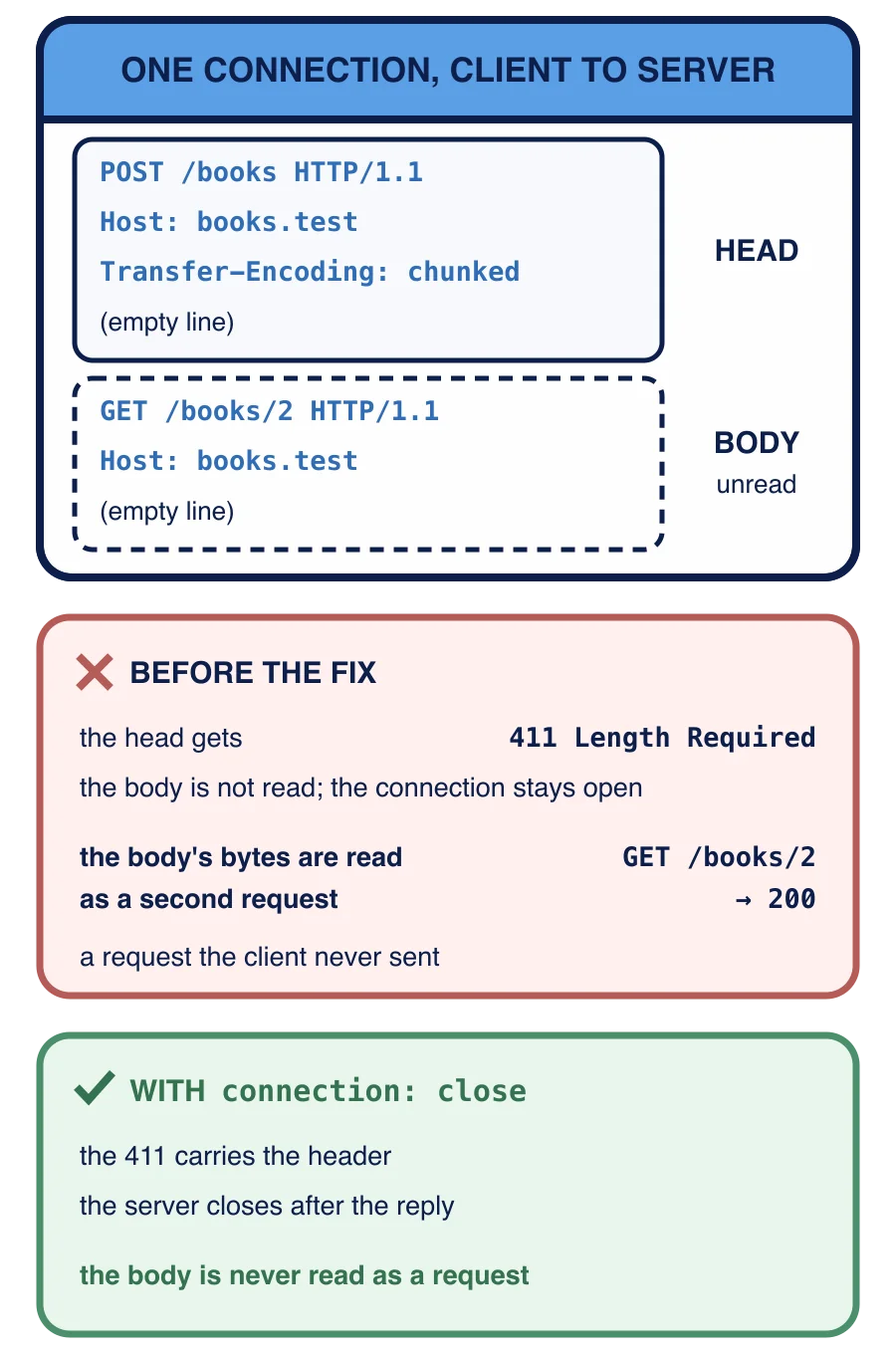
If the body had been ordinary chunks such as 5\r\nhello, the server would have read the line 5 as a request line, logged Bad request syntax ('5'), and written an HTML error page with no status line at all.
The server answers 411 to a POST and keeps the connection open without reading the 40 body bytes. What does it read next?
The rule is the protocol’s. RFC 9112, section 9.3, says a server must “read the entire request message body or close the connection after sending its response”. Your read_body refuses before reading, by design, so it has to close: every reply it returns (the 411, both 400s, and the 413) carries the header connection: close. Replies built after the body was read in full, such as 415 or 422, leave the connection usable and need nothing.
About that 411: an HTTP/1.1 server is required to decode chunked request bodies (RFC 9112, section 7.1). Yours answers 411 instead, which RFC 9112, section 6.3, notes real services also do, and a client can answer it by sending the body again with a length. You will decode chunks yourself in Lesson 3, on the client side.
Which reply makes http.server close the connection after writing it?
Your task
In
make_server, passprotocol_version="HTTP/1.1"tohttp_adapter.make_handler_class.Make every reply
read_bodyrefuses with carryconnection: close. A small helper that callsjson_errorand adds the header keeps the four refusals short.
Then run python pl_http.py keep-alive once more. The 411, shown here without its Server and Date values, now ends the run:
server -> client b'HTTP/1.1 411 Length Required\r\nServer: ...\r\nDate: ...\r\ncontent-type: application/json\r\ncontent-length: 56\r\nconnection: close\r\n\r\n...
Nothing follows it, and the log has no GET /books/2. Press Check my work. Next, Lesson 2 asks the question this lesson raised from the client’s side: how does a reader know where a body ends?
Task
Switch your server to
In reading_server.py:
In
make_server, passprotocol_version="HTTP/1.1"tohttp_adapter.make_handler_class. Keephttp.server.HTTPServer, the address("127.0.0.1", 0), andserver.timeout.Every reply
read_bodyrefuses with (the 411 for a missing length, the 400 for a malformed length, the 413, and the 400 for a body that ended early) carries the headerconnection: close. Keep their statuses and the order of the checks from Chapter 5.
Nothing else changes: handle’s replies, including its errors, leave the connection open.
In the python pl_http.py keep-alive sends three requests on one connection, then a chunked POST whose unread body is a whole GET request, and shows what came back.
Then press Check my work. It builds your server with make_server without opening a read_body with request connection: close. Then it passes several requests at once through that handler class, as one connection, with books, users, and tokens you have not seen, and splits the replies by their content-length: three reads must get three replies, a write followed by a read two, and a refused body, whether a hidden GET or chunks, exactly one reply, the refusal. It also sends eleven requests from Chapters 4 to 8 on one connection to see that every earlier rule still holds. Nothing from your terminal is graded.