HTTP Is Text on a Socket · practice
Read Exactly the Body
read_head stops at the empty line, and parse_head tells you what the head says. What follows the empty line is the body, and some of it may already sit in reader["buffer"], because it arrived in the same piece as the end of the head. The question for this lesson is where the body ends. A reader that stops too early hands back half a document; a reader that waits for more than the server sends waits until its timeout.
There are two candidate answers: read until the server closes the connection, or read a number of bytes the server announced. The first one looks simpler, so try it first. Keep one fact in mind while you do: an Connection: close. Chapter 9 is about exactly that.
Reading until the server closes
Reading until close is the recv returns b"":
data = b""
chunk = sock.recv(4096)
while chunk != b"":
    data = data + chunk
    chunk = sock.recv(4096)
Try it against practice-api. The command below is python -, which reads the program from the lines that follow, up to the line that says EOF, so paste the whole block into the Shell tab, first and last line included. It sends the hook request and runs the loop on a
python - <<'EOF'
import socket
import wire

sock = socket.create_connection(wire.ADDRESS, timeout=2.0)
sock.sendall(wire.make_request("GET", wire.HOOK_TARGET))
data = b""
chunk = sock.recv(4096)
while chunk != b"":
    data = data + chunk
    chunk = sock.recv(4096)
print(data)
EOF
You should see it wait about two seconds and stop with TimeoutError: practice-api keeps the connection open after its reply, so no b"" ever comes. If the whole body comes back at once instead, the service closed the connection right after replying; reading until close happened to work this time.
Even when it works, reading until close cannot tell whether the body is complete. A body that arrived whole and a body cut short by a dropped connection end the same way, with b"", and the loop returns whatever it has. And a server that keeps the connection open, as HTTP/1.1 expects, never sends that b"" at all. You can see all three endings without a network, with the scripted sockets from fakes.py. The first script delivers a whole reply and closes, the second closes two bytes early, and the third delivers the whole reply and then stays silent, as an open connection does:
python - <<'EOF'
from fakes import scripted_socket

def read_until_close(sock):
    data = b""
    chunk = sock.recv(4096)
    while chunk != b"":
        data = data + chunk
        chunk = sock.recv(4096)
    return data

reply = b"HTTP/1.1 200 OK\r\nContent-Length: 5\r\n\r\nhello"
print(read_until_close(scripted_socket([reply])))
print(read_until_close(scripted_socket([reply[:-2]])))
print(read_until_close(scripted_socket([reply, None])))
EOF
The first two lines it prints are:
b'HTTP/1.1 200 OK\r\nContent-Length: 5\r\n\r\nhello'
b'HTTP/1.1 200 OK\r\nContent-Length: 5\r\n\r\nhel'
and the third call ends in a TimeoutError: scripted silence. The second reply is broken, and nothing in it says so. The third was complete, and the reader never found out.
The length comes first
The reply above already holds the answer: Content-Length: 5. The server announces the body’s size in bytes in a header, before the body starts. That is the length prefix from Networks with Python’s notice board, written as text in a read_exact raises ConnectionError if the connection closes first.
read_exact(reader, n), already in wire.py, does the counting. It takes bytes from reader["buffer"] first and calls recv only for what is still missing, so the body bytes that arrived with the head are not lost. Follow it for a body of 182 bytes, of which the first 100 arrived with the head:
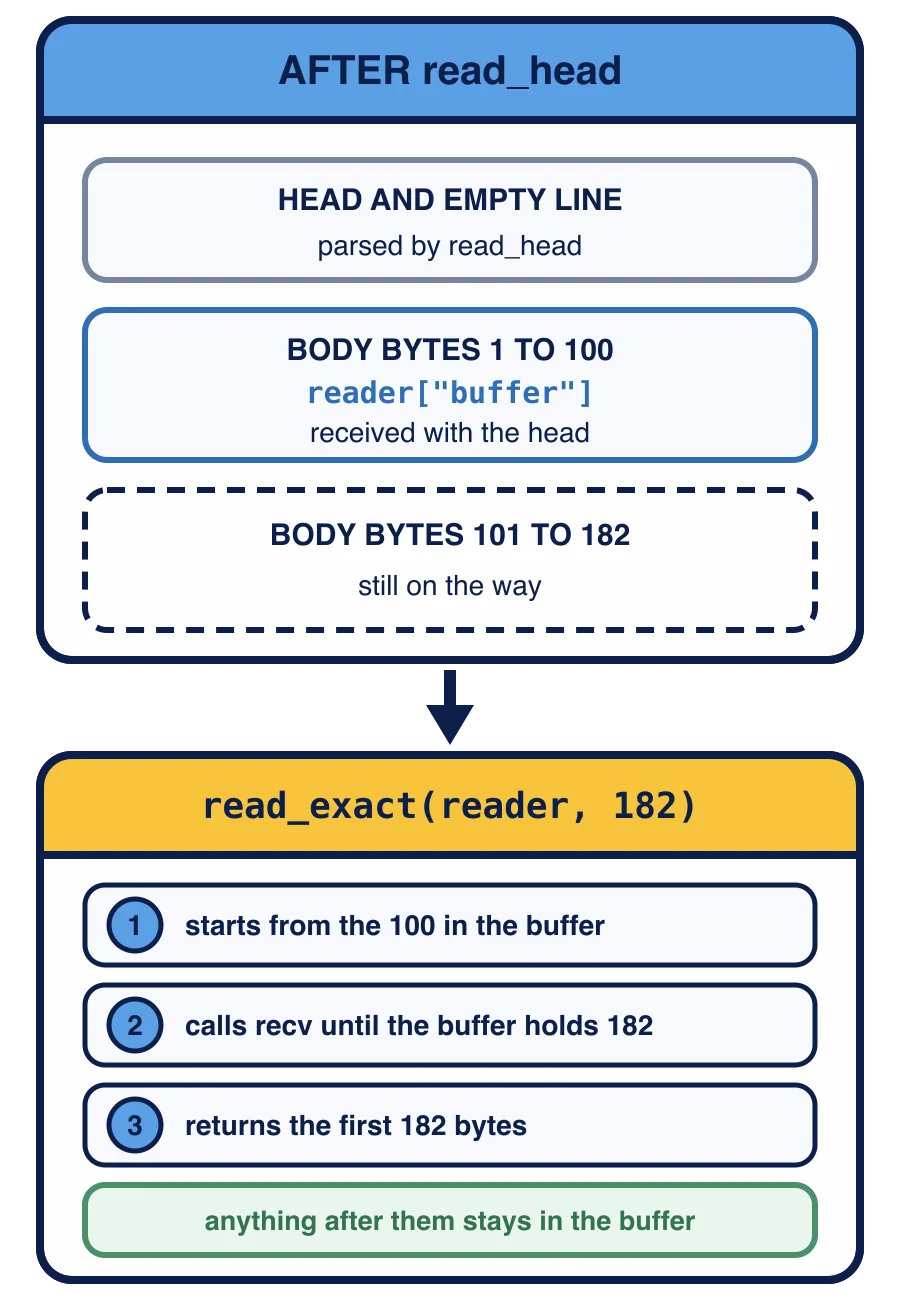
After read_head, reader["buffer"] holds those first 100 bytes, and the other 82 are still on the way. read_exact(reader, 182) starts from those 100 bytes, calls recv until the buffer holds 182, and returns the first 182 bytes; anything after them stays in the buffer.
Rules for this client
read_body(reader, method, headers) reads the length from the parsed headers, which parse_head stored under the lowercase name content-length as a
Exactly one
. A list with two values is ambiguous: the server said two different things, or the same thing twice. The protocol requires a client to reject different values; this client refuses any repeat. Digits only. The value must be ASCII digits, checked with
isascii()andisdigit(), as thewas. 12aor-5is not a number of bytes.Not too big. At most
MAX_BODY, one million bytes. Compare the number with the limit before reading, as the notice board compared a frame’s announced length with its limit: a reader that reads first and checks later has already received whatever the server chose to send.
A length that breaks one of these rules is malformed, and read_body raises
Two kinds of response are valid HTTP that this client cannot read yet. A response with no Content-Length may end its body by closing the connection, and a response with a Transfer-Encoding header, such as Transfer-Encoding: chunked, sends its body in pieces, each with its own length. Neither is wrong, but this client cannot measure either body yet, so read_body refuses both with ValueError and a message that says so. Chapter 9 adds both. Check for transfer-encoding first, then for a missing content-length.
Bytes, not characters
Content-Length counts bytes, and read_exact counts bytes, so the two agree. Decode the body only after all of it has arrived. As you saw in Networks with Python, one character can take several bytes in
json_body(response) does the decoding, once the body is complete: json.loads(response["body"].decode("utf-8")).
After read_head, the buffer holds 10 bytes of the body, and Content-Length is 25. How many more bytes must come from the socket?
Your task
In wire.py:
Write
read_body(reader, method, headers). RaiseValueErrorifheadersholds"transfer-encoding", if it holds no"content-length", if"content-length"holds more than one value, if that value is not ASCII digits, or if the number is greater thanMAX_BODY. Otherwise returnread_exact(reader, length). Themethodis for the next lesson; this lesson does not use it. Write
json_body(response): decoderesponse["body"]with"utf-8"and return whatjson.loadsgives.Finish
fetch. Inside thewithblock, after making the reader, parse the head withparse_head(read_head(reader)), storeread_body(reader, method, response["headers"])under the key"body"of that, and return the dictionary.
Then send two requests from the Shell tab:
python wire.py
python -c "import wire; print(wire.json_body(wire.fetch('GET', '/v1/items/1')))"
The first prints the whole response as a dictionary, its body as bytes; the second prints the item itself, {'category': 'color', 'id': 1, 'name': 'blue', 'value': 10}. Both return as soon as the body is complete. Neither waits for the server to close the connection.
Then press Check my work. The next lesson sends the one request whose reply announces a length and still has no body.
Task
In wire.py, write read_body and json_body, and finish fetch.
read_body(reader, method, headers) takes a reader whose head has been read and the headers parse_head returned. It raises
if
headersholds"transfer-encoding", or holds no"content-length": this client cannot measure such a body yet;if
"content-length"holds more than one, or a value that is not ASCII digits; if the length is greater than
MAX_BODY, before receiving any body byte.
Otherwise it returns read_exact(reader, length): exactly the announced number of bytes, starting with the ones already in reader["buffer"], and leaving any byte after the body in the buffer. The method
json_body(response) returns json.loads(response["body"].decode("utf-8")).
fetch keeps its with block. Inside it, after making the reader, it sets response = parse_head(read_head(reader)), then response["body"] = read_body(reader, method, response["headers"]), and returns response.
In the python wire.py and python -c "import wire; print(wire.json_body(wire.fetch('GET', '/v1/items/1')))".
Then press Check my work. The check calls read_body after the head of replies you have not seen, delivered in one piece, one byte at a time, cut in two at every position (including inside the body and inside a character that takes two bytes), and in pieces of 7 bytes, each time both with a server that closes afterwards and with one that keeps the connection open. One reply is followed by the start of another. It also gives read_body malformed and repeated lengths, a response with no Content-Length, responses with Transfer-Encoding, a length far over the limit, and a server that closes partway through the body. It calls fetch with a stand-in connect on a 200 and a 404 reply, and json_body on a body with characters outside ASCII. It does not read your terminal or contact practice-api.