Your First Repository · practice
Configure Your Identity Before the First Commit
You have a saved README.md in /workspace, and you are about to put it under version control. A few words carry this lesson, and they are quicker to meet now than mid-command.
A
Git also attaches an author identity, a name and an email address, to every commit, so that a history can say who did what. That is configuration for your own work, not an account on a hosting site, and it is where this lesson starts.
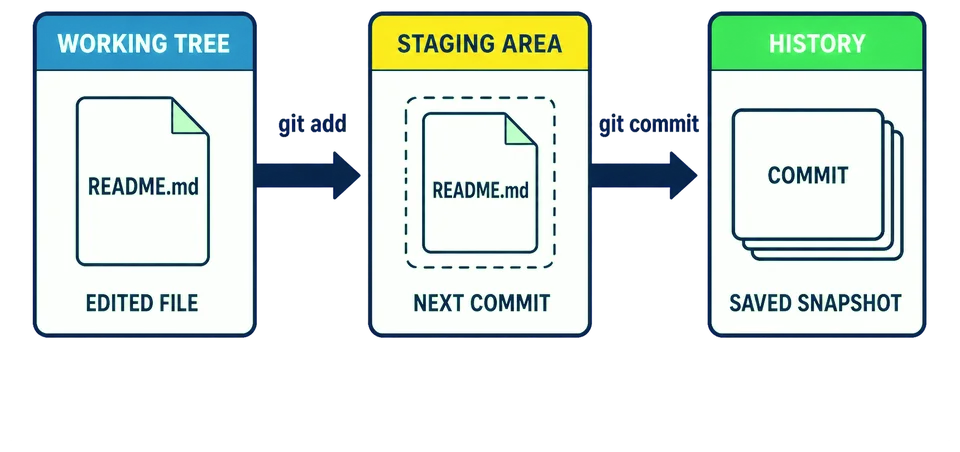
Why identity comes first
Git cannot invent the author of a commit. If neither a name nor an email address is configured, it refuses to commit and explains that the author identity is unknown. You will answer that question before making the repository’s first commit, so the first history entry has the author you intended.
Configure the identity
git config reads and writes Git’s settings. Each setting has a name, and the two you need are user.name and user.email. Give one a value and that value is stored. The --global part decides where: in your user-level Git configuration rather than inside one repository. Despite the word, it sends nothing anywhere.
Replace both example values with the name and address you want attached to your work. A Your Name together as one value for Git. Keep the quotes while replacing the text inside them. The .invalid address is a teaching placeholder, not an identity to copy into a real project.
git config --global user.name "Your Name"
git config --global user.email "you@example.invalid"
The setting applies to repositories you use as this user, rather than being stored in the repository you are about to create. In a shared or work account, use the identity that project expects instead of copying these teaching values.
Name a setting without giving it a value and Git prints what it currently holds:
git config --global user.name
git config --global user.email
Make the repository
Stay in /workspace; do not create another project directory. pwd prints the folder the git init then makes that folder a repository, creating the hidden record described above. Your files are untouched. git status describes where things stand, and it is the command you will reach for most often.
pwd
git init
git status
pwd should answer /workspace. Git calls README.md untracked: it is in the working tree, but nothing about it is staged.
Stage the file, and look again
git add README.md puts that file’s current contents into the staging area, which answers the question git status just raised. Nothing has entered the repository’s history yet, and nothing is sent anywhere.
git add README.md
git status
The same command now calls README.md staged. The file has not moved and has not changed; it is still in your working tree, ready to edit again. What is new is the copy Git set aside for the next commit. Asking twice is how that becomes something you can see rather than something you take on trust.
Commit it, and read the history
git commit makes the commit from whatever is staged. On its own it opens a text editor to ask for the message; -m supplies the message directly instead, so the quoted text is the message and no editor opens. git log then reads the history back, newest first.
git commit -m "Start the garden notes"
git log
One entry, holding the author, the date, your message, and the identifier Git gave that snapshot. The Author: line is the identity you configured at the start.
That commit is local. No account or network connection was involved. Later chapters exchange history with other repositories, but this first one needs only the project in front of you.
You ran git status, then git add README.md, then git status again, and the two answers were different. What changed in between?
One commit is a history of one. In the next lesson you will change README.md a second time and watch Git describe the same file differently, now that it has something to compare against.