Undoing Things · practice
I Committed Something Wrong and Others May Have It
You committed something, and it was wrong. Not a typo in the message this time: the change itself should not have been made. Perhaps you have already shared that
There are two ways to undo a commit, and choosing between them is the actual skill. The commands are the easy part.
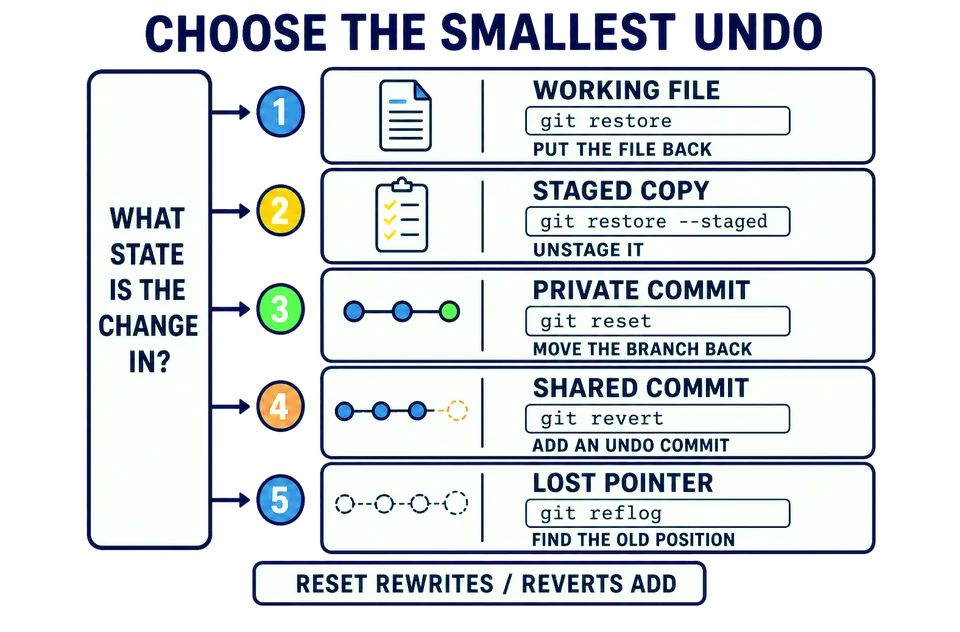
First, make the mistake
You need a wrong commit before you can undo one. The preceding lessons have already restored route.txt and left scratch.tmp safely untracked. Change the start of the route to somewhere it does not start, and commit it as though you believed it:
nano -w route.txt
Change the first line so it reads Start: Whitehaven. Save with Ctrl-O, Enter, then leave nano with Ctrl-X, exactly as in chapter 2. Then commit it:
git add route.txt
git commit -m "Correct the start of the route"
git log
The walk does not start at Whitehaven. That commit needs to go.
The question that decides the method
Before reaching for a command, answer one question:
Does anyone else have this commit?
If nobody does, you may rewrite your history freely, which is what git reset does and what you already saw a smaller version of when you amended.
If somebody does, rewriting is the wrong tool. Their copy of the history still contains the commit you deleted from yours, and the two no longer agree. Sorting that out is a genuinely unpleasant afternoon, and it is avoidable.
When someone else may have the commit, you do not remove it. You add a new commit that undoes what it did, and both stay in the history. That is git revert.
Undo it by adding, not removing
git revert --no-edit HEAD
git log
git status
git revert takes a commit and makes a new commit whose changes are the exact opposite of it. HEAD names the newest commit, the one you just made. --no-edit accepts the default message Git offers, which is the word Revert and the original message quoted, rather than opening an editor to write your own.
git log now shows both commits: your wrong one, and the revert that undid it. The file is back to Start: Ravenglass, and git status reports no staged or modified tracked files. It still lists the private scratch.tmp as untracked, safely outside both commits.
That double entry is not clutter. It is an honest record: this was done, then it was undone, and here is when. Anyone who already had the first commit simply receives the second one and ends up in the same state as you.
What this destroys, and what it cannot
git revert adds a new history commit instead of rewriting an existing one. Your reachable history gets longer, the original commit remains, and anyone else’s copy stays valid. That is precisely why it is the right choice for shared work.
The trade is that the mistake stays visible in the shared history beside its undo. Some people dislike that. It is the price of not breaking someone else’s
You shared a commit yesterday and a colleague already has it. Today you realize it was wrong. What should you reach for?
Next: the one where the work looks like it is gone.