Chapter 7
Remotes, Without a Server
What a Remote Really Is
You can use Git with another
Start with the repository you already have
The prepared garden directory is an ordinary working repository. It has committed history and a working tree you can edit. Start with commands you already know:
pwd
git status
git log
You should be in /workspace/garden. The working tree is clean, and main ends with the plants.txt.
A remote is another repository
A remote is a saved name and location for another Git repository. Git can exchange commits,
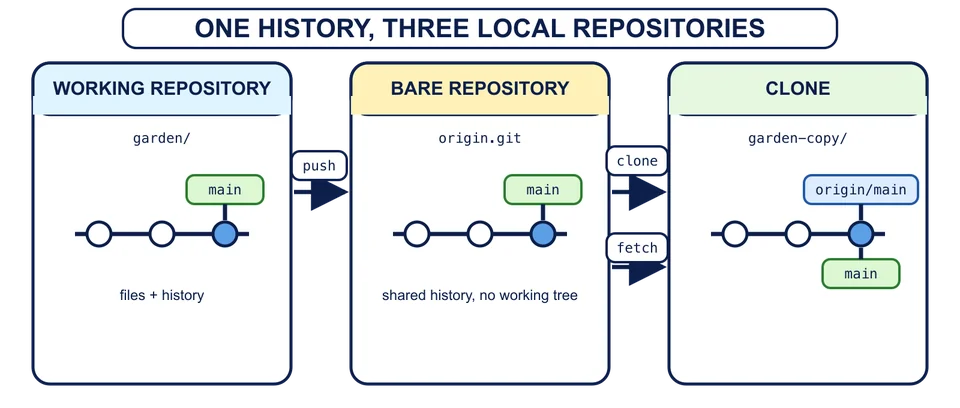
This chapter will build the following local arrangement:
/workspace/
├── garden/         ordinary working repository where you make a later commit
├── origin.git/     bare repository that stores shared history
└── garden-copy/    ordinary clone used to observe and fetch that history
garden and garden-copy will have working trees. origin.git will be a bare repository: a Git repository that stores history and refs without checking out an editable set of project files. That makes it a useful exchange point. No person edits files inside its working tree because it has no working tree.
The command git init --bare creates that kind of repository. The command git clone creates a new working repository from an existing repository. You will use both in the next lessons, after each command’s pieces are explained.
Three names that must stay separate
As the chapter builds the arrangement, keep these three names separate:
mainis a local branch in the repository where you are standing.originwill be the conventional saved name for another repository.origin/mainwill be a remote-tracking ref: a local record of whereorigin’smainwas at the last exchange.
The next lessons create those names and show them moving. For now, the boundary is enough: main is where you work, origin names another repository, and origin/main reports remembered information rather than becoming your editable branch.
In this chapter, what makes origin.git a remote of garden?
The useful mental model is repository to repository. A host can provide storage and collaboration around that model, but it does not change what a Git remote is.