Collaborating Locally
Pull Is Fetch Plus Integration
A local git pull, provided you keep its two parts visible in your mental model.
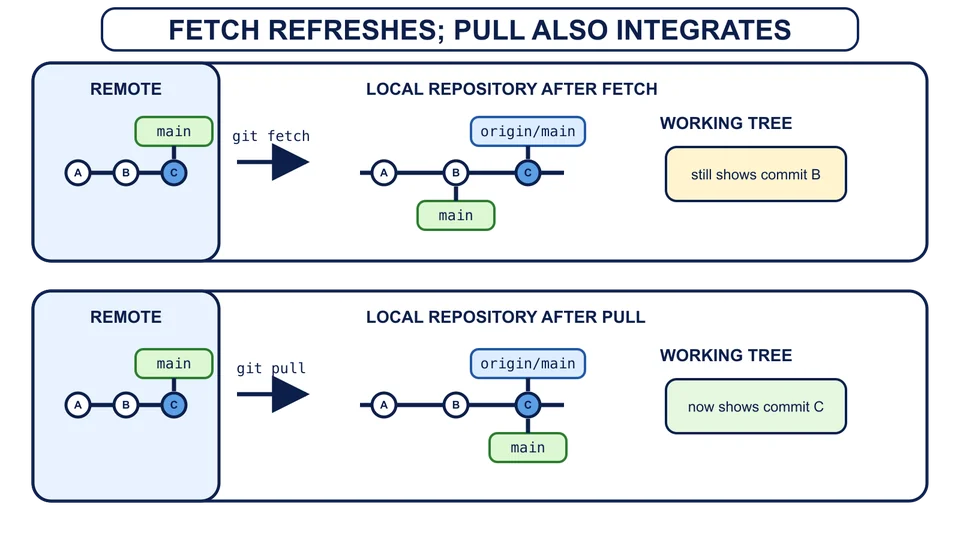
The diagram shows a fast-forward pull. Other pulls may create a merge
Pull performs two jobs
The command git pull first fetches from the upstream remote, updating remote-tracking information such as origin/main. It then integrates the fetched upstream branch into the current local branch. That second step is not a universal synonym for merge: Git can be configured or explicitly told to merge, rebase, or accept only a fast-forward. A pull may therefore move local main and the working tree, unlike a fetch.
Your shop
git pull
git status
Git reports that the branch is already up to date, and the working tree stays clean. If the histories had diverged and no integration preference had been chosen, modern Git could stop and ask you to choose rather than guess. That is why git fetch followed by inspection and an explicit git merge origin/main was the right learning route for the earlier divergence.
Hosted tools wrap the same exchange
The exercises used a local path for origin. On a hosting service, a remote usually saves an HTTPS or SSH URL instead. The URL changes how Git reaches the other repository; it does not change what commits, branches, origin, or origin/main mean. The service may require authentication, proof that your account may read or update that repository. Account, token, and key setup belongs to the service rather than to Git’s history model.
A fork is another repository created by a hosting service under a different account or namespace. It is not a branch, and it is not the working copy made by git clone. You can clone a fork and exchange commits with it using the same fetch, merge, pull, and push mechanics you practiced locally.
A pull request, called a merge request by some services, is a hosted proposal to review commits and integrate one branch into another. It is not a commit and it is not the git pull command. The website adds discussion and review around the Git histories; the histories still meet through the integration mechanics you already know.
What does git pull do when main tracks origin/main?
The safe pattern is now explicit beneath both local and hosted tools: fetch to refresh what your repository knows, compare the histories, integrate without discarding either side, and push only when the shared tip will remain an ancestor of the result.