What Is the Command Line?
Terminal, Shell, Prompt, and Command
The dark window with the blinking cursor is not one thing. It is at least four things stacked on top of each other, and almost every confusing error message you will ever get comes from not knowing which one is talking to you.
Here is a complete interaction:
PS C:\Users\Sam\Documents> python report.py
Report ready
PS C:\Users\Sam\Documents>
That is three lines on the screen, and only one of them was typed. The first and last PS C:\Users\Sam\Documents> are prompts, printed by the python report.py is what was typed. Report ready came out of the program.
Follow the text through the layers
A
draws the window, catches your keystrokes, and displays text. Windows Terminal, Terminal on , GNOME Terminal on . A shell runs inside it. It reads what you typed, works out its structure, and decides what to run. PowerShell is this course’s Windows shell; Bash and zsh are the usual ones on Linux and macOS.
A prompt is text the shell prints to say it is ready. Often the working directory, sometimes a username, usually ending in
>or$.A command is what you submit. It either asks the shell to do something built in, or asks it to start another program.
A program does the work and produces output or an error, which the terminal displays.
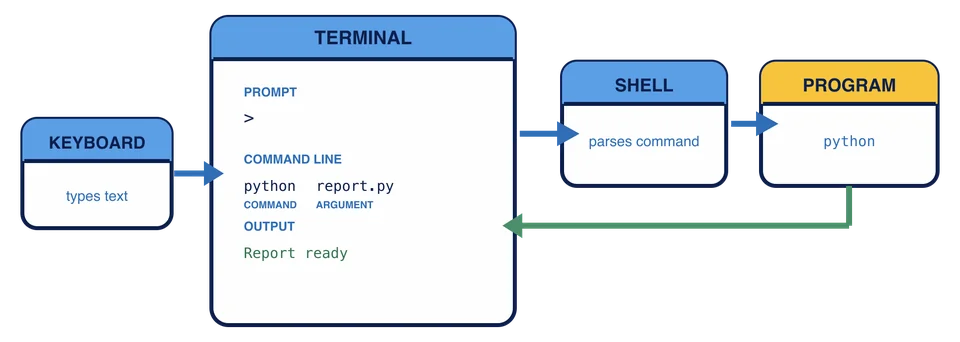
The top two layers are swappable, which is the fastest way to prove they are separate. Windows Terminal can host PowerShell, Command Prompt, or a Linux shell in three tabs at once. A macOS terminal can host zsh or anything else you install. Change the terminal’s font or color scheme and not one command behaves differently, because you changed the window, not the language.
Some products bundle the layers so tightly they look like one thing. The distinction still holds: the application owns the window, the shell owns the prompt and decides what your text means.
You change the font size in Windows Terminal, but PowerShell commands behave exactly as before. Why?
Know what not to type
Documentation shows prompts to give you context:
$ python report.py
The $ means “type the rest of this in a $. Same with PS C:\Users\Sam> in a PowerShell example. Type only what comes after the prompt.
When a command finishes, the next prompt appears. If no prompt comes back, the program is still running, waiting for input, or stuck. Ctrl+C asks many programs to stop, and it is worth knowing now, before you need it. It does not undo anything already done.
Read the three kinds of text
In the transcript above, prompt text says the shell is ready, python report.py is the submitted command, and Report ready is program output. Keeping those roles separate is enough for now. Later, when an error appears in one of those places, you will know which layer had control when it happened.
A command runs and the next line says Report ready. Which layer produced those words?
You can identify everything around a command. Next, the command itself: which word is the name, which parts are arguments, and where a typo is going to hurt.