What Is a Computer?
The Motherboard Connects the Parts
Sharing a case does not make components a system. The CPU, RAM, storage, and every device attached to them need actual electrical connections carrying data, addresses, control signals, and power. The motherboard is the main circuit board that provides them.
Follow a file through the connections
Open a saved image and apply a filter. Here is the route:
The drive sends the image and program data through its controller and the board’s connections.
The active data is placed in RAM.
The CPU fetches instructions and data from RAM, and writes results back.
A graphics processor or display system reads the result and pushes pixels toward the screen.
Simplified, but far more useful than memorizing socket names. Every step is one component handing something to another, and the board is what makes each handoff physically possible.
What is actually on the board
On a typical desktop PC, the CPU sits in a socket with RAM modules in slots beside it. Storage and external devices connect through built-in connectors or controllers. Expansion slots take extra
The numbered picture is one example, not a universal layout. Use it to find five broad regions rather than memorizing every tiny component.
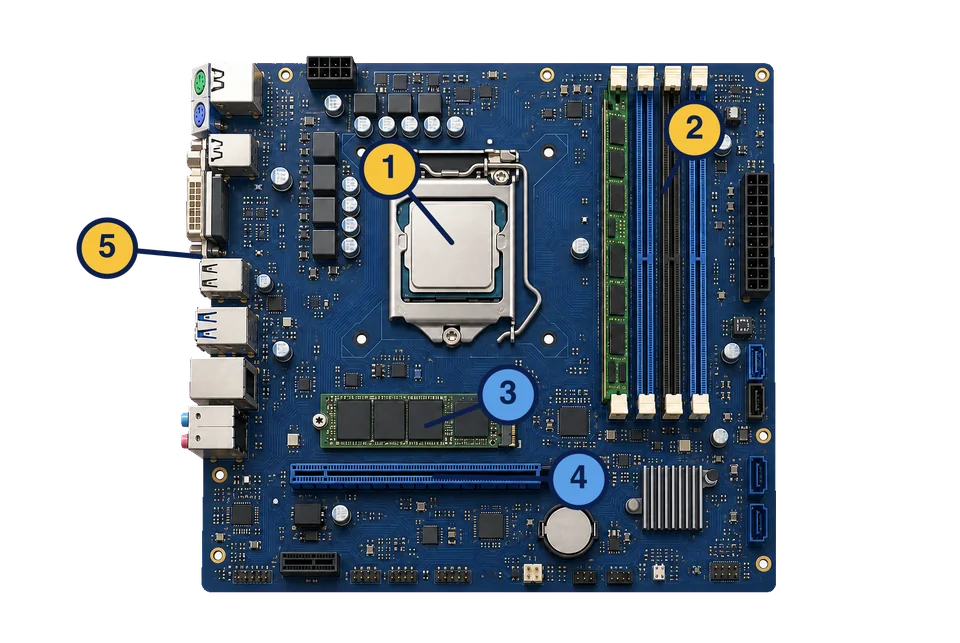
CPU and socket: the silver CPU package sits inside its socket.
RAM slots: long slots hold the working-memory modules.
Storage connection: this board has a small M.2 SSD installed.
Expansion slot: extra hardware, such as a graphics card, can connect here.
External ports: plugs at the edge connect devices outside the case.
Boards vary enormously, so a photo of one machine is not a map of yours. You do not need to know connector names, CPU types, and other such details for this course. The idea that lasts is the relationship: a component has to have a compatible connection and a communication path with other components.
Laptops and phones pack far more onto one board, or into a small set of chip packages. The three boards below are not shown at the same scale. Compare the number of replaceable sockets and slots with how densely each board is integrated.
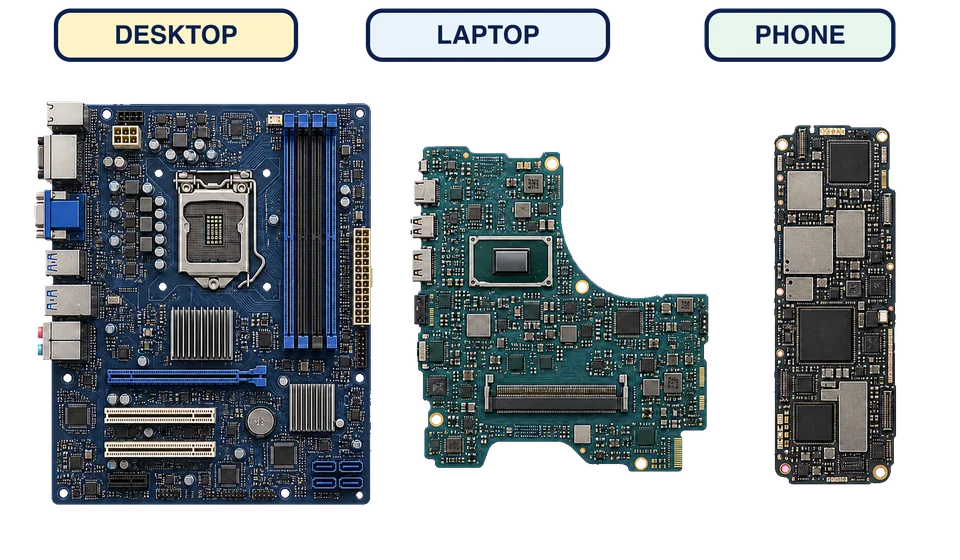
The shapes and packaging change, but the job does not: each board still provides the paths that let its components communicate.
The motherboard connects; it does not command
Here is the single most important thing you should remember from this lesson: the motherboard carries signals between parts. It does not decide anything.
The CPU executes instructions. The drive keeps files. RAM holds what is in use. The motherboard provides the connections and supporting circuitry that let those parts reach each other. Keep the useful distinction: the board connects; it does not carry out the application’s instructions.
An image editor applies a filter to a photo. Which description is right?
Getting that straight gives you a useful troubleshooting split. A damaged connector or cable is a hardware problem. An application that cannot use your camera may instead be blocked somewhere along the software or device-access path. Check the physical connection and the request path before deciding which one failed.
One question remains before either kind of troubleshooting is possible. Press the power button on a machine that is completely off, and every program on it is data sitting on a drive. None of it is running, so none of it can load itself.
So what does?