How Data Becomes Work
From Source Code to a Running Program
Here is a line of Python:
print("Hello")
You can more or less read that, even having never programmed. The CPU cannot. It does not read English, it has no idea what quotation marks are for, and it has no concept of printing. It carries out machine instructions, and that line is not one.
Text like this is
Source code needs an implementation
A programming language is a set of rules for writing source code. An implementation supplies the working software that turns code written by people into operations the machine can carry out. Implementations use several strategies, often in combination.
One common route translates code ahead of time. A compiler reads source code and produces a native executable containing machine instructions for a particular kind of system. The translating may happen on the developer’s machine before you download the application. The executable can still rely on the right
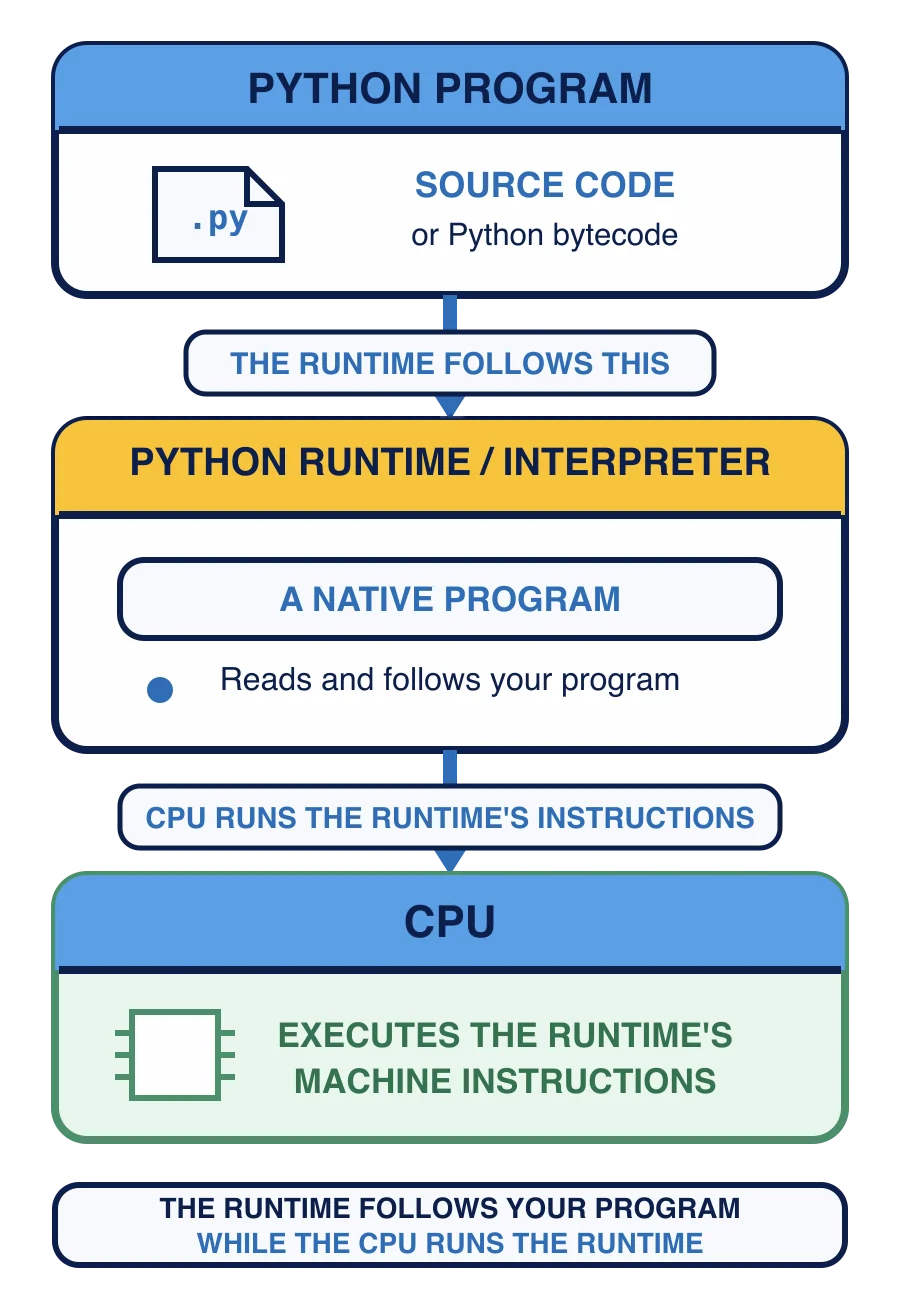
Another route keeps a runtime involved when the program runs. A runtime may translate source into an intermediate form, interpret that form, compile parts into machine instructions while the program is running, or combine those steps. An interpreter is the part that reads source or intermediate instructions and carries out what they describe. These strategies belong to a particular implementation, not permanently to the language itself.
Python uses a runtime-managed route. A Python implementation translates the source into an internal form and executes it. You do not need those internal stages yet. The practical consequence is the part that matters for this course: the Python implementation must be present when you run a Python source file.
Why a Python file needs Python
A .py file is source text rather than a native executable. On its own it cannot carry out its instructions.
To run it you need Python itself installed, because Python is the thing that reads your file and does what it says. So running your own code always involves two things rather than one: the Python program, and the file you want it to read.
Hold onto that. In Chapter 7 you will start Python that way yourself, and one of the ways it can go wrong is that the computer cannot find Python at all. Knowing that Python is a program somebody had to install makes that failure obvious rather than mysterious.
You send a friend a small .py file that uses only ordinary Python features. They have no Python installation. Why is receiving the source file alone not enough to run it?
Double-clicking a file without seeing output does not by itself prove Python is missing. The file may open in an editor, or a
What to ask when something will not run
All of these strategies end with the CPU executing machine instructions. What differs is which implementation performed the translation, when it happened, and what must be present on your machine.
That gives you a short list of questions, each naming something specific that could be missing:
Is this program the right kind for this computer?
If it needs a runtime, such as Python, is that runtime installed?
Are the other pieces it depends on there too?
Did the operating system allow the file to run?
You will use a version of that list in Chapter 7, with a real error message in front of you.
One question is still open. A compiled program is machine instructions, ready to run. But ready for what? Not every CPU understands the same ones.