The Command Line · practice
Values That Live in the Session
Some values do not belong inside a command: which mode a tool should run in, which language it should use, or where it should write a temporary result.
The
A shell value is not automatically an environment value
PowerShell has ordinary variables for its own work and an $env: prefix for values that child processes should inherit:
$localLabel = 'only this PowerShell'
Write-Output $localLabel
$env:COURSE_LABEL = 'visible to a child'
Write-Output $env:COURSE_LABEL
Both values are visible in the current PowerShell session. Only COURSE_LABEL was placed in the environment that a started program receives.
An assignment first creates a
LOCAL_LABEL="only this shell"
printenv LOCAL_LABEL
The shell knows the value, but the separate printenv program receives no environment value with that name. export places a value in the environment handed to later child processes:
export COURSE_LABEL="visible to a child"
printenv COURSE_LABEL
An assignment first creates a shell variable, which belongs to this shell:
LOCAL_LABEL="only this shell"
printenv LOCAL_LABEL
The shell knows the value, but the separate printenv program receives no environment value with that name. export places a value in the environment handed to later child processes:
export COURSE_LABEL="visible to a child"
printenv COURSE_LABEL
The copy travels one way and only downward. A child receives the parent’s environment when it starts. Nothing the child changes can reach back into the parent, and a terminal window that was already open does not get an update from another window.
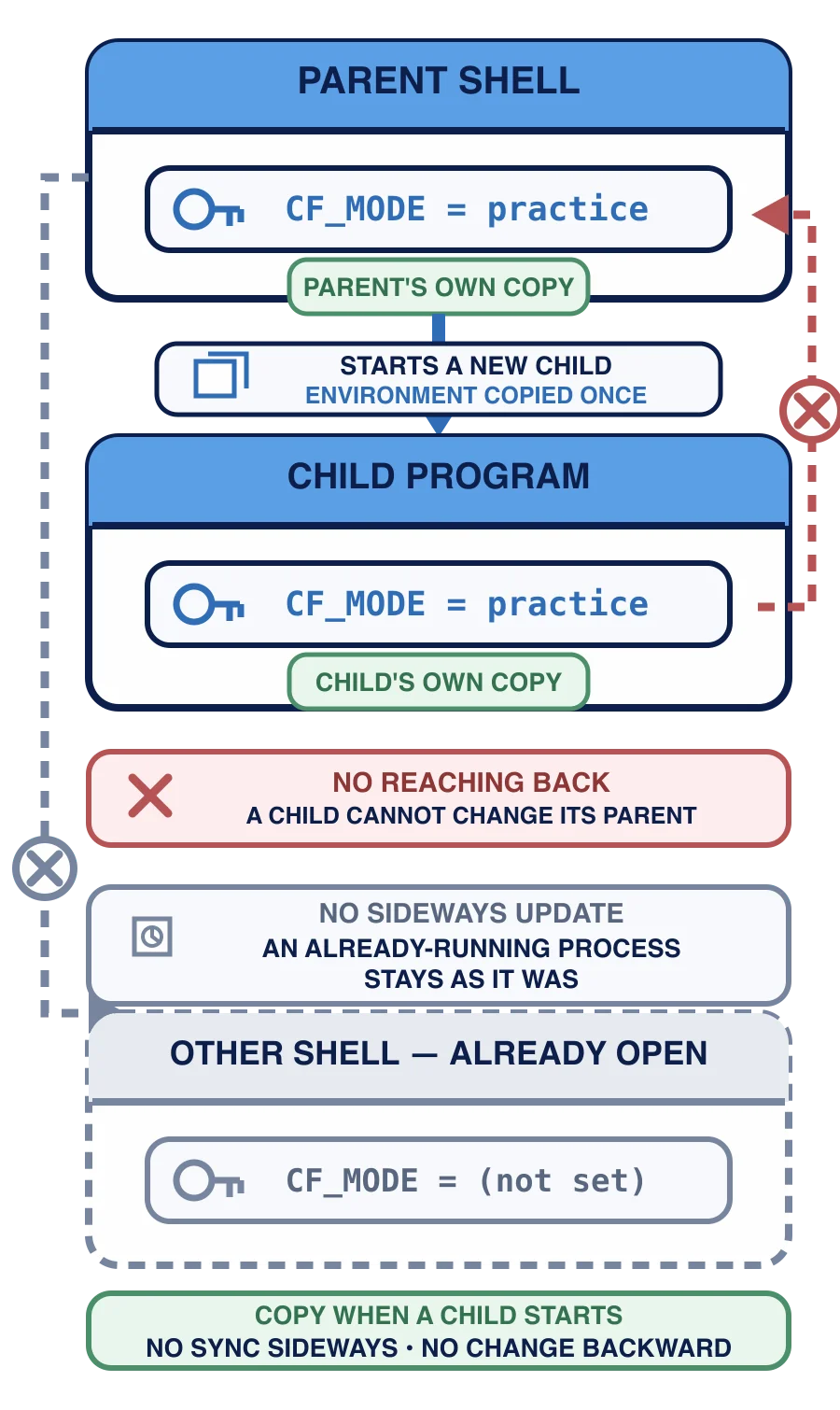
None of this rewrites a startup file or a permanent system setting. Close the session and a new one starts without the values you added. Persistent configuration is deliberately outside this course: changing every future session deserves its own recovery instructions.
Practice: let a child program record what it received
The workspace includes a supplied program named environment-check.py. You are not learning its Python syntax here; it is a measuring instrument. When a child process receives COURSE_MARKER, the program writes the observed value to destination/environment-check.txt.
Use Reset first, then stay in one terminal session at /workspace.
$env:COURSE_MARKER = 'environment ready'
Write-Output $env:COURSE_MARKER
python ./environment-check.py
Get-Content -LiteralPath ./destination/environment-check.txt
The python process is the child. If it prints child received: environment ready, it received the environment value rather than an ordinary PowerShell variable.
export COURSE_MARKER="environment ready"
printenv COURSE_MARKER
python environment-check.py
cat destination/environment-check.txt
The python process is the child. If it prints child received: environment ready, it received the exported environment value rather than a shell-only variable.
export COURSE_MARKER="environment ready"
printenv COURSE_MARKER
python environment-check.py
cat destination/environment-check.txt
The python process is the child. If it prints child received: environment ready, it received the exported environment value rather than a shell-only variable.
Read the receipt before you press Check my work. The state check verifies the supplied program and the exact file it produced. It cannot reconstruct every keystroke in an earlier shell process, so your own observation of the child program’s output is part of the exercise evidence.
You set a session value and then start a program from that same terminal. What should you expect?
You set a value in one terminal window. A second window, already open, does not see it. Why?
You have proved one value crossed a process boundary and seen where that boundary stops. The checkpoint now combines orientation, inspection, careful tree changes, and one plain completion receipt without introducing another command.