What an Operating System Does
Processes, Memory, Files, and Devices
Start copying a very large file, and leave your music playing while it runs. The copy wants as much storage bandwidth and memory as it can get. The player wants something quite different: a small slice of CPU at very regular intervals, and an audio device that never runs dry.
Those two demands are not the same shape at all, and neither program is in a position to take charge of the machine. Here is how the
Two processes, two shapes of work
Opening an application normally creates at least one process, an operating-system-managed instance of a running program with its own state and resources. The operating system gives ready processes opportunities to use the CPU, switching often enough that several programs can keep making progress.
The file-copy process wants large bursts of work whenever storage is ready. The music-player process needs much smaller pieces of work at regular intervals. Resource management is not about giving both the same amount at the same moment. It is about coordinating different demands without letting either process take the whole machine.
Keep their memory separate
The operating system tracks which memory belongs to each process and stops an ordinary application from writing into another process’s working area. That boundary is why one application can often fail without taking every other application with it.
If running programs together need more working memory than the machine has, the operating system can move less-active data to storage, as you saw in Chapter 1. That keeps work moving, but storage is much slower than RAM.
Keep the audio supplied
The copy and the music player both need data moved through the machine. The copy can tolerate uneven bursts. Playback cannot: the audio device needs its next piece on time. Holding a small amount of audio ready in a buffer gives the operating system some breathing room while storage and CPU time are being shared.
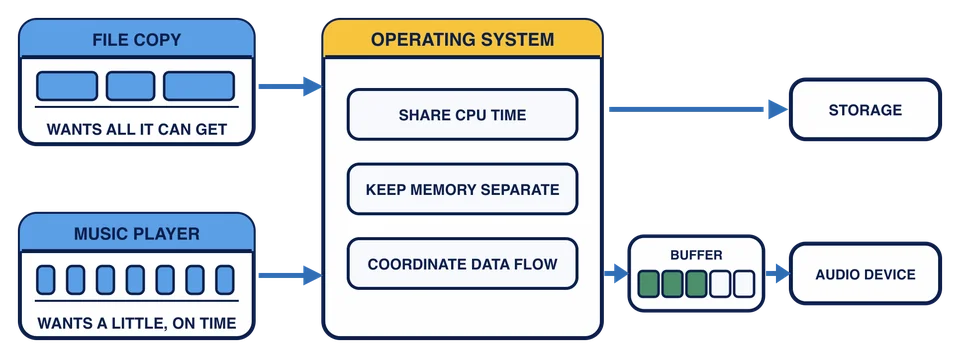
The two strips on the left are the same stretch of time drawn twice. The copy can use uneven bursts, while the player needs its small slice to arrive on schedule. The partly filled audio area is what buys that margin.
During a large file copy, the music player keeps working but occasionally stutters. Which explanation uses the OS resource model best?
None of this guarantees that programs never crash or never slow each other down. What it provides is boundaries and shared services, so that failures stay contained more often than not, and ordinary applications can share one machine without knowing anything about each other.
Every desktop operating system does these jobs. What differs between them is how they look while doing it.