Commands, Configuration, and Errors · practice
Find Which Layer Failed
The fastest troubleshooting question is not “what should I try?” It is “how far did the request get?” An error message is evidence about the last layer that worked, and reading it that way turns a wall of red text into a location.
Read failures in order
For the launch examples in this course, work through four questions:
Command lookup: did the
find and start the program you named? Path lookup: did that program find the target you gave it?
Permission: did the
allow the action? Program: did the program finish its own work?
Start with the first failure the evidence identifies. These are diagnostic categories, not four stages every program completes exactly once. Permissions can stop a program from starting, and a running program can later fail while opening another file. Read the complete message to find the failed action.
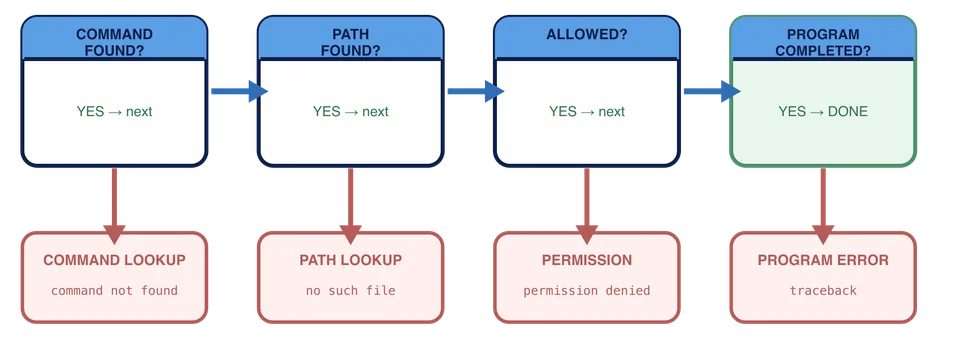
| Evidence | Failed layer | First useful move |
|---|---|---|
pythno: command not found | Command lookup | Check the spelling, then ask the shell what that name resolves to. |
can't open file '/workspace/data/report.py' | Path lookup | Compare the attempted path with your current location and the real tree. |
permission denied | Permission | Inspect that exact target and action. Do not start widening permissions. |
| A traceback naming a file and a line number | Program | Read the last line of the traceback, then look at that line. |
Each message quietly tells you what already succeeded. A traceback proves the shell found Python and Python found the file. A message that Python cannot open its source file shows Python started but could not reach that file at the attempted path. The path may be wrong, or the file may be missing. A command-not-found message proves neither got that far.
A traceback lists where a failure occurred while Python was running. Its final line names the error and gives a message. For example, a traceback ending in PermissionError: ... Permission denied means Python started, then an action inside the program was refused. A traceback ending in FileNotFoundError points to a file the running program could not find. Do not reinstall Python merely because a later file operation failed.
Diagnostic practice
Reset the Chapter 7 workspace and start in /workspace. It contains a working report.py, a deliberately broken broken-report.py, and a data directory.
Produce three of the four failures yourself and read the fourth from a transcript.
python ./missing-report.py
python ./broken-report.py
pythno ./report.py
PowerShell’s final message says the term pythno is not recognized. That message comes from the shell; Python never started for that line.
python missing-report.py
python broken-report.py
pythno report.py
Bash’s final message says pythno: command not found. That message comes from the shell; Python never started for that line.
python missing-report.py
python broken-report.py
pythno report.py
Bash’s final message says pythno: command not found. That message comes from the shell; Python never started for that line.
Permission failures need a file whose permissions are wrong, and this course does not ask you to create one. Read this transcript instead and classify it from the wording alone:
PS /workspace> & ./locked-tool
ResourceUnavailable: Program 'locked-tool' failed to run: Permission denied
bash: ./locked-tool: Permission denied
bash: ./locked-tool: Permission denied
Notice that the shell found ./locked-tool well enough to try it. Nothing was misspelled and no path was missing. The operating system refused the attempted action. Inspecting and changing permission settings is deliberately out of scope here; the useful beginner move is to classify the evidence without widening permissions blindly.
Practice: classify all four
Once you have seen all four cases, write down which layer each one failed at. Create destination/diagnosis.txt with four lines, one per case, in this order:
pythno report.pypython missing-report.py./locked-toolrefusedpython broken-report.py
Use exactly one of these labels for each case: command-lookup, path-lookup, permission, or program. The receipt must have exactly four nonblank lines in this shape:
case1=<layer>
case2=<layer>
case3=<layer>
case4=<layer>
Write the first line with Set-Content in PowerShell or > in Bash, then append the other three with Add-Content or >>. Read the result with Get-Content or cat and check the order before you submit. Leave both supplied programs exactly as they are.
Check can validate the four labels and the supplied fixtures, but it cannot replay your
If you find yourself unsure between two layers, go back to the error text and ask which program produced it. The answer is almost always in who is speaking: the shell, the launcher, the operating system, or the program itself.
You run python report.py. The terminal shows a traceback naming line 12 of report.py. Which conclusion is supported before you change anything?
A teammate reports only, "The project will not run." What is the best first request?
You now have a flow instead of a guess list. The final chapter opens with a vague report of something missing and asks you to prove what is actually wrong.