Chapter 6
Tools
A Model That Can Ask for Help
The study assistant has twelve course notes in its notes folder, and so far the model has never seen one unless your program pasted it into a message, as Chapter 2’s note_message did. That works when you know in advance which note a question needs. Often you do not. A learner asks “What do the notes say about copying a list?”, and the program would have to guess that the answer is in 03-lists.md.
This chapter turns that around. The program tells the model which functions it is willing to run, and the model asks for the one it needs. Such a request is called a tool call, and the functions on offer are tools.
Your project for this chapter
Open tools.py in the project editor. Below json, Path and openai, it imports from two course files:
from client_calls import MODEL, make_client
from prompts import TOOLS_SYSTEM
client_calls.py is Chapter 5’s finished code, supplied next to it together with the earlier files it imports: structured.py, quiz_models.py, conversation.py, llm_basics.py and errors.py. You do not need to change any of them. As before, checking your work uses its own copies, so an edit there cannot change a grade, but it can stop the demonstration from working. prompts.py now also holds TOOLS_SYSTEM, the system message the project sends.
Near the top are three finished functions: note_ids, list_notes and read_note. They are the tools. list_notes returns the ids of the notes, such as 03-lists, and read_note returns the text of one note. You read them properly in Lesson 4. Below them are two empty placeholders, TOOL_DESCRIPTIONS = [] and TOOLS = {}, six unfinished functions, and two finished values that later Runs use, MISNAMED_READ_NOTE and BAD_CALLS. python tools.py runs the file, and the demonstration at the bottom calls each of your functions as soon as it exists.
A question the model cannot answer
In the Shell, run python tools.py now, before you change anything. The demonstration sends one question through the client, with no tools in the request:
question = "What do the notes say about copying a list?"
messages = [{"role": "user", "content": question}]
A question sent with no tools:
I would call the tool read_note here, but this request's tools do not include a tool with that name.
Run stopped at the next function to build: TOOL_DESCRIPTIONS is written in Lesson 2.
That reply is the scripted model’s, and it is written for this course: no real model would talk about a read_note tool that nobody mentioned. The scripted model has the question in its table with a prepared answer that needs the notes, and it says plainly what is missing. A live model given the same request has no notes either. It might answer from what it learned in training, which can sound right without coming from your notes, or say that it cannot see them. Either way, it has not read 03-lists.md.
The last line is the usual stop line: the demonstration stops at the first thing you have not written yet.
What a tool call is
A model only ever reads the messages in a request and writes a reply. It cannot open a file, run Python or reach the internet. A tool call does not change that. It changes what the reply can contain:
The request lists the tools: for each function, a name, a sentence saying what it does, and the arguments it takes. Lesson 2 writes these descriptions.
The model reads the question and the list. When a tool would help, its reply is not an answer. It is a request: “run
read_notewithnote_idset to03-lists”. Lesson 3 reads that request out of the reply.Your program runs the function itself (Lesson 4), and sends a second request that carries the conversation so far plus the function’s result (Lesson 5).
The model reads the result like any other message, and writes its answer.
Here are the same four steps as messages between your program and the model. Notice that step 3 happens entirely on your side.
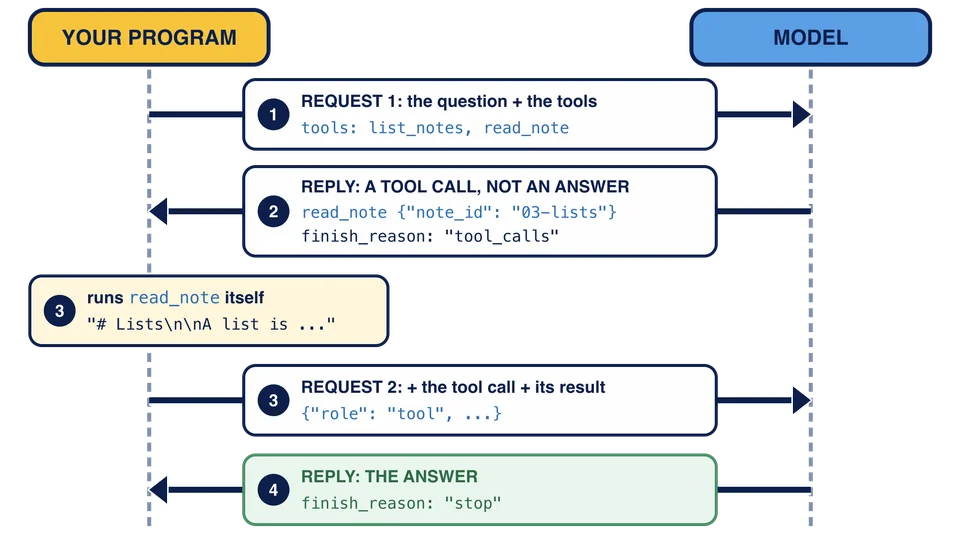
The model never runs anything. It chooses a function from the list you gave it and writes arguments for it, and your program decides what actually happens. That is why the program can refuse: Lesson 6 checks every request before anything runs, because the name and the arguments were written by the model, not by you.
The scripted model plays the same game with fixed rules. With the right tools in the request, it asks for read_note with 03-lists; given the result, it answers. SCRIPTED_MODEL.md lists the questions it knows, and like every scripted prompt they must be sent exactly as written. A live model would accept any wording.
The plan for this chapter
Lesson 2 describes the two tools so the model can ask for them. Lesson 3 reads a tool call out of the reply, Lesson 4 runs the function it names, and Lesson 5 sends the result back for the answer. Lesson 6 makes the program refuse bad requests without crashing, and Lesson 7 handles a reply that asks for several tools at once. The project puts the round together in one function, answer_with_tools.
The model replies with a tool call for read_note with {"note_id": "03-lists"}. Who opens and reads the file notes/03-lists.md?
A request offers a read_note tool, and the model decides it needs a note. What does its reply contain?
A program sends a model only the question "What do the notes say about copying a list?". The notes are files in the program's workspace. Why can the model not answer?