Taking It Home
Set a Spending Limit Before You Start
On the course model, a mistake costs nothing. A loop that never stops, a retry that retries too often or a prompt that grows with every turn only wastes a little time. On a real provider, every one of those mistakes is billed. Before the program makes its first paid call, decide how much it may spend, and put a limit at every level where something can go wrong.
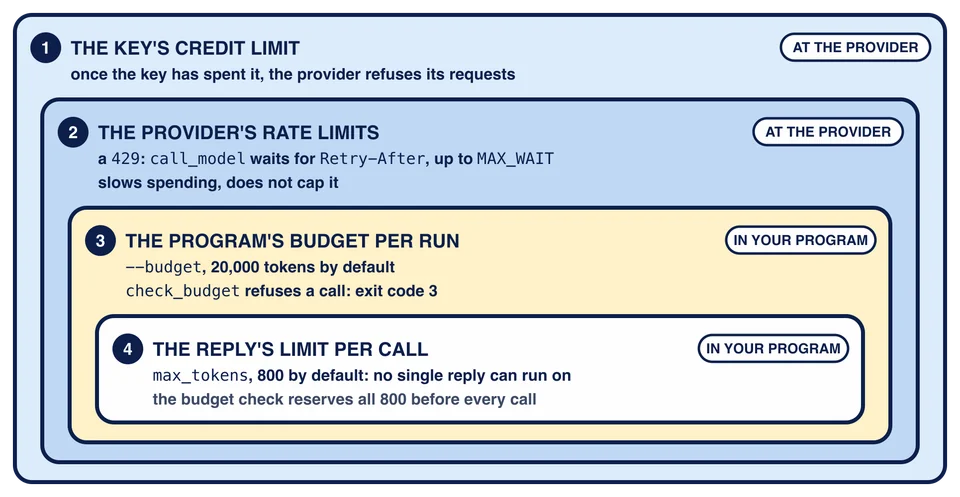
Four limits, from the outside in
The key’s credit limit
The outermost limit lives at the provider. OpenRouter lets you give each key its own credit limit: once the key has spent that much, the provider refuses its requests. Set it before the first call, at a small amount you would not mind losing.
This is the limit that still holds when everything else is wrong: a bug in your loop, a budget you set too high, a key that leaked and is being used by someone else. Nothing in your code can switch it off, because it is not in your code. The course’s own live model works the same way: its key has a credit limit of its own, as a backstop behind the limits the service sets.
The provider’s rate limits
Providers also limit how many requests you send per minute, and sometimes per day. Passing one gets a 429. Your program already handles that: Chapter 9’s call_model waits for the time in the Retry-After header and tries again, up to MAX_WAIT (60 seconds), and gives up with exit code 1 when the provider asks for a longer wait. A rate limit protects the provider, and it slows your spending, but it does not cap it.
The course’s live model is an example of limits a service sets for its users: ten requests a minute, a daily count of requests and tokens, and a daily cost cap. Chapter 9 met the first two as 429 replies with a short and a long Retry-After.
The program’s budget per run
--budget is the study assistant’s own limit, 20,000 tokens per run unless you pass another number. Every model call of the run draws from that one budget, and Chapter 9’s check_budget refuses a call before it is sent when its estimate does not fit in what is left. A refused call ends the run with exit code 3.
The reply’s limit per call
Every call sends max_tokens, DEFAULT_MAX_TOKENS (800) unless the request says otherwise, so no single reply can run on. The budget check reserves that whole amount before every call, because the reply could be that long. That is why a run can be refused with plenty of room for the reply it would really have got: the check has to hold for the longest reply the request allows, and it cannot know in advance that this one would be short.
The picture nests the four limits. Each one works inside the limits around it, and only the outer two are outside your code. That is why the key’s credit limit still holds when your program is wrong.
What a run costs
Chapter 10 Lesson 1 showed a live answer from openai/gpt-oss-20b that used 72 input tokens and 206 output tokens. OpenRouter reported its cost as $0.0000310. At the model’s list prices on 2026-11-08, $0.03 per million input tokens and $0.13 per million output tokens, it would have cost $0.0000289. The difference says that the endpoint that answered charged about $0.14 per million output tokens. OpenRouter sends a request to one of several endpoints for a model, and they do not all charge the same.
Using the price that was actually charged, a whole run that used its full default budget would cost about:
20,000 × $0.14 / 1,000,000 = $0.0028
That is about $0.003 per run, depending on the endpoint OpenRouter picks. It counts every token at the output price, the higher of the two, so it errs on the high side. It is still an estimate, not a hard bound. The budget counts characters divided by four, which is close to but not exactly how the provider counts, and it leaves out the tool descriptions that ask sends with every agent step, which the provider does count. A live run can end a little above --budget.
Most runs use far less: Chapter 11’s ask used 539 tokens on the course model. But the price depends on the model. Another model can cost a hundred times more per token, so read the provider’s price for a model before you point the program at it.
Numbers to revisit at home
The course chose its numbers for the course model, which answers in well under a second and counts tokens by a simple rule. Once the project is yours, these are the settings to look at again, all in your own files:
CLIENT_TIMEOUTinclient_calls.py, 10 seconds. A slower provider or a bigger model may need longer; Chapter 9 showed what a timeout looks like.DEFAULT_MAX_TOKENSinreliable.py, 800. A reasoning model spends part of itsmax_tokensthinking before it writes the answer, so a long answer may be cut off where the course model’s never was.MAX_WAITinreliable.py, 60 seconds: the longest wait for a rate limit before the program gives up.--budgeton the, 20,000 tokens by default.
Change one at a time, and look at the log of your runs before and after. Lesson 4 adds that log.
Your agent has a bug: it keeps asking for tools, and a change you made by mistake set --budget to 10,000,000. Which limit still stops the spending?
Roughly what does one run cost on openai/gpt-oss-20b if it uses its whole default budget, and why is the figure not exact?
A run has 700 tokens of budget left. The next call's text is about 100 tokens and the real reply would have been 50 tokens. Why does the budget check refuse it?