Chapter 12 · practice
Taking It Home
Get an API Key and Keep It Secret
The study assistant works. It answers from the notes, writes quizzes, chats, keeps to a budget and exits with a code that says what happened. So far it has only talked to the course model, which checks no key, answers for free and lives inside this site. This chapter moves it to a real provider, the kind you pay for, without leaking a key and without spending more than you meant to.
Your project for this chapter
Open study_assistant.py in the project editor. It is Chapter 11’s finished program with a few supplied additions near the top: import json and import os, the constants COURSE_BASE_URL and COURSE_MODEL, LOG_FILE and PRICE_PER_MILLION_OUTPUT, and three new functions. read_api_key (this lesson) and log_run (Lesson 4) are unfinished. summarize_log is finished code that Lesson 4 reads. Everything else is as Chapter 11 left it, and this chapter changes only build_client, two constants, main and the guard at the bottom.
The entry file is stages.py, as in Chapter 11. Run python stages.py in the Shell and it shows each change as soon as you make it. The program itself runs there too, as python study_assistant.py ....
The other files are supplied as before: Chapter 10’s evals.py and tests/, Chapter 9’s reliable.py with its quiz count, and the files they import. Checking your work uses its own copies of them.
A key is a password that spends money
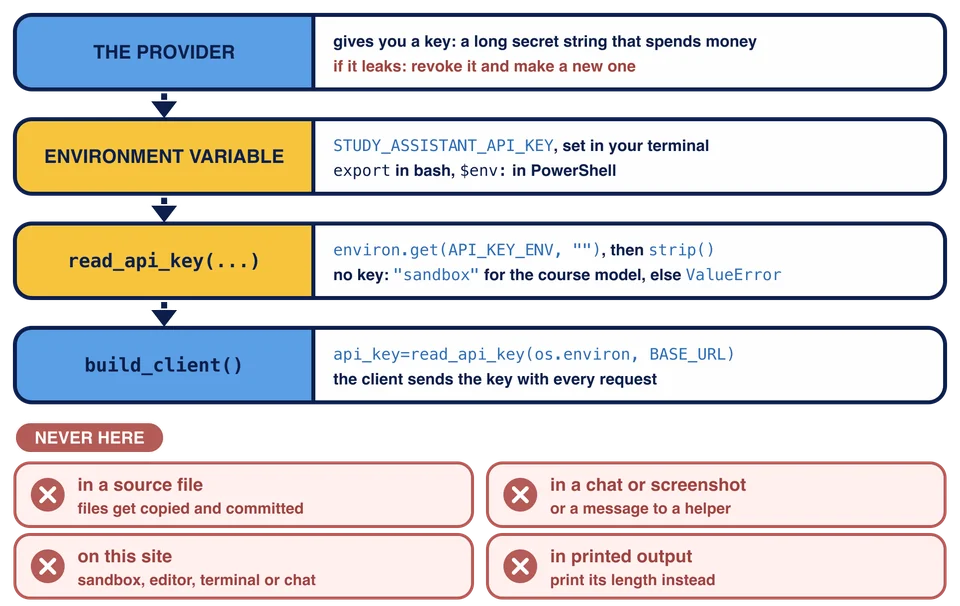
A provider such as OpenRouter gives you an API key, a long secret string that goes with every request. The provider uses it to know who is calling and whom to bill. Whoever has your key can run up your bill, so treat it like a password with your card attached:
It never goes in a source file. A file gets copied, uploaded, shared and committed.
It never goes in a chat, a screenshot or a message to someone helping you.
If it leaks anyway, you revoke it at the provider and make a new one. A revoked key stops working, so the leaked copy is useless.
One rule matters more than the others in this course: never paste a real key into this site. Not into the sandbox, not into a file in the project editor, not into the
Environment variables
The usual place for a key is an environment variable: a named value that the shell hands to every program it starts. The program reads it while it runs, so the key is never written into the code.
In bash, export sets a variable for the rest of the terminal session, so every program you start from that terminal sees it:
export STUDY_ASSISTANT_API_KEY=made-up-key
PowerShell writes the same thing as $env: followed by the name, an equals sign and the value in quotes, and it lasts until you close the window:
$env:STUDY_ASSISTANT_API_KEY = "made-up-key"
In bash you can also put NAME=value in front of one command, and the variable exists only for that command:
STUDY_ASSISTANT_API_KEY=anything python study_assistant.py ask "How do I make an independent copy of a list?"
That one works here, because the course model ignores the key, so anything is as good as any other made-up value.
A key you type at a prompt has one more way out: the shell saves your commands in its history, so the key stays on disk after you close the terminal. If your history is shared or synced to another machine, that is a leak too. Type a key in a private session on your own machine, and revoke it if your history ever leaves that machine.
Some tools read keys from a .env file. This program does not, so it needs none. If another project of yours uses one and you use Git, add it to .gitignore so it is never committed. The Git course covers how.
os.environ
In Python, os.environ is a view of the environment that works like a dictionary from names to values, both strings. Looking up a missing name with square brackets raises KeyError, like a dictionary:
import os

key = os.environ["OPENROUTER_API_KEY"]  # KeyError when it is not set
get gives a default instead, which is what this program needs:
key = os.environ.get("OPENROUTER_API_KEY", "")
The study assistant uses a name of its own, STUDY_ASSISTANT_API_KEY, kept in the constant API_KEY_ENV, because it works with any provider, not only OpenRouter.
read_api_key
read_api_key(environ, base_url) decides which key the client sends to base_url. It takes the environment as a parameter, environ, rather than reading os.environ itself. build_client passes os.environ, and a test or a check passes a small dictionary of its own, with made-up values, without touching the real environment.
It works in three steps:
Read the variable that
API_KEY_ENVnames withenviron.get(API_KEY_ENV, ""), andstrip()it. A key pasted with a stray space or line break would otherwise fail at the provider with a confusing error.If the result is not empty, return it.
Otherwise, return
"sandbox"whenbase_urlisCOURSE_BASE_URL, because the course model checks no key. For any other address, raise:
raise ValueError(f"Set the {API_KEY_ENV} environment variable to your API key for {base_url}.")
An empty or spaces-only value counts as no key.
Why check at all, when the provider would refuse a missing key anyway? Because of how it would refuse. If the program sends no key, the openai client refuses to build at all and raises openai.OpenAIError (“Missing credentials”). That is not an openai.APIError, so Chapter 11’s run_command would not catch it, and the program would end in a traceback. A wrong key fails later, as a 401 from the provider. One line that names the variable to set is kinder than either, and Lesson 2 makes main print it.
Then change build_client to send that key:
api_key=read_api_key(os.environ, BASE_URL)
Leave base_url, timeout and max_retries as they are.
The picture follows the key from the provider to the request, and lists the places it must never go. Only the environment variable holds the key; the code holds only the variable’s name, in API_KEY_ENV.
Never print a key
While you work on this, you may want to see whether the key arrived. Do not print it, even for a moment: printed text ends up in terminal history, screenshots, logs and chats. Print its length instead. A length tells you whether the variable is set and whether stray spaces were stripped, and gives nothing away. read_api_key itself prints nothing.
Run it
When both functions are done, run python stages.py. stages.py calls your read_api_key with three made-up environments and prints only what is safe:
Lesson 1: read_api_key
  No key, course model: sandbox
  A made-up key with spaces around it: 8 characters (never print the key itself)
  No key, a real provider: ValueError: Set the STUDY_ASSISTANT_API_KEY environment variable to your API key for https://openrouter.ai/api/v1.

Lesson 2: the active settings
  BASE_URL: http://llm-api:8080/v1
  MODEL: pl-scripted
  STUDY_ASSISTANT_API_KEY: not set
  To change them, set STUDY_ASSISTANT_BASE_URL, STUDY_ASSISTANT_MODEL and
  STUDY_ASSISTANT_API_KEY before the program starts. On this site, leave them unset.

Run stopped at the next function to build: main gets log_file and clock in Lesson 4.
The made-up key was " test-123 ", ten characters with its spaces, and 8 once stripped. The Lesson 2 block already runs, because it only prints settings; Lesson 2 makes them come from the environment.
The checks pass read_api_key dictionaries of their own, and call build_client with made-up values in the environment and look at the client it returns: its key, address, timeout and retries. No request is sent.
Why does read_api_key take the environment as a parameter, environ, instead of reading os.environ itself?
The provider would refuse a missing key anyway. Why does read_api_key raise its own ValueError for a real provider's address?
Task
In study_assistant.py:
Write
read_api_key(environ, base_url): readenviron.get(API_KEY_ENV, "")andstrip()it. Return it when it is not empty. Otherwise return"sandbox"whenbase_urlisCOURSE_BASE_URL, and for any other address raiseValueError(f"Set the {API_KEY_ENV} environment variable to your API key for {base_url}."). Print nothing.In
build_client, replaceapi_key="sandbox"withapi_key=read_api_key(os.environ, BASE_URL). Keep the other arguments.
Use only made-up keys. Never paste a real key into this site. Run python stages.py to see read_api_key at work, then check your work.