Structured Output · practice
Validate the Model's Answer
You now have a pydantic model that states the quiz’s shape, types included. This lesson uses it to check the language model’s reply: decode the JSON text, check every key and every type, and either get a QuizSet back or a precise list of what is wrong. Checking data against a model like this is called validation.
Decode and validate in one step
Every pydantic model has a method that takes JSON text:
quiz = QuizSet.model_validate_json(text)
It does the work of json.loads and of every check in read_quiz_json, and it also checks the types. When the text is a valid quiz, you get a QuizSet. When it is not, for any reason, it raises one error: pydantic.ValidationError. Text that is not JSON at all raises the same error, so a caller has one exception to handle.
ValidationError is imported at the top of structured.py, from pydantic.
What the error says
Here is the reply that slipped through read_quiz_json in Lesson 2:
from pydantic import BaseModel, ValidationError


class QuizQuestion(BaseModel):
    question: str
    choices: list[str]
    answer_index: int


class QuizSet(BaseModel):
    questions: list[QuizQuestion]


text = '{"questions": [{"question": "Q?", "choices": ["a", "b"], "answer_index": "abc"}]}'
try:
    QuizSet.model_validate_json(text)
except ValidationError as error:
    print(error)
    for item in error.errors():
        print(item["loc"], item["msg"])
1 validation error for QuizSet
questions.0.answer_index
  Input should be a valid integer, unable to parse string as an integer [type=int_parsing, input_value='abc', input_type=str]
    For further information visit https://errors.pydantic.dev/2.14/v/int_parsing
('questions', 0, 'answer_index') Input should be a valid integer, unable to parse string as an integer
Printing the error gives a full report, written for a programmer, with a link to pydantic’s documentation. error.errors() gives the same facts as data: a list with one dictionary per problem. Two keys matter here. "loc" is where the problem is, as a tuple of steps from the top of the document: the questions key, item 0 of that list, its answer_index key. The positions in a list are integers; the keys are strings. "msg" is what is wrong, in one sentence.
A reply with several problems gives several items, in the order pydantic found them. Text that is not JSON gives one item whose loc is empty, (), because the problem is the whole reply, and whose message starts with Invalid JSON.
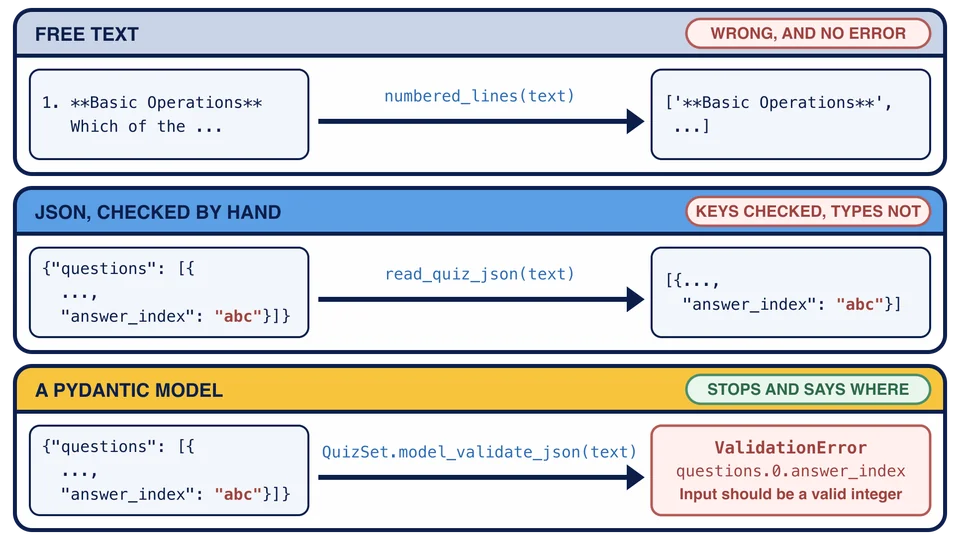
Here are the three ways of reading a reply that this chapter has used, side by side. numbered_lines and read_quiz_json each hand back a wrong value without complaint. The pydantic model stops, and its error says where the problem is.
Build parse_quiz and error_lines
parse_quiz(text) returns QuizSet.model_validate_json(text). It catches nothing: deciding what to do about an invalid reply is the caller’s job, and Lesson 8 gives the caller something useful to do.
error_lines(error) turns a ValidationError into short lines, one per item of error.errors(), each f"{location}: {item['msg']}". Build location from the parts of item["loc"]: convert each part with str(), because some are integers and ".".join only joins strings, then join them with ".". That turns ('questions', 0, 'answer_index') into questions.0.answer_index. When loc is empty, use (whole reply) instead.
Run it
Run python structured.py. The demonstration validates the JSON reply from Lesson 2 with your parse_quiz, then gives it three invalid replies and prints your error_lines for each:
The JSON reply, validated by parse_quiz:
  3 questions. The first answer is '85'.
Replies that fail validation, explained by error_lines:
  questions.0.answer_index: Input should be a valid integer, unable to parse string as an integer
  questions.0.question: Field required
  questions.0.answer_index: Field required
  (whole reply): Invalid JSON: expected value at line 1 column 1
The system message from quiz_system_message:
Run stopped at the next function to build: quiz_system_message is built in Lesson 7.
The first invalid reply has "abc" where an integer belongs. The second has a question with only choices, so two fields are missing and you get two lines. The third is Here is your quiz!, which is not JSON. Each line says where and what, which is all a person, or a language model, needs to fix the reply.
What validation does not promise
Three things to keep in mind:
pydantic converts some values. For an
intfield it accepts the string"3"as3, andtrueas1. That is usually what you want from text that came over the network, but it is not a strict type check.A valid quiz can still be wrong. A question with two choices and
"answer_index": 5validates, because 5 is an integer. Validation checks the shape you declared. If a rule matters beyond that, such as the index fitting the choices, your program has to check it itself.This is a different error from
read_quiz_json’s.read_quiz_jsonraised a plainValueErrorthat you wrote.parse_quizraises pydantic’sValidationError. AValidationErroris a kind ofValueError, soexcept ValueError:would catch both, butexcept ValidationError:says exactly what you mean, and that is what the rest of this chapter catches.
parse_quiz is given the text Sure! Here is your quiz. What happens?
Why does error_lines convert each part of loc with str() before joining?
Task
In structured.py, replace the unfinished bodies of parse_quiz(text) and error_lines(error).
parse_quiz(text)returnsQuizSet.model_validate_json(text). It catches nothing, so aValidationErrorreaches the caller.error_lines(error)takes aValidationErrorand returns a list with one string per item oferror.errors():f"{location}: {item['msg']}". The location is the parts ofitem["loc"], each converted withstr(), joined with".", as inquestions.0.answer_index. Whenlocis empty, the location is(whole reply).
Run python structured.py to see a reply validated and three invalid replies explained, then check your work.