Streaming
What a Stream Looks Like
Before you write code that reads a stream, it helps to see one exactly as the service sends it. Here is the whole stream for a short prompt, Say hello in a short sentence., whose reply is Hello there, it is nice to meet you.:
: keep-alive

data: {"id": "chatcmpl-scripted-b99acb4415bb49e095d8878c", "object": "chat.completion.chunk", "created": 1794141530, "model": "pl-scripted", "choices": [{"index": 0, "delta": {"role": "assistant", "content": ""}, "finish_reason": null}]}

data: {"id": "chatcmpl-scripted-b99acb4415bb49e095d8878c", "object": "chat.completion.chunk", "created": 1794141530, "model": "pl-scripted", "choices": [{"index": 0, "delta": {"content": "Hello there, it "}, "finish_reason": null}]}

data: {"id": "chatcmpl-scripted-b99acb4415bb49e095d8878c", "object": "chat.completion.chunk", "created": 1794141530, "model": "pl-scripted", "choices": [{"index": 0, "delta": {"content": "is nice to "}, "finish_reason": null}]}

data: {"id": "chatcmpl-scripted-b99acb4415bb49e095d8878c", "object": "chat.completion.chunk", "created": 1794141530, "model": "pl-scripted", "choices": [{"index": 0, "delta": {"content": "meet you."}, "finish_reason": null}]}

data: {"id": "chatcmpl-scripted-b99acb4415bb49e095d8878c", "object": "chat.completion.chunk", "created": 1794141530, "model": "pl-scripted", "choices": [{"index": 0, "delta": {}, "finish_reason": "stop"}]}

data: {"id": "chatcmpl-scripted-b99acb4415bb49e095d8878c", "object": "chat.completion.chunk", "created": 1794141530, "model": "pl-scripted", "choices": [], "usage": {"prompt_tokens": 8, "completion_tokens": 9, "total_tokens": 17}}

data: [DONE]
This is not one JSON document like the replies in Chapters 1 and 2. It is plain text, sent line by line over the open connection while the model writes. The format is called server-sent events, and the service marks it with the response type text/event-stream. Each line arrives when it is ready, so your program can act on the first line before the last one exists.
The parts, in order
Read the stream from the top:
: keep-alive. A line that starts with a colon is a comment. It carries no data. Services send comments to keep a quiet connection open, for example while a live model is still thinking before its first word. The scripted model sends one at the start, as OpenRouter does, so you meet one in practice. Your code must skip it.Blank lines. An empty line ends each event. Every event here is a single
data:line followed by a blank line. The blank lines carry nothing, and your code skips them too.The first chunk. Every
data:line except the last holds one JSON document, called a chunk. Itschoices[0]looks like thechoices[0]of a normal response, except that it has adeltawhere a normal response has amessage. A delta is the change since the previous chunk. The first delta says who is speaking,"role": "assistant", and has emptycontent.One chunk per piece. Then come the pieces of the reply, one per chunk, in
delta.content:"Hello there, it ","is nice to "and"meet you.". Joined together they make the whole reply. Notice that each piece but the last ends with a space, so joining them needs no extra spaces.The finish chunk. Its delta is empty,
{}, and itsfinish_reasonis"stop": the model has finished. This is the samefinish_reasonyou met in Chapter 1. Every chunk before it had"finish_reason": null.The usage chunk. Its
choiceslist is empty, because it carries no part of the reply. It holds theusageyou read in Chapter 1: 8 input tokens and 9 output tokens. The service only sends this chunk because the request asked for it, with"stream_options": {"include_usage": true}. Without that setting a stream has no token counts at all. Chapter 9 needs them to keep a budget, so the code you write in this chapter always asks.data: [DONE]. The end marker. It is not JSON, so it must never reachjson.loads. When you see it, the reply is complete.
The id and created values are the same in every chunk of one stream and change on every call.
Four ways a chunk carries no text
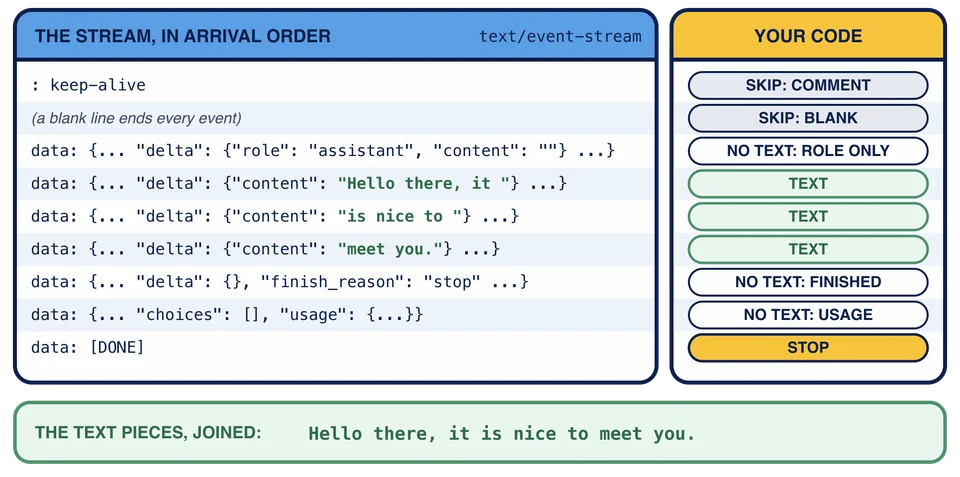
Three of the seven data: lines carry no text at all: the first chunk, whose content is empty, ""; the finish chunk, whose delta has no content key; and the usage chunk, which has no choices. A reader that assumes every chunk holds a piece of text breaks on all three. Live models add a fourth case the scripted model never sends: a delta whose content is null. Lesson 5 handles all four with one small function.
Here is the same stream again, one line per row, next to what your code will do with each line. Only three rows carry text, and joined they are the whole reply.
What the code will do
Turning this stream into the reply takes three decisions per line, and the next lessons build one at a time:
Is this line worth reading? Skip comments, blank lines and anything that is not a
data:line. Stop at[DONE]. (Lesson 4)What text does this chunk carry? Decode the JSON and take
delta.content, or nothing. (Lesson 5)What do I do with the text? Print it at once, and keep it, so the whole reply is available at the end. (Lesson 6)
python streaming.py still stops at open_stream. In Lesson 3 you open this same stream from your own code and see these lines arrive.
Which line tells your program that the stream is complete?
Why does the usage chunk have "choices": []?
What is a line that starts with :, such as : keep-alive?