Chapter 11
Capstone
The Capstone Brief
You have built every piece of the study assistant. It answers from the notes with an agent and a search tool, writes quizzes, streams a chat, survives rate limits and broken streams, stays within a token budget, and has tests that need no network. But there is still no program a person can run. Each piece is a function that another function calls.
This chapter puts the pieces together into one study_assistant.py, in checked stages. This lesson is the brief: what the finished program must do, which parts are supplied, and how it is checked.
Your project for this chapter
Open study_assistant.py in the project editor. It is the program you finish in this chapter. At the top it imports what it needs from the course files you built earlier, then sets seven names:
BASE_URL = "http://llm-api:8080/v1"
MODEL = "pl-scripted"
API_KEY_ENV = "STUDY_ASSISTANT_API_KEY"
NOTES_DIR = Path("notes")

DEFAULT_BUDGET = 20000
ASK_TOOLS = {"search_notes": search_notes, "read_note": read_note}
ASK_MAX_STEPS = 6
Below them, five functions are finished code that this lesson reads: positive_int, question_count, build_parser, use_settings and build_client. The other ten are unfinished. Lessons 2 to 6 build them, and Lesson 6 ends the file with the line that runs the program.
The other files are supplied. reliable.py is Chapter 9’s call policy, with one change you meet in Lesson 4, and everything it imports is next to it, as before. evals.py and the tests folder are Chapter 10’s finished eval and tests. fakes.py is the fake client. stages.py is this chapter’s demonstration, which you run in the Shell with python stages.py: it calls each stage of study_assistant.py as soon as it exists, the way the earlier chapters’ demonstrations did. Checking your work uses its own copies of all of these, so an edit there cannot change a grade, but it can stop stages.py from working.
The brief
The finished program has three commands, typed in the python study_assistant.py:
$ python study_assistant.py ask "How do I make an independent copy of a list?"
Use scores.copy() or list(scores). Both build a new list, so a change made through one name no longer shows through the other.

Sources: 03-lists#4
$ python study_assistant.py quiz 03-lists --count 2
$ python study_assistant.py chat
ask QUESTIONruns the agent with two tools,search_notesandread_note, and prints its answer, a blank line, and the labels of the passages it used afterSources:. An answer may cite only a passage that a search in the same run returned. If the first answer breaks that rule, or is not valid JSON, the program tells the model what was wrong and asks once more. An answer with no citations is allowed and printsSources: none.quiz NOTE_IDwrites a multiple-choice quiz about one note, with--count Nquestions, from 1 to 5. The default is 3.chatreads one question per line that you type, streams each answer, and keeps the conversation going until you type an empty line.
--budget TOKENS, written before the command, sets the most tokens one run may use. The default is 20000, and every model call of the run draws on that one budget, including ask’s second try.
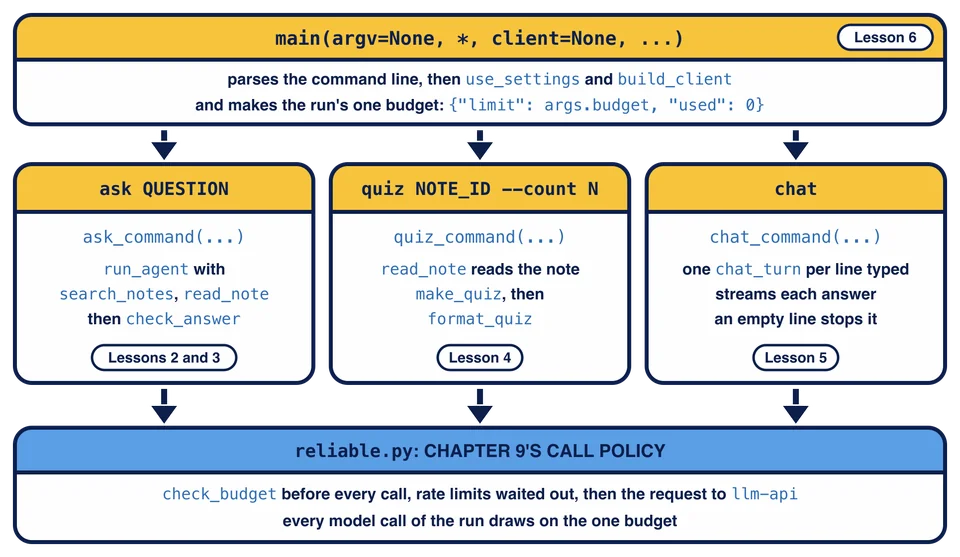
The picture shows how the program is put together and which lesson builds each part. main runs one command, each command is built from functions you wrote in earlier chapters, and every model call goes through Chapter 9’s call policy on the run’s one budget.
The program writes to two streams, as Python in Practice’s programs did. Answers, quizzes and the chat go to standard output. When something fails, the program writes one line to standard error: Error: followed by a short description of what went wrong. ask and quiz then print nothing on standard output; chat keeps what it already printed, including the start of a reply that broke. Then the program ends with an exit code that says what kind of failure it was:
| Code | Meaning | Examples |
|---|---|---|
0 | it worked | an answer, a quiz, a finished chat |
1 | the run failed | the agent stopped without an answer, an answer still invalid after the retry, a reply cut off at max_tokens, a broken stream, a model error that retries did not fix |
2 | the command line was wrong | a missing question, --count 9 |
3 | the budget ran out | --budget 1000 for a question that needs more |
4 | the note does not exist | quiz 99-magic |
In the terminal, echo $? right after a command shows the code the last command ended with.
The entry point is one function:
def main(argv=None, *, client=None, notes_dir=NOTES_DIR, stdin=None, sleep=time.sleep):
It parses argv, runs the command and returns the exit code. When it is called with no arguments, as the program does when you run it, it reads the real command line, builds the real client, reads your keyboard and really waits. The keyword arguments let a test replace each of those.
Commands with their own arguments
In Python in Practice you built parsers with positional arguments and options. This program needs one more thing. The first word after the options is the name of a command, a word that says which job to do, and each command takes arguments of its own: ask takes a question, quiz takes a note id and --count, and chat takes nothing. argparse calls these subcommands. Here is the supplied build_parser, shortened to the parts that matter:
parser = argparse.ArgumentParser(prog="study_assistant.py", description="...", allow_abbrev=False)
parser.add_argument("--budget", type=positive_int, default=DEFAULT_BUDGET, metavar="TOKENS", help="...")
commands = parser.add_subparsers(dest="command", required=True, metavar="COMMAND")
ask = commands.add_parser("ask", help="...", allow_abbrev=False)
ask.add_argument("question", metavar="QUESTION", help="the question, in quotes")
quiz = commands.add_parser("quiz", help="...", allow_abbrev=False)
quiz.add_argument("note_id", metavar="NOTE_ID", help="the id of a note, such as 03-lists")
quiz.add_argument("--count", type=question_count, default=3, metavar="N", help="...")
commands.add_parser("chat", help="...", allow_abbrev=False)
add_subparsers returns an object whose add_parser method adds one command and returns a parser for it, so ask.add_argument(...) gives that command its own arguments. dest="command" says where the parsed result keeps the command’s name: after ask "What is a tuple?", args.command is "ask" and args.question is "What is a tuple?". After quiz 03-lists, args.command is "quiz", args.note_id is "03-lists" and args.count is 3. required=True makes a missing command a usage error. --budget belongs to the top parser, so it goes before the command.
allow_abbrev=False stops argparse from accepting a shortened option such as --cou for --count. Each command’s parser needs it too, because a subcommand’s parser does not take that setting from the top one. prog="study_assistant.py" fixes the program name in the usage line, whatever file starts the program.
positive_int and question_count are Python in Practice’s pattern for an option’s type: each converts the text with int inside try, and raises argparse.ArgumentTypeError with a short rule for a word that is not a number or a number out of range. argparse prints that rule after the option’s name, shows the usage line on standard error and ends the program with code 2, before any of your code runs. That is where exit code 2 comes from: you never write it.
Once Lesson 6 has added the line that runs main, --help prints:
$ python study_assistant.py --help
usage: study_assistant.py [-h] [--budget TOKENS] COMMAND ...

Answer questions from the course notes, quiz yourself and chat.

positional arguments:
  COMMAND
    ask            answer a question from the notes, with sources
    quiz           write a multiple-choice quiz about one note
    chat           chat about Python, one question per line

options:
  -h, --help       show this help message and exit
  --budget TOKENS  the most tokens this run may use (default: 20000)
$ python study_assistant.py quiz --help
usage: study_assistant.py quiz [-h] [--count N] NOTE_ID

positional arguments:
  NOTE_ID     the id of a note, such as 03-lists

options:
  -h, --help  show this help message and exit
  --count N   how many questions, from 1 to 5 (default: 3)
Until then the file only defines functions, so running it prints nothing.
Settings the program sets
The course files each keep their own names. When reliable.py ran from client_calls import MODEL, Python made a name MODEL inside reliable, and run_agent, make_quiz and chat_turn read that one. read_note and note_ids read NOTES_DIR in tools.py, and search_notes reads NOTES_DIR in retrieval.py. The program has its own MODEL and its own notes folder, so it has to set the names those functions read. The supplied use_settings(notes_dir) does that, through each module:
reliable.MODEL = MODEL
tools.NOTES_DIR = notes_dir
retrieval.NOTES_DIR = notes_dir
That is why study_assistant.py imports the modules themselves with import reliable, import retrieval and import tools, besides the functions it uses. Changing a module’s name from outside like this is easy to lose track of, so the program does it in one place, at the start of main, and nothing else does it.
build_client() returns the same client as Chapter 5’s make_client(), built from this file’s BASE_URL: OpenAI(base_url=BASE_URL, api_key="sandbox", timeout=CLIENT_TIMEOUT, max_retries=0). The course model checks no key. Chapter 12 reads a real key from the environment variable that API_KEY_ENV names.
How it is checked
The graders run your program the way Chapter 10’s tests ran run_agent: they call main with a list of arguments, a FakeClient with scripted replies, a temporary notes folder with notes you have never seen, typed input from io.StringIO and a sleep that only records its waits. Then they look at the exit code, standard output and standard error. Nothing reaches llm-api, and nothing really waits. That is the reason for main’s keyword arguments.
Lessons 2 to 6 each build one stage and are checked with the grader’s own versions of the earlier stages, so a mistake is reported by the lesson where it was made. Lesson 7 checks the whole program with nothing of yours replaced. Lesson 8 runs Chapter 10’s eval on the finished settings.
Run it
In the Shell, run python stages.py. It starts with Lesson 2’s block. It runs the agent with ask’s settings on the copy question through the course model, prints its trace with Chapter 7’s print_trace, and stops at the first function you have not built:
Lesson 2: the agent's run for the copy question
Step 1 (159 tokens)
  search_notes {"query": "independent copy of a list"} -> 763 characters
Step 2 (380 tokens)
  answered
Run stopped at the next function to build: trace_labels is built in Lesson 2.
After python study_assistant.py ask "What is a tuple?", what does args.command hold?
python study_assistant.py quiz 03-lists --count 9 ends with which exit code, and what produces it?
Why does main take a client argument instead of always calling build_client()?