Answering from Your Notes · capstone
Capstone project: Project: Answer Questions from the Course Notes
Lessons 2 to 7 built every step of a grounded answer, and the demonstration has been calling them one by one. This project joins them into one function that answers a question from the notes, and turns the search into a tool that an agent can call:
answer = answer_from_notes("How do I make an independent copy of a list?", load_notes(), client=make_client(), k=3)
print(answer.answer)
print(answer.citations)
Use scores.copy() or list(scores). Both build a new list, so a change made through one name no longer shows through the other.
['03-lists#4']
The pieces you have
| Step | Your code |
|---|---|
| Split the notes into chunks | note_chunks(notes) (Lesson 2) |
Score and keep the best k | best_chunks(question, chunks, k) (Lessons 3 and 4) |
| Build the request | grounded_messages(question, chunks) (Lesson 5) |
| Check the reply | parse_cited_answer(text, chunks) (Lesson 6) |
| Decide whether to ask | should_answer(best) (Lesson 7) |
Build answer_from_notes
answer_from_notes(question, notes, *, client, k):
best = best_chunks(question, note_chunks(notes), k).If
should_answer(best)is false, returnCitedAnswer(answer=I_DONT_KNOW, citations=[])straight away. No request is made, so nothing is spent.Otherwise send one request:
client.chat.completions.create(model=MODEL, messages=grounded_messages(question, best), response_format={"type": "json_object"}).Return
parse_cited_answer(response.choices[0].message.content, best). Passbest, the chunks you sent, and not every chunk of the notes: a citation is real only if its chunk was in this request.
Let every error reach the caller: a ValidationError for a reply in the wrong shape (a reply with no text included), a ValueError for a citation that was not sent, and any error from the client. The caller decides what to do about each. Use the client you are given; do not build one with make_client() inside the function.
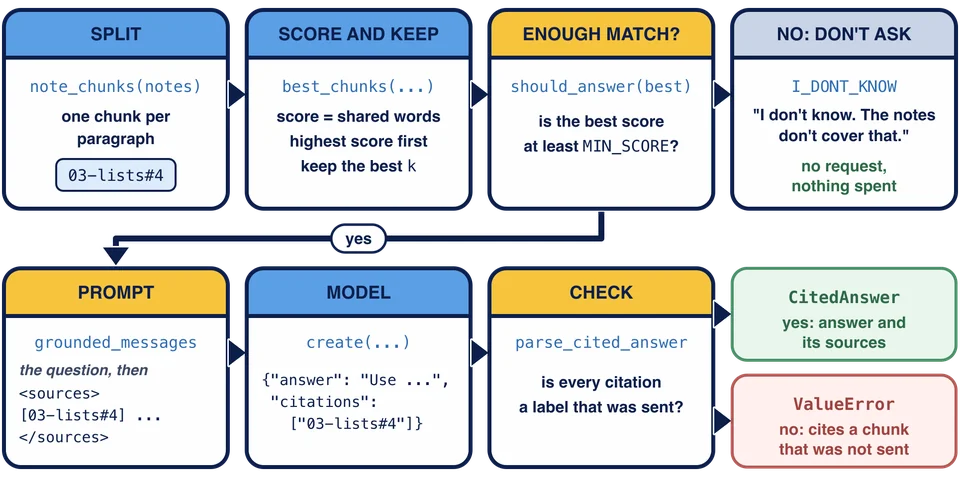
The picture follows one question through answer_from_notes. It shows three ways out: the fixed I_DONT_KNOW answer without a request, a checked CitedAnswer, or a ValueError for a citation that was not sent. A reply in the wrong shape raises ValidationError at the same check.
Why create and not the parse helper
Chapter 5’s client.chat.completions.parse could validate the reply into a CitedAnswer by itself. This project uses create with json_object and validates the text with parse_cited_answer instead, for two reasons. The citation check needs the list of chunks that were sent, which the parse helper knows nothing about. And parse_cited_answer works on any reply text, wherever it came from: in Chapter 11, the agent’s final reply is checked the same way, and that reply comes from the agent’s loop, not from one parse call.
Build search_notes
Chapter 7’s agent reads whole notes with read_note. A search tool lets it ask for the passages that fit a question instead. search_notes(arguments) is a tool function in Chapter 6’s shape: one argument, the decoded arguments dictionary, and a string result.
query = arguments.get("query"). If it is not a string (isinstance), orquery.strip()is empty, raiseValueError("search_notes needs a query string, such as copying a list."). Chapter 6’srun_toolturns that into an error result for the model.best = best_chunks(query, note_chunks(load_notes()), K). Callload_notes()each time, so a note added to the folder is found, and use the module’sK.Return
"No note matches that search."whenbestis empty, otherwiseformat_sources(best), the labeled sources.
The model reads the result like any tool result, and the labels in it are what it can cite.
Describe it
Replace SEARCH_NOTES_DESCRIPTION = {} with a tool description in the form of Chapter 6 Lesson 2: "type": "function", and a "function" with "name": "search_notes", a description that says what the tool returns, and parameters with one property, query, of type "string" with a description of its own, listed under "required", and "additionalProperties": False. The capstone in Chapter 11 offers it to the agent next to read_note.
Run it
Run python retrieval.py. The demonstration asks three questions through answer_from_notes, then calls search_notes directly:
Answers from the notes:
You: How do I make an independent copy of a list?
Assistant: Use scores.copy() or list(scores). Both build a new list, so a change made through one name no longer shows through the other.
Sources: 03-lists#4
You: Why should a default argument never be a list?
Refused: The answer cites 05-functions#6, which is not one of its sources.
You: What is the capital of France?
Assistant: I don't know. The notes don't cover that.
search_notes({"query": "copy a list"}) returns:
[01-variables#2] Assignment does not copy anything. After `a = [1, 2]` and `b = a`, both names refer to the same list, so a change made through `b` is visible through `a`. Numbers and strings cannot be changed in place, so for them this sharing never causes surprises. Lists and dictionaries can be changed, which is why sharing matters for them.

[03-lists#4] Because a list is changed in place, two names that refer to the same list both see every change. Use `scores.copy()` or `list(scores)` when you need an independent list. Adding two lists with `+` also builds a new list and leaves both originals unchanged.

[04-loops#7] Avoid adding or removing items in a list while a `for` loop runs over that same list. Loop over a copy instead, or build a new list.
The tool description is called search_notes.
The copy question is answered and cited. The default-argument reply cites a chunk it was not sent, so it is refused instead of shown. The France question gets the fixed answer, and no request was sent for it. search_notes returns the three labeled sources for copy a list, in the tie order from Lesson 4.
The scripted answers are fixed; a live model writes its own from the sources, which is when the citation check matters. Before you check your work, think about what the demonstration does not show: a reply that is not JSON, a reply with no text, a different k, a query that is a number or only spaces, and a search with no match. Each one is covered by a step above.
Where this goes next
The study assistant can answer from its notes and prove where each answer came from. Chapter 9 makes every model call survive failures, and Chapter 11 gives the agent search_notes and checks its final answer with the same citation rule.
Why does answer_from_notes pass best, not every chunk of the notes, to parse_cited_answer?
answer_from_notes("What is the capital of France?", ...) returns the fixed answer. How many requests did it send?
Task
In retrieval.py:
Replace the unfinished body of
answer_from_notes(question, notes, *, client, k). Setbest = best_chunks(question, note_chunks(notes), k). Ifshould_answer(best)is false, returnCitedAnswer(answer=I_DONT_KNOW, citations=[])without calling the model. Otherwise make one request,client.chat.completions.create(model=MODEL, messages=grounded_messages(question, best), response_format={"type": "json_object"}), and returnparse_cited_answerof the reply’s content andbest. Let every error reach the caller.Replace the unfinished body of
search_notes(arguments). Readquery = arguments.get("query"). If it is not a string, or is empty after.strip(), raiseValueError("search_notes needs a query string, such as copying a list."). Otherwise findbest_chunks(query, note_chunks(load_notes()), K), and return"No note matches that search."when there are none, orformat_sourcesof them.Replace
SEARCH_NOTES_DESCRIPTION = {}with a tool description namedsearch_notes, with a description and one required string parameterquerythat has a description of its own, and"additionalProperties": False.
Use the client you are given and the module’s K, I_DONT_KNOW and NOTES_DIR (through load_notes) by name. Run python retrieval.py to answer three questions from the notes, then check your work.