An LLM Call Is an HTTP Request · practice
Send One Chat Request
send_body sends whatever dictionary you give it. The model, though, only understands one shape of dictionary: a chat request. This lesson builds that shape from a question, so the rest of your code can ask the model something without assembling dictionaries by hand.
The smallest chat request
A chat request body needs two keys:
model: which model should answer. In this course that ispl-scripted, stored in theMODELconstant at the top ofllm_basics.py.messages: a list of messages. Each message is a dictionary with arole, saying who is speaking, and acontent, the text itself.
For one question you send one message, with the role user:
question = "What is a Python list?"
body = {
    "model": "pl-scripted",
    "messages": [
        {"role": "user", "content": question},
    ],
}
print(body)
The service turns these messages into the one block of text the model continues, and the roles tell the model who said what. messages is a list even when it holds a single message, because a conversation is a list of turns. Chapter 2 adds more messages and two more roles. For now, one user message is a complete request.
Send the question as it was given. If you strip spaces, change the case, or add words around it, you are changing what the model reads.
Build ask_model
ask_model(question, *, session=None) builds that body, using MODEL for the model name, and returns send_body(body, session=session). Passing session=session along matters: when a check hands ask_model a fake session, send_body must receive the same fake, or the request would go out over the real network.
The function does not check the status or decode anything itself. send_body already does both, which is the reason to build on it rather than writing a second POST.
Look at the whole response
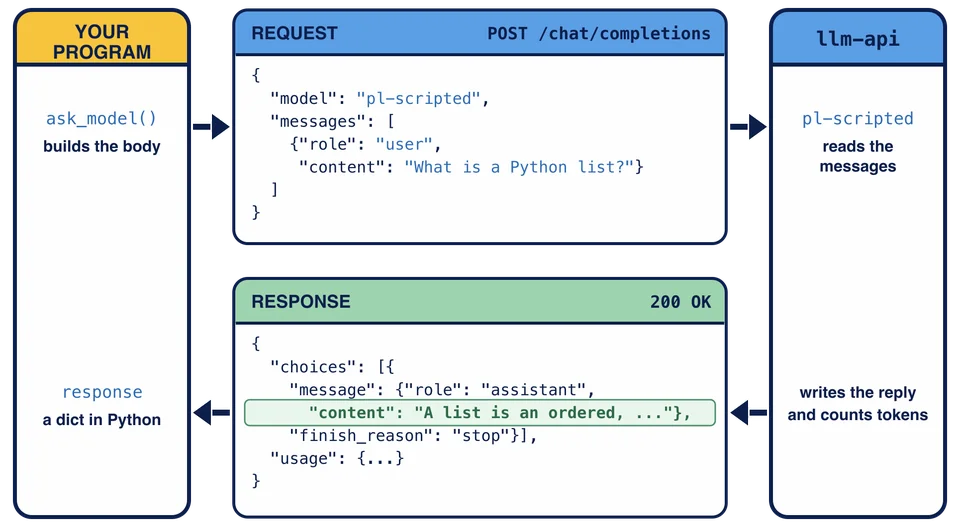
Run python llm_basics.py again. After the Lesson 3 output, the demonstration calls ask_model("What is a Python list?") and prints the whole response document:
Response document:
{
  "id": "chatcmpl-scripted-6048c79fc77f43ee8740c369",
  "object": "chat.completion",
  "created": 1794134874,
  "model": "pl-scripted",
  "choices": [
    {
      "index": 0,
      "message": {
        "role": "assistant",
        "content": "A list is an ordered, changeable collection of values. You write one with square brackets, like [1, 2, 3], and you can add, remove and change items after creating it."
      },
      "finish_reason": "stop"
    }
  ],
  "usage": {
    "prompt_tokens": 6,
    "completion_tokens": 42,
    "total_tokens": 48
  }
}
What is a Python list? is one of the scripted model’s prepared questions, so this time you get a real answer instead of an echo. SCRIPTED_MODEL.md in your project lists the questions this chapter uses. The answer sits a few levels deep, next to a finish_reason and a usage section. The next two lessons read those parts.
Here is the whole call as one picture. The request on top carries the body that ask_model built. The response below carries the reply, and the answer is the highlighted content, inside message, inside the first item of choices.
Try it live
This step is optional. In the python to start Python, then send the same question to pl-live:
import llm_basics
llm_basics.MODEL = "pl-live"
response = llm_basics.ask_model("What is a Python list?")
print(response)
If your account has live access, the response holds a real model’s answer, worded differently from the scripted one, and different again if you run it twice. A 403 error means your account has no live access, and a 429 means you have used your live allowance for now. A read timeout can also happen: a live model can think for longer than the 10-second read bound. All three are normal outcomes and none of them affects your progress.
Why is messages a list when you only send one question?
Task
In llm_basics.py, replace the unfinished body of ask_model(question, *, session=None).
Build a body with exactly two keys: "model" set to MODEL, and "messages" set to a list holding one message, {"role": "user", "content": question}, with the question unchanged. Return send_body(body, session=session).
Run python llm_basics.py to see the full response document, then check your work.